Need help making an atlas-styled map without ultramega distortion
Hey, tildes - cqns here.
I know tildes ain't never do me no wrong (apologies for the heavy colloquialism), but I've been working off and on with a worldbuilding project for the past decade and a half. Some four years ago, I finally hunkered down and created a world map completely from scratch. Due to my extraordinarily high standards, I couldn't help but slowly figure out that there was a lot of things wrong with it after I went through the effort of making it, so I ended up redoing it several times over with additions and subtractions, still feeling like there was something missing.
Turns out, my hunch was correct. Long story short, I found a website called World Orogen that procedurally generates a planet within a certain degree of "realism". Tweaking some settings, I came across a design that was good enough for working on outside of the website, in which I was beset on another issue that quickly spiraled out of control, and I found myself completely out of my depth - map projections, which is a rabbit hole all on its own, and I could only understand the bare minimum basics, such as lat/lon, but that's pretty much the extent of my knowledge. Seriously.
Undertaking this next phase of the project would eventually (and I do say "eventually" because I haven't even gotten around to it yet) lead me to making individual isolated continent maps like how one would find in an atlas. I have asked the Orange Alien Website for tips on r/mapmaking, and while I did get some nudges in the right direction, I'm still attempting to wrap my head around the programs they had suggested. QGIS and G.Projector being the areas of my focus. It's hard enough for me trying to fathom the extensive features of QGIS in general, and as for G.Projector, it comes with its own kind of clunkiness that I'm slowly getting used to. My ultimate question here is...how would I go about finding a map projection to ensure size and area accuracy (because both are apparently different) of all of my continents?
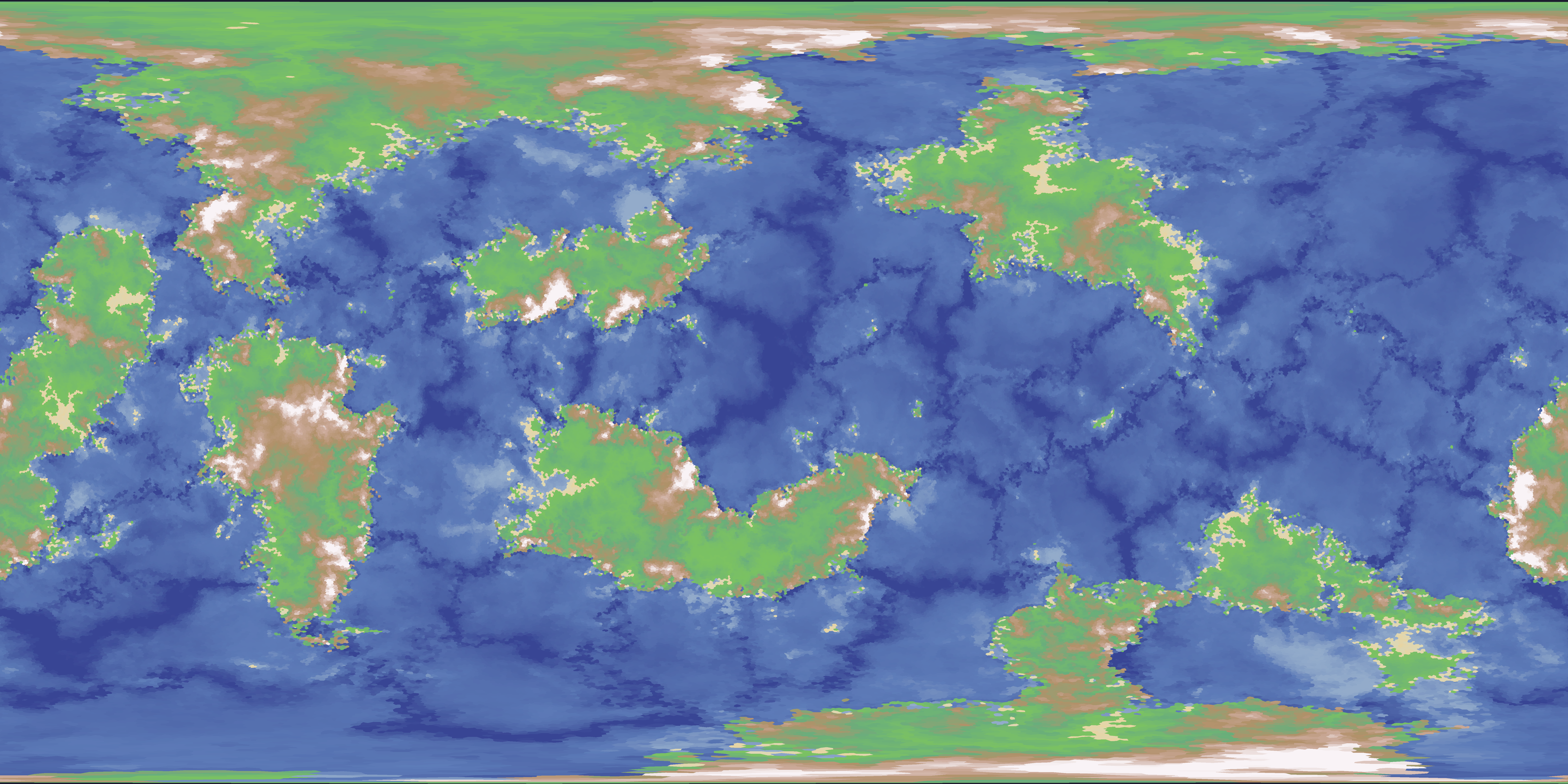
For reference, I have included the map in question so that if anyone wants to give it a go and offer up a solution.
Check out Wikipedia's List of map projections. I assume the ones labeled "equal-area" are what you need, but you can read the "Key" section on that page for explanation of other types. The main article on Map projections also seems very detailed and well illustrated and explains all the different parameters and types of them that exist.
Agree with @Englerdy's point about zooming in to specific areas. That is how most atlases are structured, there's usually only one map of the whole world and the rest are of specific parts where you don't have to worry about projections as much.
I actually ran across this article just the other day and I think it is exactly what you want
https://www.redblobgames.com/x/1938-square-tiling-of-sphere/
It contains math and code for deforming your rectangular world into a sphere along with a locally “flat” minimap of your immediate vicinity.
If shape and size are important to accurately represent you could try the dymaxion projection. It is a bit strange, but has some nice properties. For earth it has the benefit of being able to either show the Earth's oceans as one connected area or you can emphasize the landmasses instead. Pretty neat, but not super practical.
I recently learned that the regular Mercantor(?) projection preserves angles which is good when navigating the seas (something about picking a compass heading and then you can follow that and know where you end up...
...dymaxion projection is a little bit funky, but you can accomplish a similar result by projecting your globe of choice onto an
dodecahedronicosahedron* and unfolding land masses / oceans to taste, even doubling adjacent faces where it makes sense...*(always get those mixed-up)
Not my area of experience, but just want to make sure that we're on the same page that flattening a 3D sphere in to 2 dimensions will always distort the shape or change the area, yeah? If you're asking about trade offs, do you have a map example in mind you could point people toward as an example of what you're trying to achieve? Also have you read the wikipedia on map projections? It offers a lot of trade off comparisons for different map projection methods.
Just thinking as I type, but one option is to use multiple maps that are zoomed in on specific areas where the distortion to size and shape will introduce less error.
Alternatively you could make it a flat world/cosmos and then your flat map will always be exact size and area! :D (I'm only being a little cheeky with this suggestion, it is a legit option)
Yes, I'm completely aware of that. The map I have provided is, I think, something called "equirectangular projection". The northern and southern edges are extremely distorted to the point of absurdity, and, to me, there's not a clean way to get those areas all...in the same area, but then I look at Antarctica and wonder how did they manage to get that view and what kind of projection that is specifically.
In the realm of understanding the concepts, way out of my depth, unfortunately. I was never too good at my geometry when I was in school.
Don't know how you feel about this idea, but have you tried using an LLM for this, at least the basics of the terms you don't understand? Map projection seem like an established enough topic that it probably will be able to explain it in an understandable way without any mistakes.
However, the Wikipedia article doesn't seem particularly geometry-heavy to me. It does use some trigonometry, but it doesn't seem necessary to understand the topic and be able to choose a projection.
Seems to be the orthographic projection
Gotcha, thanks for clarifying. Overall sounds like a fun project. I hope you share results with us when you settle on something you like! Good luck!
QGIS has a Warp (Reproject) tool for raster data (your images) and you should be able to reproject it from equirectangular to whatever you desire. If you see that map projections list, you'll find entries like Dymaxion or Waterman Butterfly that should work.
For images of individual continents, the simplest solution may be getting a good view with globe view on Orogen and screen cap that though.
More than likely, I'm just going to end up using this thing (https://woowspace.com/MapToGlobe.html?i=1#) as a means to do so. QGIS is a special kind of hell. I had to manually add the points via the Projection wizard, but the scaling/warping did not change a single thing.
Yeah reprojections are often done with geometries rather than imagery, I imagine that's what the projection wizard was trying to help you get out of your image if you weren't using the Warp tool specifically. Bah my QGIS isn't properly configured any more and those weird projections aren't part of the standard installation by the look of things.
Any way that lets you avoid doing actual reprojection math is probably preferable, projection issues can cause a real headache at work, especially with data that doesn't have projection metadata or geometry.
It is rather weird that this site only offers to export in equirectangular, I get the impression this project is AI coded by someone that doesn't work with maps or study planetary science.
EPSG:6933 (NSIDC EASE-Grid 2.0 Global) strikes a nice balance between accuracy and still looking somewhat Mercator-like.
An AI recommended an Equal Earth Projection, which is what I was thinking would be the best. As others have said, no projection will properly maintain shape and area. As I understand it, it is mathematically impossible to do both. If you need both, you must keep it as a sphere.
You would just need to choose a good prime meridian for your map. You don't have any convenient ocean verticals, but it looks like you might have one that could work. If you labeled your current maps longitudes 0 on the left to 360 on the right, 352 or so looks like it might just miss cutting that continent.
I vibe coded a little web viewer that lets you import an equirectangular projection (the kind you shared) and interactively rotate/zoom/reproject the map into different projections. https://allemangd.github.io/map-reprojections/
No warranty as I haven't really looked at the code, but I know enough about map projections to get the robot to produce something that seems to work.
(Edit: It DOES NOT work on mobile. You can import a map, but you can't pan/zoom and the control panel is in the way. I'm not going to bother fixing this unless someone specifically asks for it.)
If you're willing to move the north and south pole, rotating the entire map, then the best-looking result I got was this. And, the same orientation re-exported so you can pull it into a different viewer.
Normally, I avoid ai anything, but I'm honestly really desperate to get this off the ground, so my own personal morality aside, I'll test it out and see if it's something I could use. I do appreciate you taking the time out of your day to do this, ai-regardless, because this is so niche.
Edit: If I want to clone the repo for this project, where would I go? This might be the one.
It's just the one html file. https://gist.github.com/allemangD/9246a2f56bcdbf3e02db2f967626f5e6#file-map-reprojection-html. Feel free to edit and/or redistribute.
Typically I'd agree with the anti-ai sentiment, but every once in a while I think it's important to give things a go to see the state of things. This was a nice well-defined but small enough project that it seemed like a good thing to try it on.
The basic idea is that at the end of the day, every map projection is some equation that relates x, y pixel coordinates to latitude and longitude. Most of the formulae have a bunch of trigonometry and polynomials. The general structure of the code is to define the x,y->lat,lon and lat,lon->x,y equations for each projection. The pixel coordinates of the equirectangular projection are latitude and longitude, so the shader code just does the x,y->lat,lon formula and looks up the pixel color according to the uploaded image.
I don't really know what the robot did to implement the maps. I just told it to restructure everything so there's an abstraction to drop in objects with forward/inverse formulae (the
Projectionsobject and#projSelectelement), and told it which ones to implement. They all seem to behave right. It produced way more code than I expected for equal earth projection, there is probably some better way to do it but I didn't care to refine it further.The click-and-drag code is handled by applying the inverse map to the previous and current mouse coordinate, which gives you a delta latitude and delta longitude. You can compute a rotation matrix from that, and apply it to the whole sphere. Since that just depends on the currently-selected
Projectionobject, you can just drop in new projections without any fuss. That was mostly the purpose to include the icosahedral net projection, since it requires having that abstraction correct.Robot review: this was a mix of Gemini Pro and Gemini Fast. I had Fast generate basic scaffolding and architecture, and had Pro implement the rendering and projections. It started out trying to reimplement every little thing, so once it got to a semiworking state with a single projection I had Pro look for common patterns and refactor. I had to specifically ask for this
Projectionsobject. From then on I just asked it to give me new projections I could drop in and test. I was most impressed that it was able to single-shot the icosahedral map without any errors, that's by far the hardest projection of the five.Does your world have an established prime meridian? Or in other words, have you already decided which lands are "east" versus "west"?
Asking because being able to rotate the globe gives you another degree of freedom. For example, right now the left/right edge of the image you posted cuts through a continent; that might be a situation where you might benefit from shifting the map over a little bit. (And/or having a ragged left/right edge—like you sometimes see on Earth maps where the edge of the map follows the International Date Line instead of the 180th meridian.)
That is something I have not yet conceptualized fully. If it's any consolation, my list of the ten continental areas are, sans-mapping...
WEST
NCEV: North CevanonSCEV: South CevanonTAPH: TaphosOSRA: OsralesELET: EletriaEAST
DRAE: DraedalEDRA: Eastern DraedalSARE: SarelanCORT: CorthanARKA: Arkanen