• Activity
  • Votes
  • Comments
  • New
  • All activity
  • Showing only topics in ~comp with the tag "ask". Back to normal view / Search all groups
    1. 3840x2160 120 Hz KVM

      Can someone recommend a KVM that works? I've been looking for a couple of years now. Requirements: 2-port, 1-monitor, DisplayPort 1.4 KVM Has a wired push button switch (and cable can be extended...

      Can someone recommend a KVM that works? I've been looking for a couple of years now.

      Requirements:

      • 2-port, 1-monitor, DisplayPort 1.4 KVM
      • Has a wired push button switch (and cable can be extended if needed)
      • Runs at 3840x2160 @ 120 Hz (or 60 Hz)
      • Works with HP docking station (HP USB-C Dock G5 for business)
      • Works with Classic 101 Black Buckling Spring USB keyboard
      • Works with Logitech TrackMan Marble Trackball
      • Works with HP laptop and custom desktop build (NVIDIA T1000 GPU)

      Anti-requirements:

      • Does not intercept keystrokes (or can be disabled)
      • Does not intercept mouse scrolling (or can be disabled)
      • Does not randomly repeat keys
      • Does not block certain keystrokes (e.g., ctrl+shift+t)
      • Does not let Windows laptop go to sleep
      • Does not require manually re-waking Windows laptop by pushing power button
      • Does not require switching back-and-forth to re-establish connectivity to both computers
      • Does not take more than 3 seconds to switch between computers
      • Does not randomly blank the screen for 1 second
      • Does not require unplugging and re-plugging the USB keyboard

      Here's the setup showing both computers and the push button switch:

      I have tried:

      • IOGEAR GCS62DP (almost perfect; kills keyboard after 60 swaps; RMA'd)
      • DiamondTiger KVM Switch EDID 8K@60Hz, 4K@144Hz, DP 1.4 (repeats keys, blanks screen, has screen tearing, and many other issues)
      • CanadaComputers iCAN HDMI USB KVM Switch 2x1 with Switch Extension 4K 60Hz (completely blocks certain keystrokes)

      Wendell's Level1Techs Store offers a highly recommended KVM, yet lacks a wired toggle button.

      What other KVM switches are available that "just work" and have a wired push button for switching?

      The next KVM I'm thinking about trying:

      ATEN also has a switch, which is on par with the IOGEAR (4K @ 60 Hz, no EDID):

      6 votes
    2. What programming/technical projects have you been working on?

      This is a recurring post to discuss programming or other technical projects that we've been working on. Tell us about one of your recent projects, either at work or personal projects. What's...

      This is a recurring post to discuss programming or other technical projects that we've been working on. Tell us about one of your recent projects, either at work or personal projects. What's interesting about it? Are you having trouble with anything?

      15 votes
    3. W11 Bluetooth won't pair but can see devices. BT works w/ Linux

      tldr; W11 bluetooth doesn't work with multiple cards. It will see devices but will not pair. Same hw pairs under Linux. hey folks. I posted this to /r/techsupport on reddit and for some reason...

      tldr; W11 bluetooth doesn't work with multiple cards. It will see devices but will not pair. Same hw pairs under Linux.


      hey folks. I posted this to /r/techsupport on reddit and for some reason they say they don't support Windows 11 Enterprise... and it took them a day to tell me instead of using automod. I thought this was both funny and the dumbest thing. Anyway, here's a fun little issue I'm trying to sort out.

      Windows 11 Enterprise 22h2 (22621.3810)

      About two weeks ago (after a year of having this system) my bluetooth decided not to pair with anything. It will see devices and try to pair, but it never goes through.

      I have tried:

      • a different wireless card / bt combo (PCIE)
      • removing the wireless / bt combo and using a bt dongle
      • removing all drivers (show hidden devices etc), rebooting clean, reinstalling
      • changing the USB connection to the mobo for the PCIE card
      • live boot of latest Ubuntu LTS -- successfully paired DS4 controller and Sony Headphones

      The event logs for Bluetooth Policy are all positive (e.g. A connection to a remote device 0xA4538553B7FD was successfully established) -- but nothing is paired.

      This happened on a day when I added two HDDs to the box and ran updates etc. I also tried everything above without the drives installed without any luck.

      Any ideas?

      notes:

      • I just finished with a W11 windows-to-go install off a super slow USB and I wasn't able to pair headphones or the DS4, but I did pair some sony TW earbuds. I'm sensing a fresh install in my future.
      12 votes
    4. What programming/technical projects have you been working on?

      This is a recurring post to discuss programming or other technical projects that we've been working on. Tell us about one of your recent projects, either at work or personal projects. What's...

      This is a recurring post to discuss programming or other technical projects that we've been working on. Tell us about one of your recent projects, either at work or personal projects. What's interesting about it? Are you having trouble with anything?

      17 votes
    5. What are some great time savers on CLI that you would recommend?

      I use these right now on Debian: ncdu ncdu (NCurses Disk Usage): A disk usage analyzer with an ncurses interface, providing a fast and easy-to-use overview of disk space utilization. Ideal for...

      I use these right now on Debian:

      ncdu

      ncdu (NCurses Disk Usage): A disk usage analyzer with an ncurses interface, providing a fast and easy-to-use overview of disk space utilization. Ideal for identifying large directories and files in a user-friendly terminal interface.

      duf

      duf (Disk Usage/Free): A modern disk usage/free utility with a beautiful interface written in Go. It provides a quick and easy way to check disk usage across various file systems with color-coded output.

      tldr

      tldr (Too Long; Didn't Read): Simplified and community-driven man pages. Provides practical examples for commands, making it easier to understand and use without wading through lengthy and detailed man pages.

      nala

      nala (Next-Generation APT Frontend): A modern frontend for the APT package manager, designed to provide a more readable and user-friendly output for package management tasks.

      Speedtest-cli

      Speedtest-cli: A command-line interface for testing internet bandwidth using speedtest.net. Allows you to quickly check your upload and download speeds directly from the terminal.

      htop

      htop: An interactive process viewer for Unix systems. It provides a real-time, color-coded display of system processes, making it easier to monitor and manage system resources.

      powertop

      powertop: A tool for diagnosing issues with power consumption and power management on Linux systems. It provides detailed information on power usage by various system components and applications.

      thinkfan

      thinkfan: A simple fan control program for ThinkPads. It helps manage the system's fan speed to balance cooling and noise levels based on the temperature sensors.

      tlp

      tlp (Linux Advanced Power Management): A power management tool for Linux. It provides various configurations and options to optimize battery life on laptops without requiring manual tweaks.

      flatpak

      Flatpak: A system for building, distributing, and running sandboxed desktop applications on Linux. It provides a universal app distribution system that works across various Linux distributions.

      neofetch

      Neofetch: A command-line system information tool written in bash. It displays an aesthetically pleasing summary of system information alongside your terminal prompt.

      iftop

      iftop: A real-time console-based network bandwidth monitoring tool. It shows a list of network connections from/to your system and the bandwidth usage for each connection.

      nano

      nano: A simple, user-friendly text editor for the command line. Known for its straightforward and easy-to-use interface, making it a go-to for quick text editing tasks.

      Edit
      Oh wow! Thank you all for your suggestions!

      I was looking around and found cheat; it's defined as a cheat that allows you to create and view interactive cheatsheets on the command line. Hopefully, someone else might find it helpful as well.

      38 votes
    6. How bad are Nvidia GPUs for Linux really?

      I've been interested in switching to Linux, or at least dual booting, for some time now as Windows has kept getting worse and Proton for Steam has been getting better. I'm particularly interested...

      I've been interested in switching to Linux, or at least dual booting, for some time now as Windows has kept getting worse and Proton for Steam has been getting better. I'm particularly interested in trying Mint Cinnamon.

      In every Linux thread on here or Lemmy, I always hear people complaining about Nvidia drivers for Linux or other hardware problems that they avoid by having AMD.

      I have an Intel CPU and Nvidia GPU. How big of a problem is that, really? Does it make it an unbearable experience? Does it make it a lot more work to get things working? Does it make certain things impossible to get working? What's your experience?

      Also for dual booting, I hear people have problems with Windows messing up their Linux install. Is that a common problem, or a few people having bad luck? Is that avoidable?

      30 votes
    7. Looking for a good, cheap VPS for a VPN in or around London

      I watch Countdown every day. For the last year I've had a t2.micro for free from AWS. Its been pretty good, but my year is coming up. I am looking for the cheapest VPN possible, which is often...

      I watch Countdown every day. For the last year I've had a t2.micro for free from AWS. Its been pretty good, but my year is coming up. I am looking for the cheapest VPN possible, which is often having my own VPS.

      Does anybody have any suggestions? Most are around $6, which isn't too bad, but I'd love to get something cheaper; either in a reliable lowend box or a proper provider.

      10 votes
    8. Web tech job sites?

      I'm looking for recommendations for good web tech job sites, ones which are most likely to lead to interviews. While I can always do a websearch myself, I haven't done a job search for many years,...

      I'm looking for recommendations for good web tech job sites, ones which are most likely to lead to interviews. While I can always do a websearch myself, I haven't done a job search for many years, so I don't know what job sites are trustworthy or not nowadays. Working remote is almost must-have, otherwise Canada would be the region of interest.

      9 votes
    9. Advice for hosting (and building) a personal website

      Hey all! I've been thinking about buying a domain and building a personal website for myself -- at this point just a personal website with links to my socials, my CV, maybe any interesting...

      Hey all! I've been thinking about buying a domain and building a personal website for myself -- at this point just a personal website with links to my socials, my CV, maybe any interesting projects I want to publicize. Maybe someday I'll decide I want to add a blog or build a webapp or something, but for now it'll be something simple and static.

      My programming experience is very much not in the frontend side of things (I'm a data scientist and mostly use python day-to-day). I played around with HTML messing with my Tumblr theme enough back in the day that I'm reasonably sure I can build something solidly web 1.0, and I've toyed with stuff like Jekyll in the past. But I was wondering if I could use this as an opportunity to build up some basic skills that I could put on my resume for the future. But I have no idea what's out there that would be useful and quick to learn but wouldn't be massive overkill for a project like this.

      I also have no idea how web-hosting works and who to go with if I want to build a personal website myself rather than relying on something like Wix or Wordpress. Most of the easily-Google-able advice is for different use-cases. Advice is either people who want something user-friendly with minimal coding like Wordpress or it's for something properly big and commercial, neither of which is me.

      Anyway, I know we've got a lot of suitably tech-y people here on Tildes, so I'm hoping people here have good advice for this sort of use case. Thanks!

      21 votes
    10. Need help BCCing entire Outlook autofill contact list

      Today is my last day at work and my boss wants me to BCC anyone I have ever sent an email to announce my departure. I have tried exporting all my sent messages and trimming the list by advanced...

      Today is my last day at work and my boss wants me to BCC anyone I have ever sent an email to announce my departure.

      I have tried exporting all my sent messages and trimming the list by advanced sorting out the duplicate email addresses in excel, but messages with multiple recipients are plentiful and need to have the emails separated into individual cells at the very least.

      I also tried the .NK2 file route. I downloaded the MFCMAPI program to find my hidden autofill contact file, but it can only be exported as an .xml or .msg file and I don't know how to handle those files properly to get the data I need.

      Does anyone here have a solution to automatically add every autofill contact on Outlook as BCC recipients for a final email?

      EDIT: I found a solution that worked for both of us. I emailed the clients I remember as the most important and set up an automated reply to handle those I forgot to message.

      11 votes
    11. What programming/technical projects have you been working on?

      This is a recurring post to discuss programming or other technical projects that we've been working on. Tell us about one of your recent projects, either at work or personal projects. What's...

      This is a recurring post to discuss programming or other technical projects that we've been working on. Tell us about one of your recent projects, either at work or personal projects. What's interesting about it? Are you having trouble with anything?

      7 votes
    12. UI/UX Design for web dev

      Does anyone have any good resources, books or otherwise, in regards do good design for web dev? I'm a self taught full stack dev who just can't really make things look "pretty". They are...

      Does anyone have any good resources, books or otherwise, in regards do good design for web dev? I'm a self taught full stack dev who just can't really make things look "pretty". They are functional, but..that's about it. I know CSS, but maybe I just don't have an eye for it?

      Any suggestions would be great, thanks.

      19 votes
    13. What programming/technical projects have you been working on?

      This is a recurring post to discuss programming or other technical projects that we've been working on. Tell us about one of your recent projects, either at work or personal projects. What's...

      This is a recurring post to discuss programming or other technical projects that we've been working on. Tell us about one of your recent projects, either at work or personal projects. What's interesting about it? Are you having trouble with anything?

      11 votes
    14. Looking for some guidance for SEO for a small business

      Hi Tildes! My significant other works in a mom and pop veterinary practice (litteraly : one manages cattle care and the other manages pets (i. e. cats and dogs)) . They are going to retirement, so...

      Hi Tildes!

      My significant other works in a mom and pop veterinary practice (litteraly : one manages cattle care and the other manages pets (i. e. cats and dogs)) . They are going to retirement, so she's gonna take over along with a colleague (only for the pets part though). The practice is located in a mid-sized town (for Switzerland at least) ; it's big enough to support a couple more practices, not enough to feel that much competitive pressure (in fact all but one practice share the night and weekend on-call duties).

      I volunteered to build her a new website, since the name doesn't match the new structure they're creating (it basically goes from "John and Jane Smith Veterinary Practice" to "VetPun Ltd" ), and also because the old website has a dated early 2000s vibe.

      There no plan yet to integrate their practice management software to the website (it's also an ancien piece of tech, they are keen to replace it some day), so it's going to be a couple of static pages for now.

      This is technically well within my range (I'm a full stack dev, for such a small thing it's probably going to be a Github Page; although a small Digital Ocean droplet is not out of question), but I mainly work on B2B and have no idea how to do SEO.

      Here's what's in my checklist

      • Redirect the old website to the new one
      • Register in the Google Business directory
      • Register in the local business directory
      • Register in Google Maps
      • Modify the entry in Openstreet Map
      • Follow those guide for the website itself:
      • Ads: we plan some ads on local newspaper, and adwords for a limited time (and targeting people local to the area of course).
        • I guess I should also do Facebook? Does that overlap with Instagram? (I'm not a regular user of either of them, although I do have to use Facebook for some LARP event)
      • Analytics : say that I integrate Google Analytics, what kind of actionnable item can I expect out of it? Can I get the same kind of data using a self hosted solution? It has been years since I used it in my now defunct blog back in my teenage days, so I expect some change compared to 2008.

      Am I missing something?

      8 votes
    15. What programming/technical projects have you been working on?

      This is a recurring post to discuss programming or other technical projects that we've been working on. Tell us about one of your recent projects, either at work or personal projects. What's...

      This is a recurring post to discuss programming or other technical projects that we've been working on. Tell us about one of your recent projects, either at work or personal projects. What's interesting about it? Are you having trouble with anything?

      5 votes
    16. Advice on sharpening skills for career pivot

      After spending a couple years in management I want to get back into more individual contributor roles. It's where I can apply the skills I actually enjoy. Preferably I'd work as a dev or data...

      After spending a couple years in management I want to get back into more individual contributor roles. It's where I can apply the skills I actually enjoy. Preferably I'd work as a dev or data scientist, but what I want is to spend time solving technical/mathematical problems and less herding cats and politicking.

      EDIT: US with ability to relocate; willing to take a paycut.

      Background
      • About 9 years as lead dev in a start up (2004-2013). It was the golden era of 2005 when we started and I got the role strictly on skills I developed as a teenager. The start up failed shortly after I left but an associated passion project has lived on. In this role I built video streaming software client side, server side, web apps, and iOS apps. I used C#, javascript/node, mongodb, redis, SQL, PHP, objective-c, and C++ as well as functioning as sys admin and webmaster. Pretty much solo dev except for a contractor or intern occasionally.
      • Went back to school (homeschooled, no high school so I needed some pieces of paper), BS-MS-PHD, in mathematics (number theory) and published several papers. One of which launched a bit of a cottage industry for my collaborators. I haven't been involved post graduation but get updates when friends see me cited at conferences, etc. Wrote more domain specific stuff (Python, MAGMA, GAP).
      • During my last year of grad school I got very jaded towards the grind I saw before me that more that likely ended with a job at a teaching school making less than I wanted. Pretty much as soon as I made my intentions public covid happened so I was job searching during 2020 while finishing my doctorate.
      • Got my break early 2021, an entry level data analyst role for a major corpo. In this role I had a lot of time to just explore data, find patterns, test out some of the ideas friend in topological data analysis were thinking about, tested early ML models. Pretty much strictly Python and SQL. Went to manager in 2022 and then People Analytics Director in 2023.

      Current plans:

      • Attend more meet ups, there are a couple about an hour south of me. Hoping to build some connections with the local industry.
      • Private server and website stood up, plan to host projects etc here for interested parties.
      • Runs through exercism.io to refresh on some stuff.
      • Find some open source projects to contribute on? There is also a local group of indie game devs, perhaps offer my services where possible.

      So my question to you all is how would you go about sharpening skills and building up a portfolio?

      11 votes
    17. What programming/technical projects have you been working on?

      This is a recurring post to discuss programming or other technical projects that we've been working on. Tell us about one of your recent projects, either at work or personal projects. What's...

      This is a recurring post to discuss programming or other technical projects that we've been working on. Tell us about one of your recent projects, either at work or personal projects. What's interesting about it? Are you having trouble with anything?

      17 votes
    18. What’s your method for archiving bookmarked/liked social media posts?

      Following the recent upsets with both Twitter and Reddit, how have people here been exporting/archiving their bookmarked/favorited/liked/etc threads, posts, and the content within (images, links,...

      Following the recent upsets with both Twitter and Reddit, how have people here been exporting/archiving their bookmarked/favorited/liked/etc threads, posts, and the content within (images, links, etc) for later reference?

      It hit me not too long ago that there’s a lot of good stuff I’ve bookmarked over the years on both and it’d be unfortunate for viewing it to be locked behind keeping accounts active. Additionally, more and more of it’s disappearing over time not just due to link rot (which seems to have been accelerating dramatically in the past decade), but also as a result of users deleting their posts on the way out.

      I’m particularly interested in solutions that saves content locally, because exporting these things to e.g. a cloud read it later service or bookmark manager really just shifts the problem around instead of solving it, but beggars can’t be choosers and all that.

      17 votes
    19. What programming/technical projects have you been working on?

      This is a recurring post to discuss programming or other technical projects that we've been working on. Tell us about one of your recent projects, either at work or personal projects. What's...

      This is a recurring post to discuss programming or other technical projects that we've been working on. Tell us about one of your recent projects, either at work or personal projects. What's interesting about it? Are you having trouble with anything?

      9 votes
    20. How do you organize your Linux packages?

      Hello everyone. I am planning to get back into Linux development after working with Mac only for almost a decade. On Mac, one of the most important lessons that I learned was to always use...

      Hello everyone.

      I am planning to get back into Linux development after working with Mac only for almost a decade. On Mac, one of the most important lessons that I learned was to always use Homebrew. Using various package managers (e.g. Homebrew, NPM, Yarn, Pip, etc.) creates situations in which you don't know how to uninstall or upgrade certain pieces of software. Also, it's hard to generate a complete overview.

      How do you Linux folks handle this?

      Bonus question: How do you manage your dotfiles securely? I use Bitwarden, and it's a bit clunky.

      If that helps, I want to try Mint and always use Oh My ZSH!.

      6 votes
    21. Opinions or experiences on Corsair build kits

      I am looking to replace my PC that I mostly use for gaming for close to 10 years. While I used to work in data centers, I've never been into building custom PC, particular the planning and...

      I am looking to replace my PC that I mostly use for gaming for close to 10 years. While I used to work in data centers, I've never been into building custom PC, particular the planning and research portion on what parts to get.

      I am currently eyeing the Corsair build kit, and wonder if anyone has any experience to share.

      Thanks in advance.

      6 votes
    22. What programming/technical projects have you been working on?

      This is a recurring post to discuss programming or other technical projects that we've been working on. Tell us about one of your recent projects, either at work or personal projects. What's...

      This is a recurring post to discuss programming or other technical projects that we've been working on. Tell us about one of your recent projects, either at work or personal projects. What's interesting about it? Are you having trouble with anything?

      10 votes
    23. What programming/technical projects have you been working on?

      This is a recurring post to discuss programming or other technical projects that we've been working on. Tell us about one of your recent projects, either at work or personal projects. What's...

      This is a recurring post to discuss programming or other technical projects that we've been working on. Tell us about one of your recent projects, either at work or personal projects. What's interesting about it? Are you having trouble with anything?

      12 votes
    24. A variety of beginner home server questions

      I will soon have a home and figured now's the time to do a proper home server, especially since it's going to come with cat 6 run from the main panel to just about every room. I code for a living,...

      I will soon have a home and figured now's the time to do a proper home server, especially since it's going to come with cat 6 run from the main panel to just about every room. I code for a living, but at the same time network is a massive gap in my knowledge, as are servers, and I was hoping to use this as a learning moment as well as just a way to optimize things. I've been doing research for a few weeks now on and off and feel like I've got more questions than I started with, so I'll just vomit them out and if anyone has some guidance I'd really appreciate it.

      Some information:

      1. I'm willing/able to spend to get quality/simplicity. Time is the much bigger crunch for me right now, and I'd much rather buy something that works even if it costs more than cobbling together some deals.

      2. Related to 1, I'd like this to not become my fulltime second job/hobby. I will at some point try to expand to a full home lab, and do want to use this to learn about things I feel I should understand better for general knowledge and my career, but i'd love for core functionality to mostly "just work" after configuring so when I don't have time to do that I'm not stuck telling everyone "oh yeah it'll be broken until I find time to fix it".

      Things I know I want-

      1. Some sort of NAS. From my research Synology comes up a lot as the "it's expensive but it'll just work" option, and I probably want something like a 4 bay of NAS specific several TB HDD's in something like raid 5/6/10. Pricey as hell but I'm most willing to spend on this as the cost might very well be split by the family members who want me to guinea pig all this.

      2. I will have a camera system and would prefer to not have it sending data outside my network. This is the area i've looked at the least, as it's a little farther down the road, but I know others who have things like Arlo and lets just say i'm not super impressed. Obviously this brings up question like remote access to said camera's and where I'm storing the data (nas? Somewhere else?)

      3. I'd like to mess with a media server. Plex/Jellyfin constantly come up in my research, so I'll be looking into those, but I've also got a bunch of audiobooks that I'd love to be able to easily share, and I think there's software for that stuff as well.

      4. Pihole strikes me as the other "well if you're going to do this, you might as well" option that i'm aware of. Realllly need to better understand networking in general, but I hear these days it can kinda be installed and quickly configured and then left to do its job.

      5. Related to all of this, Casa OS keeps coming up as a very good tool for a beginner like me, since it streamlines the handling of docker containers and also file sharing. However it's not really an OS, since it must actually run on Debian (i think?) for now (zima OS still in testing?).

      Stuff I'd like to mess with but doesn't have to happen right away.

      1. Eventually the aforementioned NAS would be backed up offsite to another NAS at another family members house, once I know what the hell I'm doing.

      2. Proxmox constantly comes up as THE tool to use, but it leaves a lot of questions for me. Obviously if I start trying to do lab environments and screw with VM's it's going to be great, but my understanding is that I probably don't, as a beginner, want to say load up a device with proxmox and then have it host debian which installs CasaOS as it'll get a little more tricky to have everything talk right? Unsure on this part.

      3. Anything else I'm forgetting. One issue I keep having with this is a LOT of the information out there is either too complex for me to really grok or just says "well yeah you could do ANYTHING with this" and it just sorta assumes I know what the options are. If there's anything else worth checking out I'd love to know.

      Hardware I've come across-

      1. Synology - Already mentioned but seems like they're a common go to for a "more money than skill/time" situation like mine.

      2. Zimaboard - My understanding is it's underpowered for its price, but the main draws are that it's VERY low power, small, and quiet. What it could actually do from my list above is where i'm unsure. I see people are supposedly using it for Plex servers and what not, and I'm pretty sure it's not going to make any kick ass lab environments, but being quiet, small, and maybe a bit closer to plug and play seems tempting (I know they make the blade and a few other products but it all seems greek to me).

      3. Various mini computers - I've got a minisforum machine from several years ago that I currently use as a living room computer for light gaming and mostly playing movies and the like. Not sure if i could just wipe it and convert it to be the starting point (more on that later). I know used 1 liter mini pc's from companies like HP are also popular.

      4. The MS-01 - Similar pile as the last one but my understanding is this is the kind of thing that's probably really cool if you actually know what the hell you're doing. I'm 99% positive it is vast overkill for my purposes, but I'd like to eventually get to the point where I could understand why I might want something like this. My understanding is if I knew what I was doing I could probably drop proxmox on this and do everything I could ever want and more, but I feel quite far from that.

      Some general questions I have -

      1. The thing that kicked this all off is my new place likely having fiber, and cat 6 drops throughout the building. Architecture is something I'm still a little shaky on. I assume i'm going to need my own modem/router (just because the cox routers are meh and not really configurable from last I checked), and then that routes to the server first???...or something(seems like a must if you want the pihole to do anything)? I've seen lots of niffty network diagrams at this point but they're all from people WAAAAAAAAY beyond my skill level doing much more ambitious stuff, so it gets hard to understand. If anyone has a simple home network diagram/guide to look at I'd really appreciate it.

      2. I'm just in general going to need to learn more about networking, especially in a home environment. Should I eventually get those camera's set up, I want to understand how to let them talk to internal storage and what not ,but not get out to the web...or..something (again remote access seems nice, but also like a massive security concern). I know speed is also a big factor i'm going to need to better understand. Having a fiber connection in only to be bottle necked by a crappy router or a 1gigabit port is just a waste of money, so that's something else I'd like to better understand.

      3. I'm a little unclear on how to deliver the media in a media server to the various screens throughout the building. I've got cat 6 to all of them, but I suspect i'm still going to need, at the very least, a cheap computer to hook up to it and then display the image to the monitor/TV? This is why I assume I can't just wipe my current mini PC and reuse it as a server, because I still need it to receive the data from the home server (or at least a web browser?). A part of me feels like if I got a powerful enough server it should be able to server the media direction to the screen, but then you'd need some sort of HDMI/DP drops as well from the server to all your screens?...or something?

      Sorry for all the rambling but I've got an odd mix of knowledge and ignorance so it's been a little difficult to research when half the video is stuff I already get, and the other half blows past me or just assumes I know about the parts i'm trying desperately to learn about.

      27 votes
    25. What programming/technical projects have you been working on?

      This is a recurring post to discuss programming or other technical projects that we've been working on. Tell us about one of your recent projects, either at work or personal projects. What's...

      This is a recurring post to discuss programming or other technical projects that we've been working on. Tell us about one of your recent projects, either at work or personal projects. What's interesting about it? Are you having trouble with anything?

      22 votes
    26. What programming/technical projects have you been working on?

      This is a recurring post to discuss programming or other technical projects that we've been working on. Tell us about one of your recent projects, either at work or personal projects. What's...

      This is a recurring post to discuss programming or other technical projects that we've been working on. Tell us about one of your recent projects, either at work or personal projects. What's interesting about it? Are you having trouble with anything?

      17 votes
    27. Looking for help scraping and deleting a Reddit account

      I have a couple of old Reddit accounts I’d like to delete as fully as possible. However one of them dates back to my teenage years and it’s some of the only writings I have from that time. Any...

      I have a couple of old Reddit accounts I’d like to delete as fully as possible. However one of them dates back to my teenage years and it’s some of the only writings I have from that time. Any recommendations on good simple ways to scrape all the comments off of it and save them? Then what’s the best way to completely erase a Reddit footprint these days?

      Looking for as simple a solution as possible, I’m not tech illiterate by any means but it’s also not a real strong suit for me.

      18 votes
    28. What actually-useful questions should someone ask when hiring a cybersecurity professional?

      Imagine you’re the manager hiring someone for a technical cybersecurity job. What non-obvious questions help you judge the candidate’s skill/suitability? What makes those questions useful? That...

      Imagine you’re the manager hiring someone for a technical cybersecurity job. What non-obvious questions help you judge the candidate’s skill/suitability? What makes those questions useful?

      That is, assume you’ve done the standard complement of job interview questions such as background and tool familiarity. I’m looking for stuff specific to some part of cybersecurity. It’s okay to get specific to your part of the field.

      21 votes
    29. Linux Distro Recommendations

      I know this can be a bit of a heated debate sometimes, and with so many choices people will have their preferences. I wanted to hear some noob-friendly suggestions for me and some friends. What...

      I know this can be a bit of a heated debate sometimes, and with so many choices people will have their preferences. I wanted to hear some noob-friendly suggestions for me and some friends.

      What distros would work well for an old laptop repurposed as a glorified Chromebook (web browsing, Netflix, emails, etc) with some light Steam 2D indie game usage? It would be borrowed by less tech savvy people.

      What distros would work well for gaming desktops? Either current high end desktops or desktops that are a few years old.

      47 votes
    30. Need help planning a pseudo-upgrade for my computer tower

      Pseudo because upgrading some of the parts might have a knock-on effect for other parts. Might end up leading to an upgrade of the whole system, idk. So here's a list of parts that I've already...

      Pseudo because upgrading some of the parts might have a knock-on effect for other parts. Might end up leading to an upgrade of the whole system, idk. So here's a list of parts that I've already acquired. I was originally going to use some of them to fill out the Framework laptop that I pre-ordered... but I had an expensive couple of months earlier this year and figured I could wait on it. :(

      Part
      AMD Ryzen 7 7700x
      Crucial P5 Plus 2TB PCIe NVMe M.2 SSD
      (2) 16GB GSkill Flare X5 DDR5 6000 RAM
      $50 Microcenter gift card

      Now here's what I have in my tower currently.

      Part
      Rosewill Thor V2 ATX Full tower case
      Intel(R) Core(TM) i5-4670K CPU
      (2) 8GB GSkill DDR3 RAM
      Rosewill 650W 80 Plus Gold PSU
      MSI Z97-GD65 MOBO
      Gigabyte Nvidia 970x Windforce GPU
      1 SanDisk Ultra Plus SSD 250GB
      1 Seagate HDD 1TB

      I'm looking to keep the tower at the very least and reuse it for new components. Right now, I know that the mobo will absolutely need to be replaced IF I'm throwing the ryzen chip in. And with knock-on effect, probably the psu as well since these components are drawing more power. The goal is to get a solid 60 fps on Helldivers (which I can't do at the moment, even on the lowest graphical settings) since it's the most intensive game that I play. With this goal in mind, does it make sense to start using the components I have from the first list, or might it be cheaper to keep them for the framework and get older (still compatible) parts that would fit right in to the system as it stands?

      8 votes
    31. What programming/technical projects have you been working on?

      This is a recurring post to discuss programming or other technical projects that we've been working on. Tell us about one of your recent projects, either at work or personal projects. What's...

      This is a recurring post to discuss programming or other technical projects that we've been working on. Tell us about one of your recent projects, either at work or personal projects. What's interesting about it? Are you having trouble with anything?

      6 votes
    32. [help] Tips on resolving git conflicts, for the faint hearted

      I’ve been using git to keep revisions of my website. Since I work alone I only need three commands: git add -A git commit -m “<description>” git push Soon I’ll be adding a second person, and I...

      I’ve been using git to keep revisions of my website. Since I work alone I only need three commands:

      git add -A
      git commit -m “<description>”
      git push
      

      Soon I’ll be adding a second person, and I remember from experience that conflicts can happen even with two people. So I have two questions:

      • Is there a way we can avoid that happening outright?
      • Are the commands to resolve fairly standard or does it differ much on a case-by-case basis? I’m hoping to keep the number of commands as small as possible.
      10 votes
    33. What programming/technical projects have you been working on?

      This is a recurring post to discuss programming or other technical projects that we've been working on. Tell us about one of your recent projects, either at work or personal projects. What's...

      This is a recurring post to discuss programming or other technical projects that we've been working on. Tell us about one of your recent projects, either at work or personal projects. What's interesting about it? Are you having trouble with anything?

      17 votes
    34. What programming/technical projects have you been working on?

      This is a recurring post to discuss programming or other technical projects that we've been working on. Tell us about one of your recent projects, either at work or personal projects. What's...

      This is a recurring post to discuss programming or other technical projects that we've been working on. Tell us about one of your recent projects, either at work or personal projects. What's interesting about it? Are you having trouble with anything?

      9 votes
    35. What useful tasks are possible with an LLM with only 3B parameters?

      Playing with Llama 7B and 13B, I found that the 13B model was capable of doing a simple task, rewriting titles in sentence case for Tildes submissions. The 7B model doesn't appear capable of the...

      Playing with Llama 7B and 13B, I found that the 13B model was capable of doing a simple task, rewriting titles in sentence case for Tildes submissions. The 7B model doesn't appear capable of the same task, out of the box.

      I heard about Android's new AICore available on a couple of new devices. But it sounds like Gemini Nano, which runs on-device, can only handle 2B or 3B parameters.

      Is this size of model useful for real tasks? Does it only become useful after training on a specific domain? I'm a novice and wanting to learn a little bit about it. On-device AI is an appealing concept to me.

      12 votes
    36. What programming/technical projects have you been working on?

      This is a recurring post to discuss programming or other technical projects that we've been working on. Tell us about one of your recent projects, either at work or personal projects. What's...

      This is a recurring post to discuss programming or other technical projects that we've been working on. Tell us about one of your recent projects, either at work or personal projects. What's interesting about it? Are you having trouble with anything?

      16 votes
    37. Please proofread this AI-generated AutoHotkey script

      For my job I need to copy a person's name out of a field and split it into first and last names. I have a AHK script that can do this but my version only works with simple, one-word,...

      For my job I need to copy a person's name out of a field and split it into first and last names. I have a AHK script that can do this but my version only works with simple, one-word, non-hyphenated names. I tried prompting Gemini as below.

      There is a line of text consisting of one or more words, a comma, then one or more words. write an autohotkey 1.1 script to select everything before the comma, store it to a variable called firstname, then select everything after the comma and store it to a variable called lastname. thanks

      (the firstname and lastname variables should be swapped as the last name would come before the comma, that was my error)

      Here's the AutoHotkey 1.1 script to achieve what you described:

      ; This script splits a text line into first and last name based on a comma
      
      #NoEnv  ; Recommended for performance and compatibility.
      SendMode Input  ; Simulates keystrokes for reliable input.
      
      ; Function to split the text
      Func SplitText(_text, firstName, lastName) {
        StringSplit, parts, _text, `,`
        if (parts[1]) {
          firstName := parts[1] ; Assign first name
          lastName := SubStr(_text, 1 + StrLen(parts[1])+1) ; Extract last name after comma (including space)
        } else {
          firstName := _text ; Handle cases without a comma
          lastName := ""
        }
      }
      
      ; Hotkey to trigger the script (replace F2 with your desired key)
      F2::
        Send, ^c ; Copy the selected text to clipboard
        clipText := ClipboardAll  ; Read the clipboard content
        SplitText(clipText, firstName, lastName) ; Call the function to split the text
        MsgBox, First Name: %firstName%`nLast Name: %lastName%
      
        ; Optional: Clear clipboard to avoid unintended pasting (comment out if not desired)
        ; Clipboard := 
      Return
      

      Explanation:

      #NoEnv and SendMode Input: These lines are included for performance and reliable input simulation.
      Func SplitText(_text, firstName, lastName): This function takes the text (_text) as input and assigns the split parts to variables firstName and lastName.
      StringSplit, parts, _text, ,:** Splits the text based on the comma (,`) delimiter.
      if (parts[1]):** Checks if there's a second part (i.e., text after the comma).
      If true, the first part is assigned to firstName and the text after the comma (including the space) is extracted using SubStr and assigned to lastName.
      else:** If there's no comma, the entire text is assigned to firstName and lastName is set to an empty string.
      F2::: This line defines a hotkey. When F2 is pressed, the following actions occur:
      Send, ^c:** Copies the selected text to the clipboard.
      clipText := ClipboardAll:** Reads the copied text from the clipboard and stores it in the variable clipText.
      SplitText(clipText, firstName, lastName):** Calls the function to split the copied text into first and last names.
      MsgBox:** Displays a message box showing the extracted first name and last name.
      Optional: Clear Clipboard: The commented line Clipboard := clears the clipboard content after processing. Uncomment this line if you want to avoid accidentally pasting the copied text elsewhere.

      Edit: To answer questions, and provide info I probably should have from the beginning: I'm a medical transcriptionist using AHK with my job's software (Emdat Inscribe) and a word expander (Instant Text). Inscribe seems to be browser-based but functions as a standalone app. I already have dozens of AHK 1.1 macros; my .ahk file has over 2000 lines, although I'm sure it's terribly written code. This is also why I'm disinclined to switch to AHK 2.0 since I have no desire to rewrite everything unless absolutely necessary. The first part of this macro is a bunch of keypresses to jump to the relevant patient info field, then this part would be used to store the names appropriately. I already have hotkeys to use the variables as needed and most macros are limited with #ifwinactive to Inscribe.

      6 votes
    38. What programming/technical projects have you been working on?

      This is a recurring post to discuss programming or other technical projects that we've been working on. Tell us about one of your recent projects, either at work or personal projects. What's...

      This is a recurring post to discuss programming or other technical projects that we've been working on. Tell us about one of your recent projects, either at work or personal projects. What's interesting about it? Are you having trouble with anything?

      6 votes
    39. What programming/technical projects have you been working on?

      This is a recurring post to discuss programming or other technical projects that we've been working on. Tell us about one of your recent projects, either at work or personal projects. What's...

      This is a recurring post to discuss programming or other technical projects that we've been working on. Tell us about one of your recent projects, either at work or personal projects. What's interesting about it? Are you having trouble with anything?

      12 votes
    40. Learning new programming languages with limited time: Rust, golang, or otherwise?

      I want to learn a new language that I can use for personal projects. But I want to pick the right one for me, given the fact that learning it will be a time investment and I don't have a ton of...

      I want to learn a new language that I can use for personal projects. But I want to pick the right one for me, given the fact that learning it will be a time investment and I don't have a ton of time for "fun" stuff these days.

      I've spent a decent amount of time tinkering around with Rust and my experience has been decent so far, if I'm trying to filter it through the lens of the current Rust craze. It just seems that the code has a somewhat... ugly(?)... aesthetic to it? I'm not willing to cast it aside yet and I think the "ugliness" just comes from me not really recognizing the syntax very well.

      I started looking at golang and was immediately interested in the marketing message of it being "a better C". Aside from Hello World, I haven't done anything else with it.

      Some random notes/points about my experience and what I'm looking for:

      • I am very accomplished with PHP, quite accomplished with C, somewhat accomplished with C++ and Python. Of those, I find Python to be too "free and easy", PHP (Symfony specifically) and C++ to be so OOP-oriented that I just end up writing a bunch of boilerplate, and C is just... C (I'd rather pull out a tooth than have to work with C strings).
      • Aside from the obvious pains of C, I think it's the most fun of the bunch. I don't know why I think this, because again, I absolutely hate C strings.
      • I appreciate the package management and ecosystem of Rust, from what I've seen. C-with-Cargo would be awesome.
      • The older I get, the more I appreciate strong typing.
      • I like a language that allows me to systematically and logically organize my code into various modules, directories, etc. This is where PHP/Symfony shines in that there's a place for everything, as opposed to a bunch of .c and .h files all dumped into a folder.
      • Ideally, I'd like something that can compile into a binary that doesn't require JVM, etc.

      I'm open to suggestions outside of Rust and Go... those are just the ones I've been seeing mentioned the most over the past decade.

      26 votes
    41. What libraries do you use for implementing web forms, if any?

      I recently ran across Modular Forms, which is a new and rather obscure JavaScript library for doing form validation that claims good support for TypeScript (type safety) and low download size. It...

      I recently ran across Modular Forms, which is a new and rather obscure JavaScript library for doing form validation that claims good support for TypeScript (type safety) and low download size. It has variants for a few frameworks like React and Preact.

      I’m wondering what else people use? I ended up writing my own Preact hooks to help out, with the actual validation done using Zod.

      6 votes
    42. What programming/technical projects have you been working on?

      This is a recurring post to discuss programming or other technical projects that we've been working on. Tell us about one of your recent projects, either at work or personal projects. What's...

      This is a recurring post to discuss programming or other technical projects that we've been working on. Tell us about one of your recent projects, either at work or personal projects. What's interesting about it? Are you having trouble with anything?

      11 votes
    43. What programming/technical projects have you been working on?

      This is a recurring post to discuss programming or other technical projects that we've been working on. Tell us about one of your recent projects, either at work or personal projects. What's...

      This is a recurring post to discuss programming or other technical projects that we've been working on. Tell us about one of your recent projects, either at work or personal projects. What's interesting about it? Are you having trouble with anything?

      12 votes
    44. What programming/technical projects have you been working on?

      This is a recurring post to discuss programming or other technical projects that we've been working on. Tell us about one of your recent projects, either at work or personal projects. What's...

      This is a recurring post to discuss programming or other technical projects that we've been working on. Tell us about one of your recent projects, either at work or personal projects. What's interesting about it? Are you having trouble with anything?

      12 votes
    45. What programming/technical projects have you been working on?

      This is a recurring post to discuss programming or other technical projects that we've been working on. Tell us about one of your recent projects, either at work or personal projects. What's...

      This is a recurring post to discuss programming or other technical projects that we've been working on. Tell us about one of your recent projects, either at work or personal projects. What's interesting about it? Are you having trouble with anything?

      19 votes
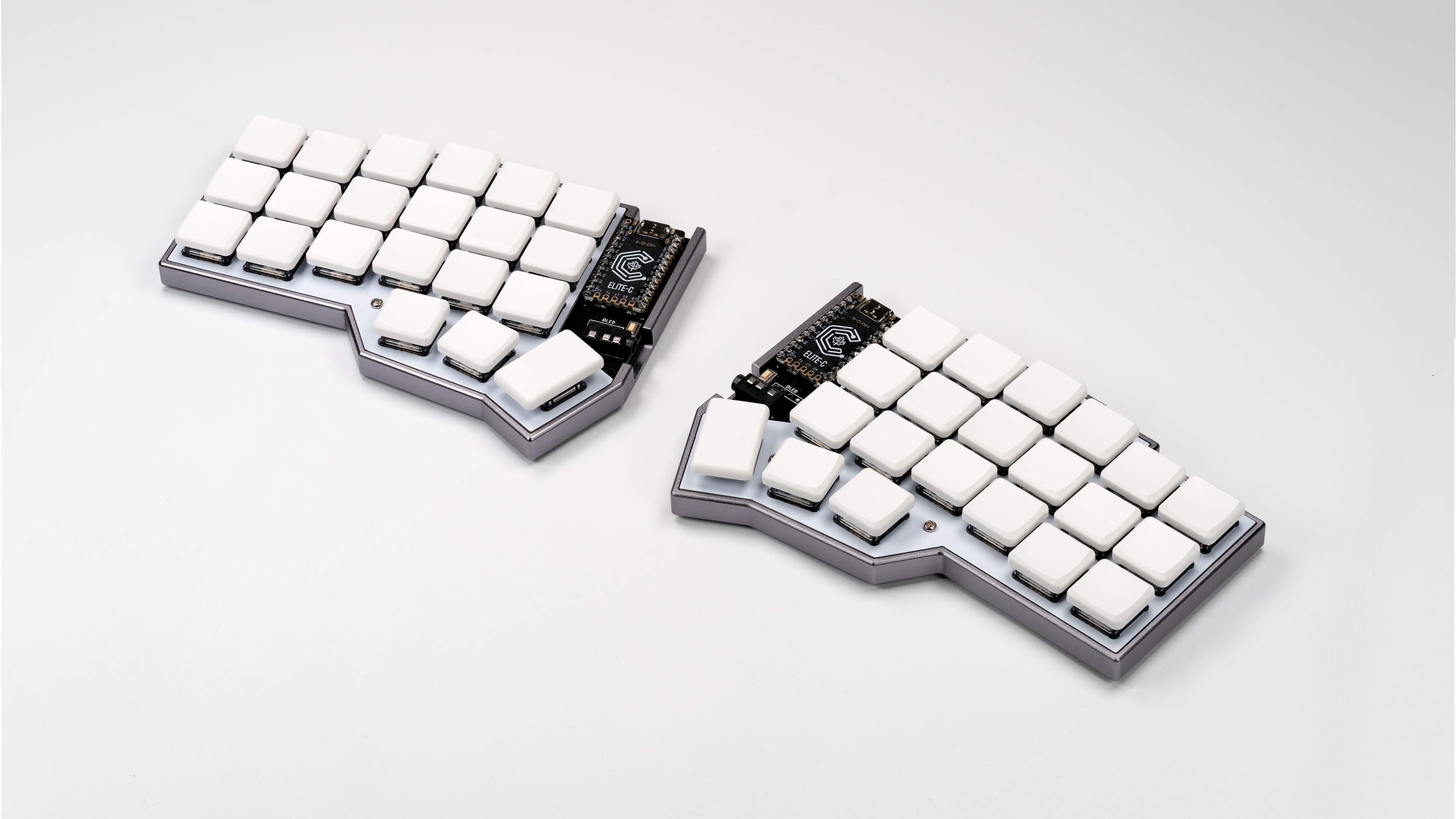
    46. Why you should consider a smaller keyboard

      Intro Whenever smaller keyboards come up online, I often see a lot of the same reactions/dismissals. I've found many of these to be foolish, but also that the community around such devices has its...

      Intro

      Whenever smaller keyboards come up online, I often see a lot of the same reactions/dismissals. I've found many of these to be foolish, but also that the community around such devices has its own barriers. It sometimes is represented from its most extreme aspects rather than someone with a more normal approach and use case.

      So here is yet another pitch on why you might want to consider trying out some of the smaller keyboards out there, and the various advantages it can bring. This will probably be quite long, but I hope it at least is interesting.

      Daily Drivers

      My current main use keyboard's are-
      • Corne LP split 40 - I carry this with me and use it for work and as a better keyboard for my GPD Pocket 3.

      • Mercutio 40 - for my lighter media/older/lower spec game machine.

      • Discipline 65 - for my gaming machine as at the time having the number row still seemed needed (and it just looks so nice)

      • Velcifire wireless 60 - As my other media keyboard since it's wireless and can be used from anywhere and causes my normal friends and family to have less of a stroke if they have to use it. A lot of what i'll say below won't apply to this as it doesn't have some keys and can't be custom mapped. (It's also what i'm typing all this on, much to my chagrin.)

      I've gone through and have owned/own several others but i wanted to be clear about what i'm using in case anyone doesn't have a clue what i'm talking about.

      Skills Required

      I think the only real "skill" you must have to consider downsizing your keyboard is the ability to decently touch type without looking. If you're the sort of person who still hunts and pecks, no judgement, but this is not for you.

      If you're someone who has to code, do data/numerical entry, or type a lot for work, then I encourage you to read on. Those are common barriers I hear thrown out, but in my experience are actually easier with a smaller keyboard.

      Why?

      The normal keyboard for most machines has a lot of dead/wasted space that could just be used better, and has some keys that are important or have grown more important in really poor positions.

      Some main offenders

      1. Capslock - How often do you use capslock? How often do you NEED capslock? If I can convince you of one thing to try out right now it's this, remap capslock (check out powertoys on windows) to left control. As it stands capslock is one of the easiest buttons to hit, and yet it if you moved it over next to Scroll lock you'd probably never mind. A large portion of my job is coding SQL and I never use it because that's what modern formatters are for. Please try remapping it(throw capslock on left control or some combo if you want).
      2. Spacebar- Hear me out, as this might vary depending on how you type. Do you use one or both thumbs to hit your spacebar? If you're anything like me, you use one, and in my case it's the left thumb. This means that I've got a massive portion of my keyboard dedicated to one button, even though I'll never touch more than half of it (you'd be surprised how small you can make the space key and still hit it reliably). Now you might think that you don't need that space, but I'll dive into that more later.
      3. The number row- More on this later, but my brief take on this is that humans are actually pretty bad at knowing exactly where the numbers are when they get away from the home row, and as anyone who's ever had to do lots of number entries know, the 10key/numpad is the way to go.
      4. PgUp/PgDwn/Home/End/Delete- These 5 keys (and control and shift) are great for navigating/editing text/code/spreadsheets/webpages quickly, and could not be farther away from where you really need them to actually do that easily.
      5. Arrow keys- A lot of people think it's fine that they're waaaaaay out there away from everything. I will be proposing an alternative given these are also critical to quick navigation.

      How is smaller better then?

      The core idea is simple. You can find the home row easily with the homing keys (j/f generally have a bump or some defining feature). You're probably excellent at hitting the keys in relation to that if they're 1 step away from the home row. The farther you are from that, the more likely you'll need to look, and the longer it'll take you to press the key even if you don't. So where possible, it's ideal to try and use space more efficiently to keep the keys you actually need to use near this position.

      But how are you going to fit all those keys anywhere near the home row?

      My Keymap

      As an example, to help explain moving forward, here is the keymap for my mercutio 40.

      You'll want to save that json, and then upload it at qmk configurator, which will make it much easier to explore. If you've never looked at this before it can seem insane, but I promise you it's pretty tame ignoring some edge case stuff.

      If you don't feel like going through the hassle here's screenshots from the site with descriptions of each layer.

      Mostly the same as below but i did fix some missing info below so sorry about that. I'm also leaving the descriptions of my "gaming" layers 4/5/6 in the imgur only because I think that's out of scope for this).

      The magic of programable layers and context.

      Space is an interesting key. It's a key only ever really tap, never hold (outside of games, more on that later). So, why not double it up, and make it do something different when you hold it?

      Well in this case, tapping any of my 3 space buttons gives you a space like anyone would expect, but if you hold either of the left 2, it "shifts" you to layer 1 (base layer is 0), and holding the right one, shifts you to layer 2.

      I put shifts in quotes because it's just like the shift key. If you hit 7 on your keyboard, you get a 7. If you hold shift and hit 7, you get &. This is the same concept, and just keep the layers organized in a way that makes sense, keeps it very easy to know what layer what key you want is on.

      The Detailed Layers

      Detailed Layer breakdowns(assuming you're looking at the json loaded into the website or the imgur album)-

      Layer 0 (Base Layer)

      Ignore the N/A's on this and the rest (where they'll be another symbol), as they are optional keys i don't have. Mute is also the encoder knob so don't worry about it.

      It's pretty basic qwerty in the the middle, and tab/left shift/right shift/backspace/windows/the alts/right control are where they normally are, and left ctrl replacing capslock is something I recommend EVERYONE do.

      Space, is still space. In fact all 3 of those spacebars are space...on tap. On hold, the left two "shift" the keyboard to layer 1, while the right one "shifts" the keyboard to layer 2. So just like holding shift + a key gets you a capital version of that key (or a symbol from the number row), holding space + a key gets you something else.

      The left control/right windows key are also layer keys. Holding them takes you to layer 3 and they do nothing when tapped.

      Finally right shift is where it always was, and is somewhat similar to space. If you tap it, you get /?, and if you hold it, you get right shift instead.

      All this to say, that outside of enter, escape, the numbers, and moving control, most people who can already touch type could mostly type on this without any explanation.

      Layer 1(Navigation/No Output)

      Accessed by holding left space.

      All keys that don't actually put a character on the screen (ignoring the left side where i've got some coding stuff but it doesn't really matter).

      Up, down, left, right, home, end, page up, and page down are all in instantly intuitive positions and make navigating anything quickly a breeze (home on the left side since it jumps you to the left/start of the line, and end on the right since it jumps you to the right/end) . Enter, Delete, and Escape are the other 3 major keys on this layer, as they are of course useful, but don't actually put text on the screen.

      The point is that if you're thinking to yourself, "where is that key on this keyboard" and you know that key doesn't actually put a character on screen, you know it's on this layer.

      Layer 2 (Number layer + the rest of the character outputs.)

      Accessed by holding right space.

      I've turned the right side of my keyboard into a numpad that is always under my fingertips(my middle finger is always on 5, just like a 10 key), and since i'm using the number row numbers, I also have access to all their symbols instantly as well by just holding right space + shift. I also have dedicated *,/,+ keys, and the -/_ underscore laid out to be intuitive as well (higher key increases the value, lower key decreases, so multiplying above division, and addition above subtraction)

      Finally we've got the rest of the keys that can output characters but didn't make it to the home row and don't fall into the numpad. `, ;, and . Again they are all basically where they normally would be, but instead you just hold right space and hit the key.

      The other 5 keys that output text are on the left hand side near the home row because they're super useful for coding (I also use | and -/_ a lot, but their positions in this layout are intuitive to me). Having the paren's/brackets under/near my middle and index finger is so nice for all sorts of coding.

      Layer 3 (Function keys, mouse inputs, music controls, and other misc.)

      Accessed by holding "left control" or "right windows".

      The function keys are the exact same layout as the numbers. F1 is where 1 on my layer 2 is. So F5 is where 5 is which means it's right under my middle finger. I put 10/11/12 going down on the left because that made the most sense to me, and so far has never caused me any issues.

      The mouse/music stuff I don't use that often, but it's something I'd like to mess with a bit more.

      I threw capslock on here in the rare cases where I actually need the key because some program or game wants it. I also have Insert on this layer in my live map, but I use it so rarely I tend to forget it until something needs it.

      Finally you'll notice that on layer 3, where the G key is, is a toggle to put you into Layer 4. Meaning that once you hit it, you'll jump to layer 4 and NOT return to layer 0 when you let go. This is explained more on that layer and is totally bonus points. The main point of this keymap is done, and I think this is an excellent layout for productivity (or at least a starting point), without having to dive into lots of complicated or unintuitive concepts.

      The shorter version

      If you don't want to read all of that, the basic idea is that your average person can type on the keyboard with minimal explanation. If they forget where a key is, the other 3 layers all follow rules to help guide them. One layer for navigation and keys that don't actually output characters (home/end/delete/esc/et) and one layer for the rest of the keys that output characters, namely the numbers, which are then also your numpad and ALWAYS under your right hand, centered and ready to go. The final layer is, mainly, for the function keys, still following the numpad from the previous so you can again easily figure out where the button you want is.

      What does this gain you?

      In the end the main benefits i've found are easier navigation, as I essentially now have a navigation layer with every key i could want on it, and much faster access to numbers. I still do data entry and lots of numbers, and having the numpad always one keyhold away is awesome.

      On top of that it's just nice to not have to move my hands so much to type, and to get so much of my desk space back.

      I type just as fast as I do on a normal keyboard for basic text, as there's almost no difference, and I type faster doing code/editing text because my numbers, brackets, and navigation keys are all closer at hand and in such a way I don't need to look or even move my hand from the home row to hit them.

      So is it just all upsides?

      On the typing side, honestly yeah. I've seen a lot of excuses like "well i prefer a numpad" or "how do you type numbers" which I've tried to address in this post.

      The only issue i've run into is gaming, where I already really solved most of my problems as shown in the extra layers in the imgur gallery, and think it might even be better for gaming vs the normal layouts.

      The only remaining hassle is roguelike games such as stone soup or caves of qud, which LOVE to assign every fucking key a use so there's no easy way to remap things and I have to actually add another layer JUST so i can hit the numpad numbers because I need them to navigate....

      BUT unfortunately, you might actually want to acquire one of these keyboards, and that's where stuff gets a little tricky.

      Programmability

      All the upsides I just mentioned assume you can actually program the keyboard. Thankfully this has gotten much much easier with both Via and ZMK making the process very simple. QMK is doable, but difficulty wise it shared a lot of similarities with trying to get the perfect modded run of Fallout New Vegas going with about 20-40 mods. If you are not more comfortable in the tech world, I recommend ONLY boards that support via software. I believe these days anything that supports QMK supports VIA, but it's worth checking on the via website to make sure the board you're about to get works.

      Some assembly required

      The mercutio and the discipline I built myself after ordering the parts. They're through hole soldering and were some of the first soldering I'd ever done on my own outside of a quick kit I bought off amazon to practice. It is actually not that hard BUT you need the equipment. It's not horribly expensive to get but it's not cheap either. I do really enjoy just throwing on music and putting these together, but I totally understand that you might just want to, you know, buy the fucking thing already built.

      Thankfully many sites offer build services (or you can find them on etsey) which charge a fee to assemble it for you. This is what i've done with every corne i've ordered because it is NOT through hole soldering and I don't have the guts for it, and even still they've all had some eventual issues (although again, i carry mine with me in a very unprotected state because i'm insane so some of that is on me).

      Made of money

      Especially if you're paying for the aforementioned build services, these things can get into the 200-400 range FAST, which is a lot for a keyboard. There are some cheaper options out there, and the Mercutio was only $70ish before switches(not bad) and keycaps (range from dirt cheap to ungodly expensive).

      Still I would not recommend ANY of these for a first time buyer. My first smaller board was a 60% mechanical and those range from $70-100 these days from what i'm seeing.

      Take my money....please?

      Sometimes you just won't be able to find or buy the board you want in the way you want. There are lots of interesting boards i've seen over the years, but they're either very expensive or only open for a limited time. I had a working cornish zen that died on me. I'd love to replace it. I cannot as they currently don't sell them. Will they make more? Dunno. I hope they do.

      Recommendations

      I DO NOT recommend diving in head first and suggest starting with something simple like a 60 or 65, probably keychron, as they're a decent budget brand. You might want to go even cheaper with just a 60% off of amazon that isn't even programmable just to see if you outright hate it, but I do think that getting something you can start to tweak as you begin to understand what you want helps adoption.

      Final Thoughts

      I hope this gave some of you the push to look into all this. I'm glad I dipped my toe in it, less glad about the absurd amount of money i've spent on it (dear god keycaps), and really glad about the moment where I thought "huh i really just don't need all these keys" and pulled some out. I hope I can convince a few others give it a shot and hopefully see the same results. No dvorak or home row modifiers and weird triple tap macros. Just some layers and common sense.

      I do still, if nothing else, highly recommend switching left control to caps lock.

      58 votes
    47. Advice on expanding storage in starter homelab/media server

      I've been slowly fiddling around with setting up a little homelab and media server for the last few months. As a web developer, I've always wanted to learn a bit more of the infrastructure side of...

      I've been slowly fiddling around with setting up a little homelab and media server for the last few months. As a web developer, I've always wanted to learn a bit more of the infrastructure side of things, hence the homelab part. The deteriorating quality of major streaming services finally pushed me to set up a media server as well.

      Right now, my setup is very basic. I've been using an old repurposed office laptop. It's a simple dell latitude 5540 I got ridiculously cheap due to it's barely usable crusty keyboard, but since I mainly SSH into it that's not really an issue. I formatted it, doubled the ram, and installed the latest stable Debian release. (Headless)

      After that, I chose to install yams which was recommended here. Definitely saved a lot of time there! Finally, I added an old unisex raspberry pi I had lying around. The idea is that it's the only part of the setup that is on 24/7, since it has an almost negligible footprint. Whenever I want the main server running, I SSH into the raspberry and use wakeonLAN to start the main server. I'm probably gonna make a tiny web interface for that soon.

      Now on to the part I need advice for. The laptop and attached HD are quickly running out of space. I know just slapping on extra hard drives has a limit, and am vaguely aware of things like unraid existing, but am a bit overwhelmed right now with all the information and options in this space.

      Does anyone have some advice on something I can tackle for a reasonable amount of work/budget? Something basic, but with the possibility of expansion in the future?

      Any other tips on where to go next in general are of course also appreciated. (On that note, I'm right now not opening up the server to ingress from outside. I only interact with it on the home network, as I primarily work from home)

      17 votes
    48. Using work OSX machine while travelling

      I will shortly be travelling for work. I do not have the capacity to bring anything other than my work machine. In addition to working every day I would like to: legally stream movies in the...

      I will shortly be travelling for work. I do not have the capacity to bring anything other than my work machine. In addition to working every day I would like to: legally stream movies in the evening, work on writing, email friends etc. At home of course I use a separate laptop for this but in this case I won't have that option. Any thoughts on how best to achieve a separation of concerns while travelling? How do people on Tildes manage this case?

      p.s I know in a best case scenario it's not ideal, hence my behaviour at home, I just need a working method for this particular case.

      12 votes
    49. What Is A Secure Note-Taking App?

      I've been using Google's Keep Notes for all my note-taking, but I would like to shift away from that and use an app that is more secure. I've heard of Notion and Evernote but I'm not sure about...

      I've been using Google's Keep Notes for all my note-taking, but I would like to shift away from that and use an app that is more secure. I've heard of Notion and Evernote but I'm not sure about their level of security/encryption. Any suggestions?

      20 votes
    50. Syncthing on a VPS questions

      I've been using syncthing for a while now and more recently I've started to use a VPS but I find it to be a mild pain in the ass to setup and I'm wondering if there's a better way or just how are...

      I've been using syncthing for a while now and more recently I've started to use a VPS but I find it to be a mild pain in the ass to setup and I'm wondering if there's a better way or just how are you administering?

      I've been just editing the config.xml file and restarting it. It feels clunky editing it in nano especially when I have to delete a folder or remove a device.

      I'm starting up on a new VPS and doing this initial setup again is mildly frustrating.

      Another question, a friend is also going to be backing up some files onto this server (both of us treating it as untrusted), would it be better practice to set up 2 users each running their own syncthing@user service or just have it all under one?

      9 votes