-
4 votes
-
Twelve years before the Nintendo Wii took over living rooms, Sports Sciences released Batter-Up, a motion-controlled baseball bat for the Sega Genesis, Super Nintendo, and personal computers
6 votes -
No, you can’t get a 16TB SSD for a hundred bucks
5 votes -
Wi-Fi routers used to detect human locations, poses within a room
8 votes -
Will Floating Point 8 Solve AI/ML Overhead?
6 votes -
A gift from the Stadia team & Bluetooth controller functionality info
14 votes -
Defective vapor chamber may be causing RX 7900 XTX overheating issue. A recall could be on the horizon.
9 votes -
These are my old PC spare parts. I wanna build a new PC. What's the best I can do with those? (details in the post)
So I disassembled my old PC, and there are a few spare parts that I believe are still good. According to the technician, the motherboard is fried. I have no way to test this, so I'm believing him...
So I disassembled my old PC, and there are a few spare parts that I believe are still good. According to the technician, the motherboard is fried. I have no way to test this, so I'm believing him for now.
I wish to use those parts on a new desktop PC, but I have no idea where to begin... what do I need to buy new? Of what kind/brand/specification/pricepoint?
So here's what I got:
- AMD Ryzen 5 2400G processor
- with the AMD cooler that came with it
- 1TB 7200RPM non-SSD hard-drive
- 1 Ballistix by Micron 16GB 2400MHz RAM stick
- 1 240GB WD Green Sata SSD M.2 2280
I may have access to another 8GB RAM stick of unknown origins from my partner's old PC, but she's a bit protective of those things so I'll way for her to be home to open it in front of her :P
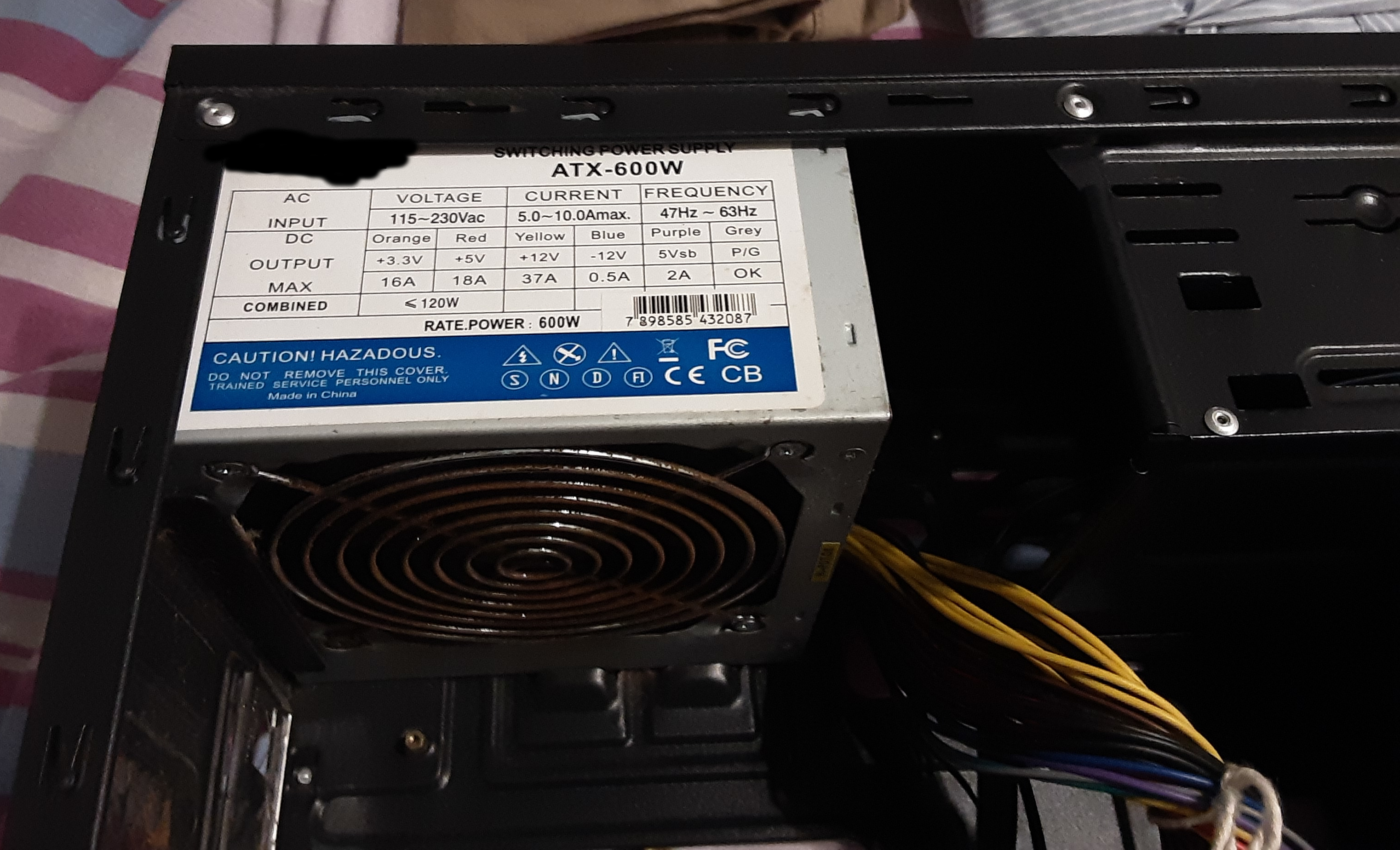
There's a power source attached to the case, which reads
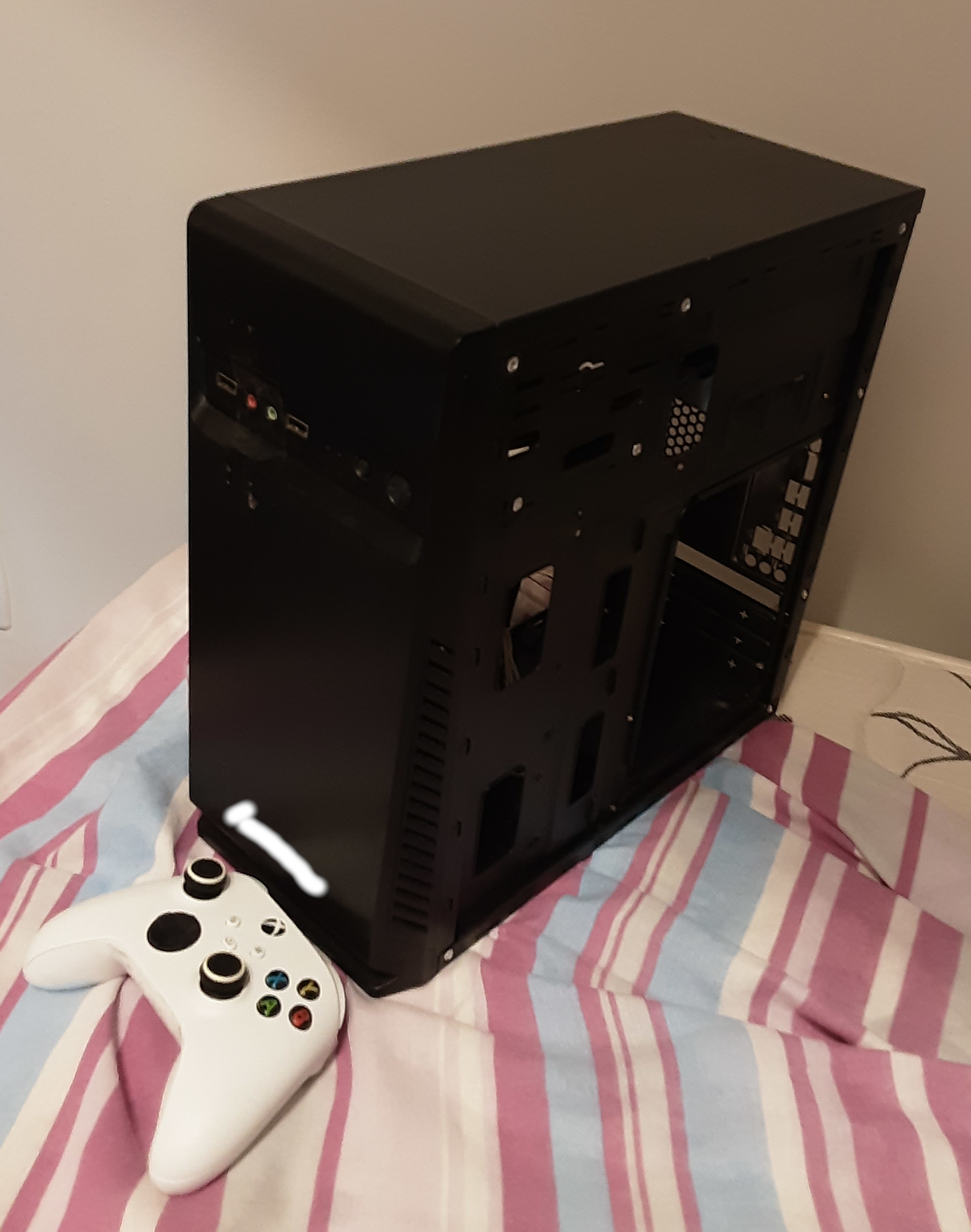
ATX-600W. Image1, image2.The computer case itself is a little beat up but I don't care about looks at all. Its external dimensions are 34.5cm by 35cm, with a width of 16cm. Here's how it looks (Xbox controller for scale).
I wanna build a new machine with the goals of:
- video editing
- so Adobe Premiere, Adobe After Effects, some audio work, and maybe streaming.
- gaming
- nothing super high-end, I'll probably get one or two 1080p 24" monitors because 4K reduces my options quite a bit. But here are some of the games I'm looking forward to playing (all MMOs): World of Warcraft Classic and Retail, FFXIV, Guild Wars 2, and the upcoming Ashes of Creation (which I believe is an Unreal 5 game).
My budget (including the monitor or monitors) is roughly 1400 US dollars. I understand that is not a lot of money for the majority of Tildes users, but that is just my reality. My 1400 US dollars PC is very much a luxury around here.
If needed for budget purposes I can get just one monitor now, and another down the road.
So, what's the best I can do?
Thanks! ;)
10 votes - AMD Ryzen 5 2400G processor
-
Non-binary DDR5 memory could be a game-changer for businesses everywhere
3 votes -
Apollo guidance computer explained: Everything you need to know
3 votes -
Two C64s plus a pile of floppy disks equals one accordion
6 votes -
DIY Blu-Ray laser scanning microscope
3 votes -
Valve answers our burning Steam Deck questions
10 votes -
Transporting a desktop PC
So, next year, I will spend two 3-month periods at a place that is 1400km away from my home. Because of my somewhat large, superfast dog, with a tendency to run away and topple people, I will have...
So, next year, I will spend two 3-month periods at a place that is 1400km away from my home. Because of my somewhat large, superfast dog, with a tendency to run away and topple people, I will have to go by car, dog in hand (don't worry, I won't be driving :P). Each roundtrip amounts to 42 hours on the road.
At the same time, I'm budgeting for a new desktop workstation for gaming and video editing (so both fun and work). I could get a much inferior gamer laptop with the money, but I wanna have a good machine for things like Adobe After Effects, and the inferior part bothers me quite a bit.
Hence the question: how can I safely transport a desktop PC plus monitor for an 84-hour car trip? Should I take it "whole"? Disassembled? Or not at all? I really don't wanna screw up my brand-new PC!
6 votes -
Choosing a good e-reader for studying
I started studying again this semester, and have to read a lot of stuff because of it. As we get nearly all our Books as PDF and reading on my notebook or my phone gets tiering quite fast. So I'm...
I started studying again this semester, and have to read a lot of stuff because of it.
As we get nearly all our Books as PDF and reading on my notebook or my phone gets tiering quite fast. So I'm thinking about getting myself an e-reader to make things go easier.So i tried to find some ressources to learn about e-readers, but the internet (or search engines) these days seem to suck.
So maybe my lovely tildes can help.must haves:
can read PDF
needs to make reading this "shitty" two colums pages my PDF have good and easynice to haves:
FOSS
Backlightcan somebody help me out? or do you know about a resource where I can learn about the pro and cons of the different e-readers, I'm starting with close to 0 knowlege as I never thoght I will need one, I generally prefere to read proper books.
5 votes -
WebTV returns with custom server emulating 1999 experience
6 votes -
Why do people think using this controller is cheating?
7 votes -
AMD launches EPYC 9004 "Genoa" processors - Up to 96 cores, AVX-512, incredible performance
16 votes -
Apple executive on adoption of USB-C under EU law
13 votes -
Unlaunching the 12GB 4080
16 votes -
iPad recommendations
After reserving a Steam Deck twice, and letting it drop, trying to get FTL running acceptably with touch controls on my old generic Windows Tablet, and doing the bulk of gaming and leisure time...
After reserving a Steam Deck twice, and letting it drop, trying to get FTL running acceptably with touch controls on my old generic Windows Tablet, and doing the bulk of gaming and leisure time with my phone, I wonder if the best solution to my varied tech needs might be just to bite the bullet, turn in my Android cred and take a walk on the iPad side. I haven't used an Apple device regularly since my iPod touch from ten years ago and ever since that was stolen, I was all Android, all the time. But if I want a device to read comics (PDFs, Kindle/Comixology, Hoopla), watch streaming (Netflix, Prime Video, Youtube), try out games (Apple Arcade, Xcloud Web) but have the option to go back to my old reliables (FTL, Binding of Isaac), should I consider dropping $200 on an older iPad and see if it fits my needs? Should I do it now, or wait on rumors of new ones in October? I know they're supported for longer then the average Android, but at the same time, I don't want to pick one up just in time for it to be a security risk either.
7 votes -
Steam Deck and Docking Station now in-stock and available!
EDIT: It is official! We're happy to announce that with today’s batch of order emails, we have completed our reservation queue. We are now in-stock and Steam Deck is available for purchase! The...
EDIT: It is official!
We're happy to announce that with today’s batch of order emails, we have completed our reservation queue. We are now in-stock and Steam Deck is available for purchase!
The Docking Station is available for purchase now! Learn more about it here, or order one here.
Previous post:
I wanted to give everyone here a heads' up that it seems like Valve is through most of its preorders for the Steam Deck, so the delay between reserving one and receiving a confirmation is essentially negligible at this point (unlike the months-long waits of the past).
Anecdotally: my husband put in a reservation on Sunday and received confirmation on Monday, the next day (US 512GB model).
Less anecdotally: /r/steamdeck is unofficially confirming this for all queues except the EU 64GB model.
If you've been waiting out the wait time for a Steam Deck, it looks like your time has come! You should be able to get one almost ASAP moving forward.
Also, if you're on the fence about it, I cannot recommend it enough. I absolutely love mine.
17 votes -
A history of ARM, part 1: Building the first chip
4 votes -
Steam Deck production update (it's good news)
17 votes -
We spoke with the last person standing in the floppy disk business
11 votes -
Should the Steam Deck just be a gaming tablet?
I struck me while using my Steam Deck the other day to watch Twitch that the device has almost everything it needs to provide users with a tablet-like experience alongside being a gaming device....
I struck me while using my Steam Deck the other day to watch Twitch that the device has almost everything it needs to provide users with a tablet-like experience alongside being a gaming device. When you're not in desktop mode Steam provides you with a high quality UI optimized for many of the same constraints as a tablet. For "great on deck" games and the store/library UI you get an easily navigable touch screen-supporting experience. If Valve can bring in Android apps for Twitch, YouTube etc. we could get that kind of experience universally.
Desktop mode can peacefully co-exist with a tablet experience as you will switch between the two distinct modes of operation. This seems like a great way to capture a market of users normally turned off by ideas of tablets replacing their normal computers. I haven't used a tablet in years but I would use one that was a full Linux gaming OS at the same time.
8 votes -
Apple’s iPhone 14 event: The nine biggest announcements
11 votes -
Breaking down how USB4 goes where no USB standard has gone before
15 votes -
Linus Torvalds is using an Apple Silicon Macbook running Asahi Linux
26 votes -
Anyone DIY-fixed a liquid-damaged MacBook Pro keyboard?
Long story short, I wiped my keyboard with a moist towel and I knocked out exactly 6 keys on my mid-2020 MacBook Pro (Magic Keyboard, A2251). I'm now looking at either paying $300+ to have it...
Long story short, I wiped my keyboard with a moist towel and I knocked out exactly 6 keys on my mid-2020 MacBook Pro (Magic Keyboard, A2251).
I'm now looking at either paying $300+ to have it serviced by a technician. But I have the tempting option of buying an aftermarket replacement keyboard for less than $100 and replacing it myself. That + I'm in the spirit of DIY repairs to keep my things going longer.
Has anyone attempted this before? Any tips and advice?
It seems slightly daunting because the keyboard is adhered to the aluminium body so I would have to literally tear the existing one off.
7 votes -
RISC-V only takes 12 years to achieve the milestone of 10 billion cores, 5 years faster than ARM
14 votes -
Steam Deck hits over 4,000 titles marked either Verified or Playable
14 votes -
Two weeks with the Steam Deck
I received my Steam Deck on June 6th and have used it literally every day since then. Here are some assorted thoughts that might be of value to people either waiting on theirs or on the fence...
I received my Steam Deck on June 6th and have used it literally every day since then. Here are some assorted thoughts that might be of value to people either waiting on theirs or on the fence about ordering:
The Good
- I had no idea until I got it that there's an official Deck test game: Aperture Desk Job. It's essentially a cute test/tutorial for the Deck's controls, set in the Portal universe. Takes about half an hour, but it's a fun onboarding for the device.
- On the past two Saturdays, I have woken up and played Vampire Survivors with one hand while I held my morning coffee in the other. This is the way.
- The control remapping options are absolutely incredible. It is a very robust system. Even simple fixes (like putting A on a back paddle so I can play Vampire Survivors one-handed) can make a world of difference.
- I haven't run many heavy games on it, but I started up Bugsnax, and it was keeping a solid 60 FPS and looked great.
- Emulation on the device is a dream. I haven't done anything past OG PlayStation games yet, but the power of the device, the robust control customization, and the ease of installing emulators (adding Flatpaks in desktop mode) make this absolutely ideal for revisiting older consoles. I've spent probably 80% of my time on the device in PSOne games.
- Battery life is fine, but I don't really use it. I bought a long power cord and spend most of the time with it plugged in on my couch since it has passthrough. I thought the cord sticking out the top of the device would bother me, but it hasn't really been an issue.
- Game selection is increasing steadily (1700+ verified games currently). If you're buying it to play specific games you might be disappointed, as there's still a lot that doesn't work. If you're buying it for games in general though, there is plenty to keep you occupied.
- The grips are MUCH more comfortable for bigger hands than standard Switch joycons. Those would always cramp my hands, but the Deck feels natural and comfortable.
- The middle of the device gets warm to the touch during gameplay, especially on more demanding stuff, but the grips remain cool and you won't feel the heat at all unless you specifically move your hands to the back middle of the device.
The Bad
- The paddles on the back are a little awkward, and I accidentally click them more than I like. In most games they're not mapped to anything so it's fine, but in emulators I use them for save states. I had to set them to respond to long presses only so my accidental clicks didn't mess things up.
- The software is... still getting there. I get navigation issues on store and profile pages frequently, along with frequent UI lag. It's a bit unpolished at the moment.
- Don't know if it's specific to my hardware or a software bug, but sometimes it won't log me in to my Friends list and the only fix is a reboot.
- I wish the control sticks had deeper indents for your thumbs. They're pretty flat, and my thumbs tend to slip off on stick-focused games (most noticeable on my right (aiming) thumb during 20 Minutes Till Dawn).
- Bluetooth headphones have to be manually reconnected in the Settings menu each time. No idea why this is, but it's a bit of an inconvenience.
- Mid-game suspending is still clunky. I don't really do it, as I don't trust that it'll save like it should. It also still counts playtime while suspended but seems to have a rollback feature? I put the device to sleep with a game open that I'd played for 20 minutes and came back to it saying I'd played it for 3 hours. The playtime ended up dropping back down to 20 minutes, but only after I restarted the device.
The Ugly
- There isn't any ugly. I absolutely love this device. Despite my nitpicks above, I think it's nothing short of splendid. I'm more excited about this than I've been about anything in videogaming in a long time.
If anyone has any questions, ask away! Also if any other people here have their Steam Decks and want to chime in with their experiences (@Autoxidation), go for it!
36 votes -
Notkia: Building an open and linux-powered numpad phone
2 votes -
Hertzbleed - a new family of frequency side channel attacks on x86 processors
13 votes -
A few more things added to Steam Deck
9 votes -
Microsoft trying to kill HDD boot drives by 2023: Report
8 votes -
Scifi hifi
7 votes -
Apple's Self Repair Program toolkit weighs seventy-nine pounds
15 votes -
Introducing the new and upgraded Framework Laptop
16 votes -
Tech recommendations request: looking for a Linux-friendly 13" laptop
Final update: See here. Update: Thank you ALL for your valuable feedback. I'm definitely looking into refurbished models now and I have a lot better grasp on what what I should be considering. I'm...
Final update: See here.
Update: Thank you ALL for your valuable feedback. I'm definitely looking into refurbished models now and I have a lot better grasp on what what I should be considering. I'm going to do some digging and a ridiculous amount of overshopping over the next couple of days, and then I'll let you all know what my final pick is!
Hey techy Tildes! I'm back with another support request from you knowledgeable and helpful folks.
I need a laptop that does exactly three things: gets me online, displays PDFs, and runs office software. I have a large number of online courses that I have to take in the coming years, and I need something that I can just grab while on my couch or in bed to work on papers and assignments, hence the 13" size preference. Long battery life would be highly preferable.
I looked for options that come with Linux preinstalled, but there's really nothing available that hits what I'm looking for -- there isn't much of a market for 13". As such, my plan is to just buy a standard Windows laptop and then put Linux on it, but I have no idea which particular hardware will play nice with a Linux installation. Budget would be sub-$500 (if possible). I don't need the laptop to do anything other than stay on for a long time and let me type, so I have no need for a powerhouse.
Can anyone point me in the right direction with some recommendations?
13 votes -
Playdate handheld console release thread
Playdate announced on Twitter that they are beginning shipping today: Oh! A new Playdate Update video is here! It recaps the great developer things we've released this year, like Pulp and the...
Playdate announced on Twitter that they are beginning shipping today:
Oh! A new Playdate Update video is here!
It recaps the great developer things we've released this year, like Pulp and the Playdate SDK. Please enjoy it. https://youtu.be/BmrtkBmFSn4
There's one extra important bit in the update. Playdates in Group One will begin shipping…
…today.
The embargo on reviews also lifted:
- The Verge: All it’s cranked up to be
- Rock Paper Shotgun: A handheld indie curio that goes hand in hand with the spirit of PC
- Eurogamer: A fascinating puzzle in itself
- Video Games Chronicle: The Playdate is fun but its quirks may wind you up
- ArsTechnica: Playdate earns its $179 price tag with cute design, memorable games
- Engadget: Playdate is a magical indie game machine
- IGN: It's Crankin' Time
- Venture Beat: An alternate-history boutique handheld
- GamesRadar: Tiny, mighty, unfussy fun
- Destructoid: You’ve got a date
- Gizmodo: The Playdate Is Oozing With Charm and Potential
Also, ArsTechnica released reviews of all of the Playdate games. SPOILERS ahead:
20 votes -
PC cases without transparent side panels
Hi folks! I am, unfortunately, probably going to have to build a new PC soon; my beloved Thelio-r1 is slowly failing, and while my original plan was to buy a Ryzen 7 5800X and keep riding this PC...
Hi folks! I am, unfortunately, probably going to have to build a new PC soon; my beloved Thelio-r1 is slowly failing, and while my original plan was to buy a Ryzen 7 5800X and keep riding this PC for another three to five years, I don't know that I'll actually be able to make that work.
I like the NXT H510 I used for my boyfriend's gaming build, but the thermal performance isn't amazing and, most importantly, I hate tempered glass!
Yes, I understand that people want to show off their (ridiculously!) expensive components. I understand that lots of things have RGB. However, metal is cheaper, easier to work with, doesn't shatter, and I can modify it if I need to.
So, does anyone know of a good mid-tower PC case with decent airflow, up-to-date features (no 5 inch bays, good cable management hardpoints, a cable hiding bay, etc.), and no tempered glass or, preferably, acrylic?
Thank you!
16 votes -
Marking Steam Deck’s first month
8 votes -
VRoom is an open source, very high performance, RISC-V implementation targeting cloud servers, it's licensed under a copyleft license (GPL3) but also available as a commercial license (like MySQL)
5 votes -
GingerOfOz's "fake" GameCube portable
6 votes -
Steam Deck launch day megathread
The Steam Deck is launching today and the embargo on review units will be lifted. Use this thread to post any and all noteworthy coverage, information, or thoughts.
34 votes -
Apple Event (8th March) - Peek Performance
12 votes -
Valve releases external Steam Deck CAD files under a Creative Commons license
27 votes -
Uninterruptible Power Supply (UPS) recommendations and advice
Hello everyone, I usually do my own research, and then I try to find multiple matching results and afterwards, read specifically in detail about each recommendation, but, I have to be honest that...
Hello everyone,
I usually do my own research, and then I try to find multiple matching results and afterwards, read specifically in detail about each recommendation, but, I have to be honest that for UPS recommendations that I’ve seen, it seems to be a very personal recommendation depending on the wattage and connected devices.
First of all, most people recommend CyberPower or APC, but I’ve also seen some recommendations for Eaton. Is there any other brand that I should be looking into?
The devices I would like to connect to a UPS would be: desktop, TV, Apple TV, NAS, router and probably my Nintendo Switch.
There are some general things I've found out while searching that I think I would like some confirmation:
- I actually think I should buy two UPS's, or? I think just one for the desktop and another one just for the remaining devices, since the desktop uses a lot more wattage.
- Pure Sine Wave: It does not matter for smaller stuff (routers, etc) but it seems that anything above 70 W, it should use a UPS with this. So, that would mean I need pure sine wave, since my desktop and TV definitely use more than 70 W of power.
- Some people said to search for a UPS with line conditioning so that you always get a perfect sine wave. Would you agree?
- USB connection (not a faux USB!) so that the NAS detects the power failure and shuts down gracefully.
- It is important that the UPS has removable battery for better longevity.
How would I choose a UPS? Do I need to see the total wattage of all my devices and then pick the UPS accordingly? Anything I'm missing?
My budget would be up to €100 or €150 in case it is really worth it.
Thank you in advance for all replies.
13 votes