Nimona
38
votes
Voting closed
Sorry for the title gore, but since it is the Oscars next month, lets find a Oscar relevant selection of 4 movies, with narrowing it down to Best Picture nominees that didn't win. So if you have a favorite movie where another movie took the award that year, now is a good time to bring that up.
Rules
Wikipedia has a list of all the nominees through the years. Or this list on Letterboxd.
In case of ties in the number of votes, random.org will decide. Voting closes Sunday.
We bought our house over eight years ago and it came with a number of appliances. Within the first year, both the refrigerator and the dishwasher crapped out on us. We replaced them with new Frigidaire and Whirlpool models respectively, but I definitely haven't been satisfied with them. Now my washer and dryer are acting up and I'm not sure how much longer they've got.
When our fridge first started giving us issues, we had someone come out to try to fix the existing one. He basically told us that it would be around $400 to replace the failing motherboard on it — and given how simple that fridge was, it was essentially the price of a replacement. So you can't fix anything—you just throw it into a landfill and buy a new one.
The principle of "you get what you pay for" doesn't seem to apply, either. I don't need a fridge that has a 20-inch OLED screen for connecting to a Samsung account. Paying more just seems to get you more features that are likely to cause problems down the road.
Before we bought our replacement dishwasher, I got a subscription to Consumer Reports. The one we got was one of their recommendations. But it's just… not a good dishwasher. Little parts of it keep failing (e.g., the top rack's glassware holder-spine-thingies). And it's leaking, too!
So, to bring it back around to the subject title, how do you even find reliable appliances? Does anyone even make reliable appliances? It seems like there has been a race to the bottom among all of the appliance manufacturers (not that this is a unique to appliances, as this Vox piece explains). Long-term reliability doesn't move units off the showroom floor, so it doesn't get prioritized. (Plus there's the whole economic disincentive for "durable goods" to actually be durable.) And with model numbers changing annually, there's no good way to keep track of which models have proven reliability.
Title is a reference to this[0] post, which I really thought was about archery bows. [0] https://tildes.net/~anime/1e7z/which_characters_have_the_best_bows
GMs: do you have any gaps in the worldbuilding of your setting that you're looking for help filling? Post them here!
In case it wasn't already clear, I need help as well. My setting is a near-future hybrid of Shadowrun and Cyberpunk, in 5e. There are two major gaps. First, in my setting North America has fractured into a handful of nations - but the middle part split into a radioactive wasteland and a loose coalition of city states. What locations might be concealed in the wasteland? (A fallout vault-like society living in the NORAD mountains of Colorado?) Which city states would have survived and what would their character be?
I also need ideas for more megacorporate factions.
Here is the work in progress for the setting, if you're interested.
Help me and I promise I'll help you!
Server host: tildes.nore.gg
Dynmap: https://tildes.nore.gg
Playtime counter: https://tildes.nore.gg/playtimes.html
Verification site: https://verify.tildes.nore.gg
Tildes website extension (shows online status & location): Firefox (Desktop and Android) - Chrome
The server operates on a soft whitelist. Anyone can log in and walk around, but you need a Tildes account to gain build access.
What have you been playing lately? Discussion about video games and board games are both welcome. Please don't just make a list of titles, give some thoughts about the game(s) as well.
What food and drinks have you been enjoying (or not enjoying) recently? Have you cooked or created anything interesting? Tell us about it!
This thread is posted weekly - please try to post all relevant Israel-Hamas war content in here, such as news, updates, opinion articles, etc. Extremely significant events may warrant a separate topic, but almost all should be posted in here.
Please try to avoid antagonistic arguments and bickering matches. Comment threads that devolve into unproductive arguments may be removed so that the overall topic is able to continue.
This thread is posted weekly - please try to post all relevant US political content in here, such as news, updates, opinion articles, etc. Extremely significant events may warrant a separate topic, but almost all should be posted in here.
This is an inherently political thread; please try to avoid antagonistic arguments and bickering matches. Comment threads that devolve into unproductive arguments may be removed so that the overall topic is able to continue.
Second superhero movie Nolan's Batman Begins from 2005.
How familiar are you Batman - comicbook, animated series, other movies - and how does this compare? Have you seen the other movies in Nolan's Batman trilogy and does this stand up against the rest?
The rest of the schedule for February is:
This is Album of the Week #21 ~ This week's album is Bruno Pernadas - Those Who Throw Objects at the Crocodiles Will Be Asked to Retrieve Them
Year of Release: 2016
Genre(s): Progressive Pop/Art Pop
Country: Portugal
Length: 53 minutes
RYM | Listen!
Excerpt from RYM review by user DoubleMissMatt:
But there's more in this melting pot of sound than jazz and pop, with touches of electronic music and sampledelia in the mix on tracks such as "Anywhere In Space Time". Building a groove off of analogue synths and a fuzzy chopped vocal sample gives this track a kaleidoscopic sound that reminds me a bit of the Avalanches' debut record. And this isn't exclusive just to this track, as there are a number of nostalgic lo-fi vocal samples that seem to be pulled from films/T.V shows from the 60's (forgive me if I'm wrong with that assumption) scattered across this album at the start/end of songs. That, alongside the two "poem" interludes breaking up the track list, give this album a film-like quality that adds to the wonder of the experience.
Discussion points:
Have you heard this artist/album before? Is this your first time hearing?
Do you enjoy this genre? Is this an album you would have chosen?
Does this album remind you of something you've heard before?
What were the album's strengths or weaknesses?
Was there a standout track for you?
How did you hear the album? Where were you? What was your setup?
--
While there were conversations about this in the past, those were much more generalized.
Now, I personally don't have issues creating world maps, regional maps, or 'battle' maps, as it were, but when it comes to city maps... I'm consistently at a loss. That said, I don't want this to just be me begging and whining into the void about how I can't find something that I prefer to make city maps in, so here's what I've used and would recommend over the past 15 years or so:
Of these, I definitely recommend Wonderdraft the most. I think if you put in enough time and effort, Photoshop can turn out better (and most detailed), but if you're interested in a style that Wonderdraft has support (and assets) for, it's pretty much perfect. It's a one-time cost, has been getting consistent updates and support since it was in beta years ago, and the community assets are pretty much unending. The one caveat to Wonderdraft is that if you want to make an absolute behemoth of a map (like I'm apt to do), it will eat some serious resources and can begin to lag, due to how it handles each individual tree/mountain/path as a singular, editable asset.
Campaign Cartographer is an oldie that I tried about ten years ago, had some success with (mostly in how it designed continent outlines and things), but just didn't feel like it had enough malleability to create things the way I saw fit.
I think everything I said about world maps applies here, as well. I haven't used Inkarnate in the better part of a decade, but I know the free version was very limiting and there were some concerns about the company 'owning' anything you created in the program. That said, a brief look at it now makes it look like a more closed-off version of Wonderdraft, but with a subscription instead of a one-time purchase.
Before Dungeondraft, I pretty much hated making maps for combat. Early in my GMing 'career', I would just have a blank canvas on Roll20 and draw on details as it was needed, and eventually I just pivoted completely to theater of the mind for all of my combat. And then Dungeondraft rolled around, and it was pretty quick to export from there, incredibly quick to import to Foundry (with a module), and Just WorkedTM. Before that, I did occasionally try and make things in Photoshop, and would follow tutorials from time to time, but it was all just so time-consuming, and with a lot of asset hunting if you wanted consistent art style and detail to what you were doing. It was just so much.
Which, of course, brings me to...
Ah, the problems. So, I tried to make city maps in Wonderdraft, but it's very obvious that it was built for a larger scale, and there are a lot of 'hacks' (or workarounds, I guess?) you need to do to make it work, and it can be frustrating and very time-consuming, as there's nothing there to really automate the process at all. For example, Wonderdraft has this beautiful 'paint brush' for assets such as trees or mountains that will 'spatter' them across a set radius, with a set density, etc. This is very helpful for something random like forests, but essentially useless for placing buildings. Dungeondraft is a little better in this regard, but has the opposite issue: Everything is too 'small' and focuses on more grid-based, rigid design, given that it's built for, well, dungeons. And battle maps in general.
I purchased City Designer 3 (along with a big pack of Campaign Cartographer add-ons) as part of a Humble Bundle a while ago, and I kind of enjoyed it, but it really felt like the amount of effort required wasn't worth the end result, which - at best - would be using art assets designed to give the feel of the maps from D&D 5E. And even then, that limited the asset options because it didn't seem like there was a lot of additional third party support for the program (which is definitely showing age). That said, it's the only one I've used that seemed able to handle good building placement along roads, able to do it automatically. That said, Photoshop?
Probably the best time I had making city maps. I had to stylize them, but with enough ingenuity, good knowledge of automation (through recording Actions), and following some art style tutorials, you can make a "cheap" city map that's able to have a lot of variation. If you're interested in map design in Photoshop, I highly recommend the tutorials of Jonathan Roberts, who is very much my 'gold standard' for map creation. Unfortunately, he doesn't really update his site any more, and some of the tutorials show their age, but all of the content there is still great.
Then, we have generators. The ones linked above are the best ones I've found, though the city ones leave a lot to be desired as far as graphics and specific details go. But the village generator for small towns and the like? Beautiful. It's genuinely just a perfect little generator if you don't care all that much about the specifics of the map. So, for most towns and villages, it's fine. But what if it's a town built up against a mountain, that sprouted up around a mine? Well... that's not gonna work. What if it's a town that's split on two sides of a river, protecting passage? No such luck. A swamp town, or one in tree-tops? No, not really gonna work all that well.
And just last year, I was turned towards AI generation here on tildes, thanks to @atomicshoreline and his fairly extended description of how to set things up. But, I eventually gave up bothering him after my old video card kept having VRAM issues with only 8GB.
I have seen some very good city maps made in Inkarnate, but I don't know that I'm interested in something that has a yearly subscription, and I can imagine it being very frustrating long-term to invest in something that I've seen issues with in the past.
So, all of this is to say that I really enjoy making detailed content for my world, but I've always had issues with cities. There's just so much content that needs to be hand-placed in almost every program, and even an un-finished city has taken me well over a hundred hours in Dungeondraft, and that was with me still actively hating looking at it..
So, if anyone has other suggestions, I am quite literally always searching for new ways to make city maps, and I've tried just about every suggestion given to me at least once, often to the detriment of my bank account.
Oh, if someone can think of a better title to this post and wants to change it, please be my guest. I just wanted to contribute my knowledge and recommendations, rather than just throw a "give suggestions" post out into the ether, and wasn't sure how to phrase that.
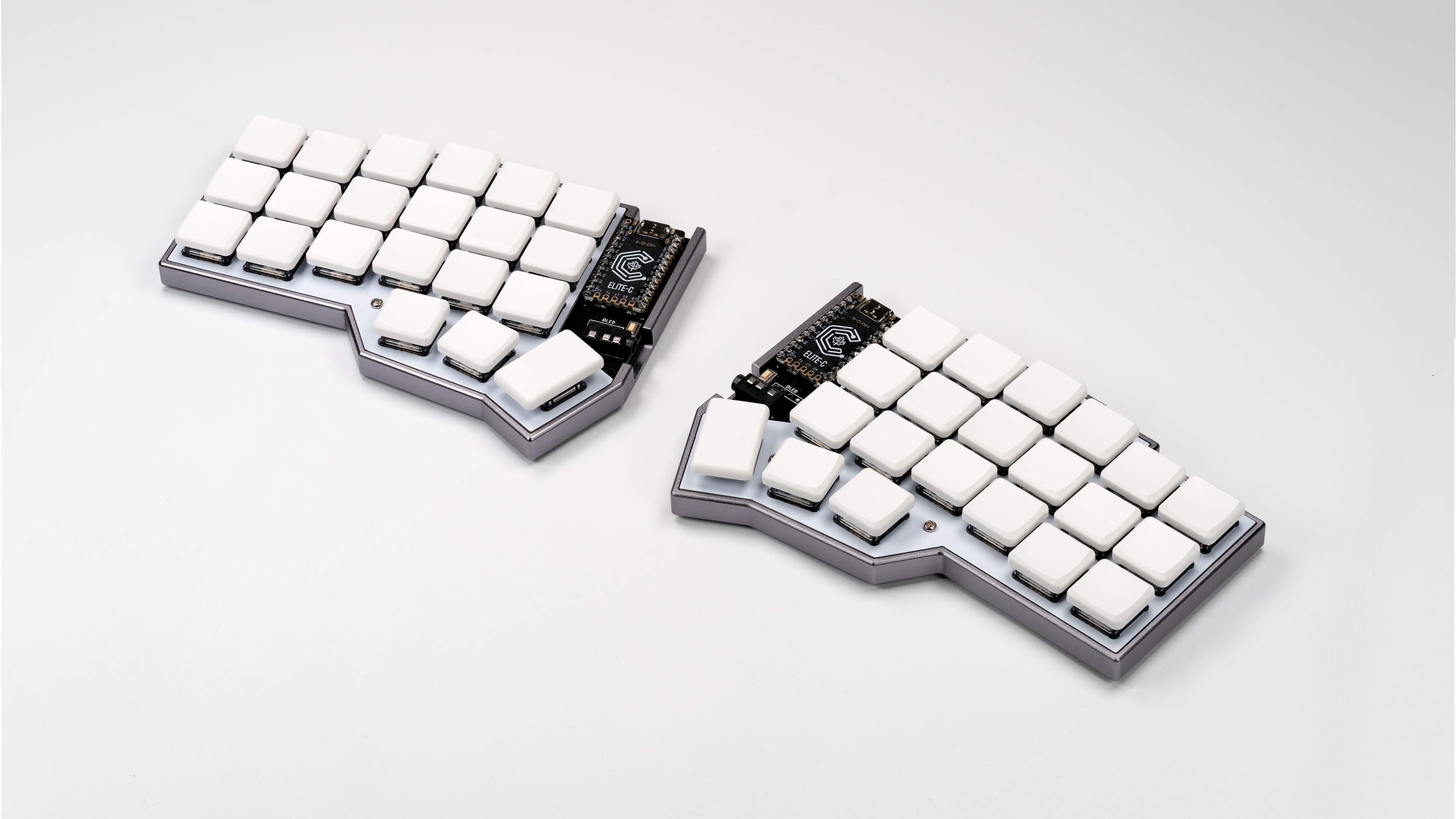
Whenever smaller keyboards come up online, I often see a lot of the same reactions/dismissals. I've found many of these to be foolish, but also that the community around such devices has its own barriers. It sometimes is represented from its most extreme aspects rather than someone with a more normal approach and use case.
So here is yet another pitch on why you might want to consider trying out some of the smaller keyboards out there, and the various advantages it can bring. This will probably be quite long, but I hope it at least is interesting.
Corne LP split 40 - I carry this with me and use it for work and as a better keyboard for my GPD Pocket 3.
Mercutio 40 - for my lighter media/older/lower spec game machine.
Discipline 65 - for my gaming machine as at the time having the number row still seemed needed (and it just looks so nice)
Velcifire wireless 60 - As my other media keyboard since it's wireless and can be used from anywhere and causes my normal friends and family to have less of a stroke if they have to use it. A lot of what i'll say below won't apply to this as it doesn't have some keys and can't be custom mapped. (It's also what i'm typing all this on, much to my chagrin.)
I've gone through and have owned/own several others but i wanted to be clear about what i'm using in case anyone doesn't have a clue what i'm talking about.
I think the only real "skill" you must have to consider downsizing your keyboard is the ability to decently touch type without looking. If you're the sort of person who still hunts and pecks, no judgement, but this is not for you.
If you're someone who has to code, do data/numerical entry, or type a lot for work, then I encourage you to read on. Those are common barriers I hear thrown out, but in my experience are actually easier with a smaller keyboard.
The normal keyboard for most machines has a lot of dead/wasted space that could just be used better, and has some keys that are important or have grown more important in really poor positions.
The core idea is simple. You can find the home row easily with the homing keys (j/f generally have a bump or some defining feature). You're probably excellent at hitting the keys in relation to that if they're 1 step away from the home row. The farther you are from that, the more likely you'll need to look, and the longer it'll take you to press the key even if you don't. So where possible, it's ideal to try and use space more efficiently to keep the keys you actually need to use near this position.
But how are you going to fit all those keys anywhere near the home row?
As an example, to help explain moving forward, here is the keymap for my mercutio 40.
You'll want to save that json, and then upload it at qmk configurator, which will make it much easier to explore. If you've never looked at this before it can seem insane, but I promise you it's pretty tame ignoring some edge case stuff.
If you don't feel like going through the hassle here's screenshots from the site with descriptions of each layer.
Mostly the same as below but i did fix some missing info below so sorry about that. I'm also leaving the descriptions of my "gaming" layers 4/5/6 in the imgur only because I think that's out of scope for this).
Space is an interesting key. It's a key only ever really tap, never hold (outside of games, more on that later). So, why not double it up, and make it do something different when you hold it?
Well in this case, tapping any of my 3 space buttons gives you a space like anyone would expect, but if you hold either of the left 2, it "shifts" you to layer 1 (base layer is 0), and holding the right one, shifts you to layer 2.
I put shifts in quotes because it's just like the shift key. If you hit 7 on your keyboard, you get a 7. If you hold shift and hit 7, you get &. This is the same concept, and just keep the layers organized in a way that makes sense, keeps it very easy to know what layer what key you want is on.
Ignore the N/A's on this and the rest (where they'll be another symbol), as they are optional keys i don't have. Mute is also the encoder knob so don't worry about it.
It's pretty basic qwerty in the the middle, and tab/left shift/right shift/backspace/windows/the alts/right control are where they normally are, and left ctrl replacing capslock is something I recommend EVERYONE do.
Space, is still space. In fact all 3 of those spacebars are space...on tap. On hold, the left two "shift" the keyboard to layer 1, while the right one "shifts" the keyboard to layer 2. So just like holding shift + a key gets you a capital version of that key (or a symbol from the number row), holding space + a key gets you something else.
The left control/right windows key are also layer keys. Holding them takes you to layer 3 and they do nothing when tapped.
Finally right shift is where it always was, and is somewhat similar to space. If you tap it, you get /?, and if you hold it, you get right shift instead.
All this to say, that outside of enter, escape, the numbers, and moving control, most people who can already touch type could mostly type on this without any explanation.
Accessed by holding left space.
All keys that don't actually put a character on the screen (ignoring the left side where i've got some coding stuff but it doesn't really matter).
Up, down, left, right, home, end, page up, and page down are all in instantly intuitive positions and make navigating anything quickly a breeze (home on the left side since it jumps you to the left/start of the line, and end on the right since it jumps you to the right/end) . Enter, Delete, and Escape are the other 3 major keys on this layer, as they are of course useful, but don't actually put text on the screen.
The point is that if you're thinking to yourself, "where is that key on this keyboard" and you know that key doesn't actually put a character on screen, you know it's on this layer.
Accessed by holding right space.
I've turned the right side of my keyboard into a numpad that is always under my fingertips(my middle finger is always on 5, just like a 10 key), and since i'm using the number row numbers, I also have access to all their symbols instantly as well by just holding right space + shift. I also have dedicated *,/,+ keys, and the -/_ underscore laid out to be intuitive as well (higher key increases the value, lower key decreases, so multiplying above division, and addition above subtraction)
Finally we've got the rest of the keys that can output characters but didn't make it to the home row and don't fall into the numpad. `, ;, and . Again they are all basically where they normally would be, but instead you just hold right space and hit the key.
The other 5 keys that output text are on the left hand side near the home row because they're super useful for coding (I also use | and -/_ a lot, but their positions in this layout are intuitive to me). Having the paren's/brackets under/near my middle and index finger is so nice for all sorts of coding.
Accessed by holding "left control" or "right windows".
The function keys are the exact same layout as the numbers. F1 is where 1 on my layer 2 is. So F5 is where 5 is which means it's right under my middle finger. I put 10/11/12 going down on the left because that made the most sense to me, and so far has never caused me any issues.
The mouse/music stuff I don't use that often, but it's something I'd like to mess with a bit more.
I threw capslock on here in the rare cases where I actually need the key because some program or game wants it. I also have Insert on this layer in my live map, but I use it so rarely I tend to forget it until something needs it.
Finally you'll notice that on layer 3, where the G key is, is a toggle to put you into Layer 4. Meaning that once you hit it, you'll jump to layer 4 and NOT return to layer 0 when you let go. This is explained more on that layer and is totally bonus points. The main point of this keymap is done, and I think this is an excellent layout for productivity (or at least a starting point), without having to dive into lots of complicated or unintuitive concepts.
If you don't want to read all of that, the basic idea is that your average person can type on the keyboard with minimal explanation. If they forget where a key is, the other 3 layers all follow rules to help guide them. One layer for navigation and keys that don't actually output characters (home/end/delete/esc/et) and one layer for the rest of the keys that output characters, namely the numbers, which are then also your numpad and ALWAYS under your right hand, centered and ready to go. The final layer is, mainly, for the function keys, still following the numpad from the previous so you can again easily figure out where the button you want is.
In the end the main benefits i've found are easier navigation, as I essentially now have a navigation layer with every key i could want on it, and much faster access to numbers. I still do data entry and lots of numbers, and having the numpad always one keyhold away is awesome.
On top of that it's just nice to not have to move my hands so much to type, and to get so much of my desk space back.
I type just as fast as I do on a normal keyboard for basic text, as there's almost no difference, and I type faster doing code/editing text because my numbers, brackets, and navigation keys are all closer at hand and in such a way I don't need to look or even move my hand from the home row to hit them.
On the typing side, honestly yeah. I've seen a lot of excuses like "well i prefer a numpad" or "how do you type numbers" which I've tried to address in this post.
The only issue i've run into is gaming, where I already really solved most of my problems as shown in the extra layers in the imgur gallery, and think it might even be better for gaming vs the normal layouts.
The only remaining hassle is roguelike games such as stone soup or caves of qud, which LOVE to assign every fucking key a use so there's no easy way to remap things and I have to actually add another layer JUST so i can hit the numpad numbers because I need them to navigate....
BUT unfortunately, you might actually want to acquire one of these keyboards, and that's where stuff gets a little tricky.
All the upsides I just mentioned assume you can actually program the keyboard. Thankfully this has gotten much much easier with both Via and ZMK making the process very simple. QMK is doable, but difficulty wise it shared a lot of similarities with trying to get the perfect modded run of Fallout New Vegas going with about 20-40 mods. If you are not more comfortable in the tech world, I recommend ONLY boards that support via software. I believe these days anything that supports QMK supports VIA, but it's worth checking on the via website to make sure the board you're about to get works.
The mercutio and the discipline I built myself after ordering the parts. They're through hole soldering and were some of the first soldering I'd ever done on my own outside of a quick kit I bought off amazon to practice. It is actually not that hard BUT you need the equipment. It's not horribly expensive to get but it's not cheap either. I do really enjoy just throwing on music and putting these together, but I totally understand that you might just want to, you know, buy the fucking thing already built.
Thankfully many sites offer build services (or you can find them on etsey) which charge a fee to assemble it for you. This is what i've done with every corne i've ordered because it is NOT through hole soldering and I don't have the guts for it, and even still they've all had some eventual issues (although again, i carry mine with me in a very unprotected state because i'm insane so some of that is on me).
Especially if you're paying for the aforementioned build services, these things can get into the 200-400 range FAST, which is a lot for a keyboard. There are some cheaper options out there, and the Mercutio was only $70ish before switches(not bad) and keycaps (range from dirt cheap to ungodly expensive).
Still I would not recommend ANY of these for a first time buyer. My first smaller board was a 60% mechanical and those range from $70-100 these days from what i'm seeing.
Sometimes you just won't be able to find or buy the board you want in the way you want. There are lots of interesting boards i've seen over the years, but they're either very expensive or only open for a limited time. I had a working cornish zen that died on me. I'd love to replace it. I cannot as they currently don't sell them. Will they make more? Dunno. I hope they do.
I DO NOT recommend diving in head first and suggest starting with something simple like a 60 or 65, probably keychron, as they're a decent budget brand. You might want to go even cheaper with just a 60% off of amazon that isn't even programmable just to see if you outright hate it, but I do think that getting something you can start to tweak as you begin to understand what you want helps adoption.
I hope this gave some of you the push to look into all this. I'm glad I dipped my toe in it, less glad about the absurd amount of money i've spent on it (dear god keycaps), and really glad about the moment where I thought "huh i really just don't need all these keys" and pulled some out. I hope I can convince a few others give it a shot and hopefully see the same results. No dvorak or home row modifiers and weird triple tap macros. Just some layers and common sense.
I do still, if nothing else, highly recommend switching left control to caps lock.
Add awesome game deals to this topic as they come up over the course of the week!
Alternately, ask about a given game deal if you want the community’s opinions: e.g. “What games from this bundle are most worth my attention?”
Rules:
If posting a sale, it is strongly encouraged that you share why you think the available game/games are worthwhile.
All previous Save Point topics
If you don’t want to see threads in this series, add save point to your personal tag filters.