• Activity
  • Votes
  • Comments
  • New
  • All activity
  • Showing only topics with the tag "android". Back to normal view
    1. Has anyone attempted to use their mobile phone as an offline device?

      I've been reflecting lately about how I enjoyed using the internet more when I could connect and disconnect from it at will. Pre-smartphone, back when the only way to access the internet was to...

      I've been reflecting lately about how I enjoyed using the internet more when I could connect and disconnect from it at will. Pre-smartphone, back when the only way to access the internet was to physically sit down and log-in, there seemed to be a clear delineation between being online and being offline. Now, the internet follows us everywhere, and between notification fatigue and doom-scrolling I've found it to be a net-negative. Insert man-yelling-at-cloud image here.

      Recently I realised that one of my preferred news apps supports downloading articles for offline reading. Considering that I already aim to have most of my music and podcasts available offline, I've been wondering... Couldn't I just, turn off the internet?

      I'm curious if anyone else runs their phone primarily offline. I'm using a Google Pixel 8, with mostly FOSS alternatives where possible (I've been hoping to making the switch to GraphineOS for some time now, but haven't yet had the capacity to do so). In a perfect world, I would just turn my phone off or leave it at home, but family and childcare commitments make that an unrealistic alternative for me right now.

      To support this experiment, I've set up two rules in Automation, one enabling WiFi at 4:30am and another disabling it again at 05:30 for any required downloads/uploads. After that, the goal is to keep it offline unless if absolutely needed. Mobile data has been turned off entirely.

      Considering my daily use case, some features can be adapted fairly easily:

      • News - As mentioned, I've been able to schedule offline downloads at 5am via the Guardian App, which I have a subscription for.
      • Podcasts - I use AntennaPod with an hourly refresh of feeds. I'm working my way through setting up automatic downloading for the podcasts I listen to most frequently, but I figure anything else can be added to the download queue and downloaded overnight.
      • RSS Feeds - I use CapyReader synced via Miniflux, no issues. Again, will download overnight.
      • Communication - Most of my friends and family already know the best way to contact me is via text or calling - I still have a Messenger account (begrudgingly, to keep in contact with family and friends), so it will be interesting to see how much of a barrier this will become overtime. Ironically, while typing this, I received a notification that I couldn't receive a MMS message due to my mobile data being switched off... Something I hadn't accounted for, but at least I know now that this would be a known-unknown and that I wouldn't miss a MMS message entirely.
      • Navigation - I've been using OSMand for a few years now with offline maps with no issues. That said, I treat Google Maps as my 'commercial maps' app to check nearby businesses/amenities that aren't always recorded (or have outdated info) in Open Street Maps, as well as checking traffic when commuting.
      • Work - Fortunately, in my current role work does not need to contact me outside of business hours, but I'm assuming for a lot of people wanting to go down the same path this would present a huge barrier.

      My main barriers moving forward are Childcare and Emergency Notifications. Our childcare centre uses an app (of course it does...) which we receive updates via. Fortunately they're not entirely reliant on this and will call directly if there is an issue requiring pick-up, but not having access to this prevents me from checking what my daughter has eaten and when/how long she has slept for. For the uninitiated, these aren't stats that I refer to out of curiosity, they absolutely determine how to plan pick up, dinner and the bed routine. My mother in law who has retired from a career in childcare used to provide written slips with these details - sadly, this is no longer an option and there really seems to be no alternative other than to wing it or temporarily reconnect to check (or rely in my partner to tell me, which isn't really fair to her - especially considering she works late and I handle pick-up).

      I've set up emergency notifications via FOSS Warn, with my state's emergency management app as a redundancy. Being an Australian with family in regional areas, receiving these alerts during summer is an absolute necessity. Australia recently introduced a federal emergency notification system that does not rely on internet connectivity, but as far as I can tell this is localised by cell-range and will only advise of local, high-level emergencies. I genuinely think I might have to keep my device online during high fire danger periods.

      I think the other big barrier to this will be, as loathe as I am to admit it, my own addiction to phone use. At the moment, there is very little stopping me from just enabling mobile data or WiFi as needed. I would love it if there was an app to allow a toggle-widget with a timer (i.e, virtual dial-up!) that would allow for enabling internet features with some friction as a deterrent, but so far I haven't found anything that fits that specific mould.

      Does anyone else use treat their mobile as a primarily offline device, or have experience with attempting to disconnect in a similar way? Otherwise open to anyone's suggestions, feedback or other experiences navigating life in an always-online world.
      20 votes
    2. Tech support request: What to do about an end-of-life Android tablet?

      The Preamble The Galaxy Tab S7 FE was released in June of 2021, and I bought mine in June of 2023. Apparently, the device reached its end of life in June 2025. I didn't get any notice about this...

      The Preamble

      The Galaxy Tab S7 FE was released in June of 2021, and I bought mine in June of 2023.

      Apparently, the device reached its end of life in June 2025.

      I didn't get any notice about this or anything, I just thought it was odd that the system hadn't updated Android in a while, and as that kept happening I started getting more concerned.

      The device is currently on Android 14, with its "Security Patch Level" being June 1, 2025.

      This is obviously concerning to me, both because I don't want to be using an insecure device and also because the tablet I dropped $400+ dollars on was only supported FOR TWO YEARS ARE YOU KIDDING ME?!

      This might be a "shame on me" situation for not doing more research before buying it (is it like, a known thing for Samsung/Android devices to have such short lives and I got duped?), but also I feel like it's a shame on Samsung situation because I feel like it's a reasonable expectation to have something I bought continue to work and not almost immediately become ewaste.


      The Support Request

      Anyway, my question is: what do I do about this?

      I want to keep using the tablet. It still works great.

      My main usecases for it are:

      • Reading comics and magazines
      • Watching the occasional movie, show, or Twitch stream

      I don't like the idea of just permanently taking it offline, as then I would have to transfer the stuff I read and watch manually, and it would rule out any livestreaming completely. That's a bit of a non-starter for me. Also, like, I want to continue to get the use I want out of the device I paid for. That's why I bought the damn thing!

      Is there a way to manually upgrade Android on it? Or can I flash it with some alternate OS that's still supported?

      Or am I making a mountain out of a molehill and it really doesn't matter that it's EOL as long as it still works?

      Let me know what the recommended path forward is.

      22 votes
    3. What mobile browser do fellow android users use?

      for the longest time I used duckduckgo browser. I was under the impression that it was the only mobile browser that did ad-blocking, especially on YouTube. and in that time, I absolutely fell in...

      for the longest time I used duckduckgo browser. I was under the impression that it was the only mobile browser that did ad-blocking, especially on YouTube. and in that time, I absolutely fell in love with its feature where it deletes all your local cache and storage if you dont use the app for more than 5 minutes.

      the only issue was if you came across a site where you wanted to persist it, you had to bookmark it to easily reference it the next time you want to visit it. only problem I have with that was that there is no duckduckgo browser for debian so I have no way to easily sync the things I bookmarked on my grapheneOS with my debian computers.

      I am currently testing firefox focus and brave on my phone to see if either really gives me that "clean session" experience I've come to value, but I was curious what browsers others are using on mobile and what they liked and don't like about them?

      26 votes
    4. Graphene speed issues and general wonderings

      First, thanks to Tildoes in the previous Graphene thread for being the push I needed to ditch stock Android. 90% of my experience with it has been positive. Where I'm left with questions is about...

      First, thanks to Tildoes in the previous Graphene thread for being the push I needed to ditch stock Android. 90% of my experience with it has been positive.

      Where I'm left with questions is about how the system impacts device performance, internet speed and the apps themselves.

      1. I'm running a Pixel 7 and unable to determine whether delayed swipes, app load times or crashing is more of an old phone issue, that Graphene is still relatively new, or something else.

      2. Internet speeds, even on a 1 Gbps home network or a wireless one can be intermittent, stuttery and slow. While the catastrophist/news reader in me defaults to incoming mobile network collapse, the obvious answer is something else. Do you have this issue with your Graphene install?

      3. I've created a user account with Google Play and one without (I have Aurora store there), and despite installing MicroG via ReVanced Manager, some streaming apps still don't work. Some of those being ReVanced YouTube distros. Any suggestions? Is this just par for the course? (Edit* added Revanced, not Vanced)

      While I'm comfortable booting former apps from Firefox shortcuts, I'm looking to. Learn whether there's an easier way to do this.

      Also, please just share your Graphene journey. How do you like it?? Do you feel so cool now??

      Thanks!

      14 votes
    5. Any electric vehicle owners with an Android phone using the ChargePoint app?

      I won't be surprised if this is moved to ~misc or something, I thought transport might be most appropriate since it's about EV's, but I'm probably wrong. I made the jump to an EV this week (Ioniq...

      I won't be surprised if this is moved to ~misc or something, I thought transport might be most appropriate since it's about EV's, but I'm probably wrong.

      I made the jump to an EV this week (Ioniq 5), and for the first time, I'm charging away from home. My work has free level 2 chargers (via ChargePoint), but I can't for the life of me activate the charger by tapping my phone to the terminal, I have to activate it through the app.

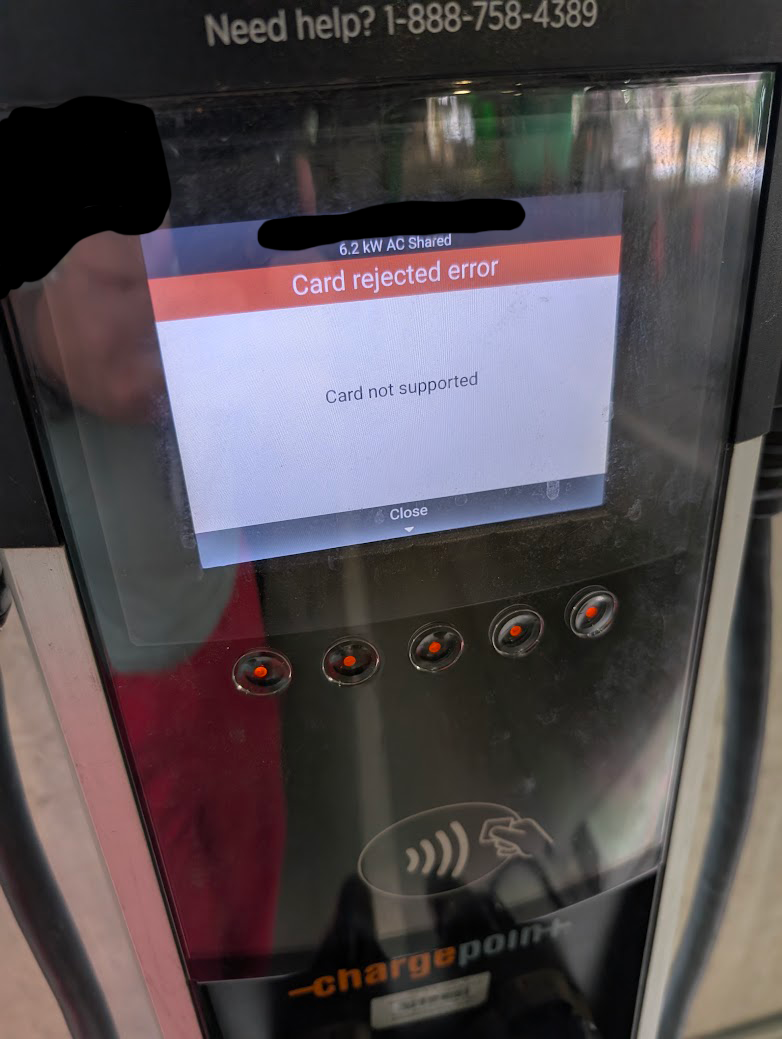
      When I tap my phone (Pixel 9 Pro), it seems to act like I'm tapping a credit card, I get an error screen:

      Card rejected error
      Card not supported
      

      The only things I can find online are in response to iOS people who apparently have to add a virtual ChargePoint card to their wallet, but from what I've read, this isn't necessary on Android since the ChargePoint app can interface directly with the phone's NFC capabilities.

      I'd appreciate any tips on where I may be going wrong.

      12 votes
    6. Boost for Tildes

      This is an unofficial Boost for Lemmy port. With the Any significant changes to Tildes are extremely unlikely topic (and the Tildes successor one) from the other day about how this site was now in...

      This is an unofficial Boost for Lemmy port.

      With the Any significant changes to Tildes are extremely unlikely topic (and the Tildes successor one) from the other day about how this site was now in minimum maintenance mode, that gave me the motivation to finally look into porting Boost to work with Tildes. Knowing that the site won't change felt like a good time to "make" an app for it. For the longest time, the two mobile apps that I used for browsing Reddit were Reddit is Fun (which Tildes already has with Three Cheers thanks to @talklittle) and Boost. I've been using Three Cheers from the day that it came out. The original Boost creator (Rubén Mayayo) went to Lemmy instead of here and he created and maintains Boost for Lemmy. While Tildes isn't federated, it still has most of the features that Lemmy has, and it's also similar enough to Reddit. In the past few months, a project called Morphe has spawned to patch Android apps. A user on GitHub called Breal, has been maintaining Boost for Reddit by providing patches compatible with Morphe. He himself built his patches off the work from wchill though he's been mia for a few weeks. He's been fixing issues and backporting the new features that were implemented in the Lemmy app. That gave me the idea that something could be done for Tildes.

      Anyway, I got a Claude subscription for the summer and I'm trying to test its limits. I've been a programmer for 16 years and it has been blowing my mind. The more I work with LLMs the more they feel like masochists (the techniques that they use to solve various problems are truly wild). Some projects that should usually take months or years can be done in only a few days through sheer brute forcing. I got a proof of concept done the other day to see if I could connect Boost for Lemmy to Tildes. It worked within only a few hours which was promising. It turns out that implementing this well though was a lot harder than I expected. It took some really heavy modding to keep it seamless. I really wanted it to feel like native Boost while still following Tildes' way of doing stuff. After a lot of trial and errors, here it is. I was able to maintain compatibility so that it can live alongside Lemmy. Boost's account switcher lets your easily switch between Lemmy and Tildes.

      To install it:

      1. Download the Morphe Manager to your phone.
      2. Add my repo as a source URL in Morphe:
        github.com/Apostolique/apos-morphe-patches
        
      3. Select Boost and follow the instructions to patch.
      4. Install the patched Boost for Lemmy.
      5. In Boost for Lemmy, select tildes.net as your instance and connect to your account.

      Here's to multiple more years of talking with you guys on Tildes.

      Report any bugs that you find, or issues with my instructions.

      Edit: Some screenshots (low battery because this took a lot of testing to get right):

      36 votes
    7. Looking for an effective self-block application for Android

      My phone is a Samsung A55. Fully updated. I have ADHD and autism, which is to say that I have a very obsessive personality. I have used various blockers over the years to prevent me from wasting...

      My phone is a Samsung A55. Fully updated.

      I have ADHD and autism, which is to say that I have a very obsessive personality. I have used various blockers over the years to prevent me from wasting time on apps and websites.

      Lock me Out has helped me for many years to curb my smartphone usage. Unfortunately, it stopped working, as it became easy to circumvent by either forcing the program to stop or uninstalling it. I have been in contact with the developer, but they weren't able to find a solution and eventually stopped responding to my emails.

      So I need an app that prevents me from disabling blocks at all.

      While I can pay for an app even if it is a little expensive, I cannot justify an expensive subscription priced in US dollars (although I might do so if there's no other alternative).

      Any suggestions that could help me out? I'm using my phone 24/7, I can't stand it anymore. And I cannot simply turn it off because I have a toddler, and I must be accessible to my wife for emergencies when she leaves the home with him.

      There are also many ways to use a smartphone that are actually useful, positive, and non-addictive. And I'd rather be able to access these functionalities.

      Thanks!

      17 votes
    8. Curious about Android forks (/e/ OS, LineageOS, etc) for old Samsung tablet

      I have a Samsung Galaxy Tab S6 Lite (2022) which has reached end of life and no longer receives updates. I was wondering if it was possible to revive it using one of these alternate Android...

      I have a Samsung Galaxy Tab S6 Lite (2022) which has reached end of life and no longer receives updates. I was wondering if it was possible to revive it using one of these alternate Android versions, but I was very frustrated to see that LineageOS (the one I've seen mentioned the most besides Graphene) supports both the 2020 and the 2024 model of this tablet, but not mine.

      I wanted to hear from fellow Tildes users if installing one of these OSes would be worth it to get continued security updates for an old tablet like this, which OSes are out there (I've only heard the names of a few of them), which ones to avoid (maybe it's abandoned or there's some drama around a particular OS for whatever reason), and if anyone knows of one that specifically supports my model.

      I'm also curious if S-Pen stylus support would work on any of these other OSes.

      9 votes
    9. Three Cheers for Tildes: App updates and feedback (July 2026) — Version 1.7 detects expired login sessions

      This topic is for the Three Cheers for Tildes mobile app. I'll summarize the major updates at the start of each similar topic, so people can read the updates and then hit Ignore if they don't care...

      This topic is for the Three Cheers for Tildes mobile app.

      I'll summarize the major updates at the start of each similar topic, so people can read the updates and then hit Ignore if they don't care about more frequent updates and user feedback.


      What's new:

      [Android] Version 1.7.1 (Aug 10, 2026): Improved HTML parsing speed. Reduced installation size. Fixed rare crashes.

      [iOS] Version 1.7.1 (Jul 31, 2026): Added light/dark theme setting. Improved HTML parsing speed.


      Version 1.7.0 (Jul 27, 2026):

      • Detect expired sessions and prompt to re-login
      • [iOS] Combined external browser settings for clarity

      On iOS, currently TestFlight only for the next week or so.


      Version 1.7 fixes a long-standing problem in the app: the interface pretty much completely broke when login sessions expired (after a year), with no obvious way to fix it from the user's perspective. Now the app will detect expired sessions and show a prompt to re-login.

      I promoted this from quiet bugfix to a more prominent release, because it was pretty terrible user experience, and anyone using the app for more than a year has run into it.

      I had to test thoroughly on Android and iOS, since I don't want to ever break users' legitimate login sessions. I also had to change approaches partway: originally I wanted the app to automatically re-login, but that doesn't work for 2FA-enabled users. Also there were too many error-prone edge cases when trying automatic re-login, whereas a user-visible re-login prompt avoids most of those silent error cases.


      Previously:

      [Android] Version 1.6.8 (Jul 15, 2026): Fixed crash when searching for topics on Android 12 and earlier.

      [Android] Version 1.6.7 (Jul 9, 2026): Fixed comment interactions after double-tap to vote.

      [Android] Version 1.6.4 (Jun 18, 2026): Indicate when replying to a deleted comment, fixed minor UI bugs in topics feed, fixed networking bugs, fixed rare crashes, support Android 17

      [Android] Version 1.6.3 (May 20, 2026): Added "Find in comments" to "..." menu. Fixed first search position in comments. Fixed tapping links in collapsed details summary. Fixed stale vote rendering.

      [iOS] Version 1.6.3 (Jun 27, 2026): Indicate when replying to a deleted comment.

      [iOS] Version 1.6.2 (Jun 14, 2026): Fixed comment scroll bugs, fixed networking bugs

      [iOS] Version 1.6.1 (May 21, 2026): Improves on the Find in Comments feature. Fixes some UI bugs related to the Find Comment bar, and with potentially stale votes showing in the UI. Also adds the iPad pane toggle on iPadOS 18 and earlier, to bring the behavior closer to iPadOS 26, and fixes some iPad animation bugs.


      Previous topic: May 2026


      Where to get it

      Android version on Google Play Store: https://play.google.com/store/apps/details?id=com.talklittle.android.tildes

      Or sideloadable APK at https://www.talklittle.com/three-cheers/

      iOS version on the App Store: https://apps.apple.com/app/three-cheers-for-tildes/id6470950557

      Join TestFlight for iOS beta testing: https://testflight.apple.com/join/mpVk1qIy

      47 votes
    10. How long can I go with an obsolete phone?

      Right now, I have a Samsung Galaxy A12 phone, which has done everything I need for quite some time. It was bottom of the barrel in the Samsung lineup, and it quit receiving updates of any kind...

      Right now, I have a Samsung Galaxy A12 phone, which has done everything I need for quite some time. It was bottom of the barrel in the Samsung lineup, and it quit receiving updates of any kind back in November of 2024. For a cheap phone, I've been pleased with it.

      My use case is unusual. I rarely use my phone to go online, but on occasion, I am forced to do so. Most of the time I use it to make calls, or send and receive texts. SMS is fine for me. I don't play games on it, though I do use the camera now and again.

      One slightly unusual task is tethering. When my internet goes down on my computers at home, the mobile network is often still available, so I tether my desktop to the phone connection. Visible will slow the connection speed tremendously, so I use an app that disguises the tether connection, and I get full speeds. So I need this app to work when the main internet connection goes wonky.

      One year and eight months without security updates makes me a little more cautious about using the phone for anything online. I don't use it for bank accounts or credit cards, no instant payments of any kind, and there are no passwords saved within it. Even if I still got updates, I wouldn't use it for any type of financial transactions. I don't even check email with it.

      In reality, a dumb phone would probably work for me, but Visible is notoriously picky about Android phones they will accept. And I don't use Apple for anything. No plans to change that.

      I have been more and more interested in ditching Google software. I was recently forced to switch to Google Messages, since Samsung is turning their messaging app out to pasture. A Pixel 10a with GrapheneOS is something I'm considering. Visible will accept any modern Pixel phone, so they aren't a problem.

      The question is, is any change necessary with how little I use the phone online? Perhaps I should just wait till the battery dies, but that doesn't help me in my efforts to de-Googlize.

      35 votes
    11. Three Cheers for Tildes: App updates and feedback (May 2026) — Version 1.6 adds "Find in comments"

      This topic is for the Three Cheers for Tildes mobile app. I'll summarize the major updates at the start of each similar topic, so people can read the updates and then hit Ignore if they don't care...

      This topic is for the Three Cheers for Tildes mobile app.

      I'll summarize the major updates at the start of each similar topic, so people can read the updates and then hit Ignore if they don't care about more frequent updates and user feedback.


      Recently:

      [Android] Version 1.6.8 (Jul 15, 2026): Fixed crash when searching for topics on Android 12 and earlier.

      [Android] Version 1.6.7 (Jul 9, 2026): Fixed comment interactions after double-tap to vote.

      [iOS] Version 1.6.3 (Jun 27, 2026): Indicate when replying to a deleted comment.

      [Android] Version 1.6.4 (Jun 18, 2026): Indicate when replying to a deleted comment, fixed minor UI bugs in topics feed, fixed networking bugs, fixed rare crashes, support Android 17

      [iOS] Version 1.6.2 (Jun 14, 2026): Fixed comment scroll bugs, fixed networking bugs

      [iOS] Version 1.6.1 (May 21, 2026): Improves on the Find in Comments feature. Fixes some UI bugs related to the Find Comment bar, and with potentially stale votes showing in the UI. Also adds the iPad pane toggle on iPadOS 18 and earlier, to bring the behavior closer to iPadOS 26, and fixes some iPad animation bugs.

      [Android] Version 1.6.3 (May 20, 2026): Added "Find in comments" to "..." menu. Fixed first search position in comments. Fixed tapping links in collapsed details summary. Fixed stale vote rendering.


      Version 1.6.0 (May 13, 2026):

      • Added Find in comments
      • Improved markdown tables rendering performance
      • [Android] Fixed drafts not loading in some cases
      • [iOS] Fixed keyboard bugs on iOS 26
      • [iOS] Fixed iOS 12 support

      On iOS, currently TestFlight only for the next week or so.


      Following version 1.5's addition of searching for posts, Three Cheers 1.6 adds a bar to find text in comments. It changes the comment bar a bit which took some work, and it was pretty tricky handling the edge cases with highlighting the matched text. Might have some leftover bugs, or configurations I forgot to consider, so please report those here.

      There was an Android bug with drafts not loading in some cases, reported last time. Should be fixed now.

      Also I'm happy to report that I was able to fix some long-standing iOS bugs, some keyboard bugs specific to iOS 26 that have been reported on TestFlight intermittently for quite a while, and an iPad rare crash that likely went even further back. So this version should be pretty stable on iOS.


      Previous topic: March 2026


      Where to get it

      Android version on Google Play Store: https://play.google.com/store/apps/details?id=com.talklittle.android.tildes

      Or sideloadable APK at https://www.talklittle.com/three-cheers/

      iOS version on the App Store: https://apps.apple.com/app/three-cheers-for-tildes/id6470950557

      Join TestFlight for iOS beta testing: https://testflight.apple.com/join/mpVk1qIy

      76 votes
    12. Thoughts on graphene OS?

      I got a pixel 9a recently and am debating whether to install graphene OS on it. My main motivations are wanting to avoid AI bloat, potentially improve battery, and reduce tracking. Though, I'd...

      I got a pixel 9a recently and am debating whether to install graphene OS on it. My main motivations are wanting to avoid AI bloat, potentially improve battery, and reduce tracking. Though, I'd rather not have to spend time continuously troubleshoot my phone for stuff that doesn't work properly. Also, graphene OS is considered quite secure, but is there a plausible risk I need to worry about of the project losing support and eventually becoming less secure than stock Android? If any of you run graphene OS, what are your long-term experiences with it?

      47 votes
    13. Cross platform mobile setup help

      Hey everyone, I’m looking to add some freedom to my mobile device setup and could use some advice from anyone who might be familiar with what I am trying to do. I am currently using an iPhone, but...

      Hey everyone,

      I’m looking to add some freedom to my mobile device setup and could use some advice from anyone who might be familiar with what I am trying to do.

      I am currently using an iPhone, but I generally prefer using android devices. In the past I have regularly switched back and forth between the platforms but it’s a pain to do and (being based in the U.S.) the turning on and off of iMessage tends to confuse the people I communicate with (and confuse their phones on occasion when it fails to acknowledge my number is no longer registered with iMessage). I also just got a Pebble Time 2 and want to use it with android to get the full experience.

      Normally I would just make the switch, but I’m hoping I can decouple my setup a bit and get the “best of both worlds.” Due to a recent BOGO deal at T-Mobile, I have an unused line in my family plan that is free. What I would like to do is keep my main phone number tied to the iPhone I have but have it act as a relay for iMessages, calls, and RCS/SMS/MMS messages to my android device that I would carry with me.

      Not only would this make switching devices easier in the future, it would allow me to seamlessly go back and forth between iOS and android with almost no disruption whenever I want to.

      Here is a simplified list of requirements/questions I need to solve for this setup:

      1. How to make and receive calls from my primary phone number on the secondary line (I assume I can setup some kind of call forwarding but that would only cover the receiving of calls)

      2. How to send and receive iMessages from my primary phone number on the secondary line

      3. How to send and receive RCS/SMS/MMS messages from my primary phone number on the secondary line

      Would love to hear this community’s thoughts and advice!

      5 votes
    14. Three Cheers for Tildes: App updates and feedback (March 2026) — Version 1.5 can search for posts

      This topic is for the Three Cheers for Tildes mobile app. I'll summarize the major updates at the start of each similar topic, so people can read the updates and then hit Ignore if they don't care...

      This topic is for the Three Cheers for Tildes mobile app.

      I'll summarize the major updates at the start of each similar topic, so people can read the updates and then hit Ignore if they don't care about more frequent updates and user feedback.


      Recently:

      [Android] Version 1.5.2 (Apr 8, 2026): Fixed username display bugs in inbox, fixed "Tildes" user display bug in topic OP such as in the April Fools megathread

      [iOS] Version 1.5.1 (Apr 8, 2026): Fixed pagination in main feed, fixed "Tildes" user display bug in topic OP

      Version 1.5.0 (Mar 21, 2026):

      • Search for posts
      • [Android] Fixed touch ripple on inbox conversation rows
      • [Android] Fixed support for high-RAM devices
      • [Android] (1.5.1) Fixed comment reply sheet on Android 11-14
      • [iOS] Fixed blur on Sort button on iOS 26
      • [iOS] Fixed ugly shadow between panes on iPadOS 26
      • [iOS] Fixed overly large vote label on own comments

      Edit: Currently on TestFlight only on iOS for the next week or so.


      [iOS] Version 1.4.5 (Jan 2026): Fixed UI bugs on iOS 26

      [Android] Version 1.4.5 (Apr 2025): Fixed YouTube bugs, voting bugs on Android 11 and earlier


      Search has been near the top of my to-do list for a long time, so it feels good to finally release this feature.

      I did some custom UI this time and I'm pretty happy with how it came out. Despite its basic appearance, it required a decent amount of detailed UI programming on both Android and iOS, to avoid breaking the adjacent Sort feature. I also had to redo the search results screen a few times, due to navigation quirks on each platform.

      There are a couple related features that didn't make it this time: Searching for posts and comments within your own profile is not possible yet. Also "find in page" for comment text is not here yet either. These are both pretty high priority to me, and as usual it's a matter of making time and finding motivation to work on it.

      Also on Android, expect a hotfix v1.5.1 coming out soon, to fix the comment reply sheet on Android 11-14. Big thanks to the user who reported this bug! The hotfix is already available to sideload, and under review on Google Play, as of this writing.


      Previous topic: April 2025


      Where to get it

      Android version on Google Play Store: https://play.google.com/store/apps/details?id=com.talklittle.android.tildes

      Or sideloadable APK at https://www.talklittle.com/three-cheers/

      iOS version on the App Store: https://apps.apple.com/app/three-cheers-for-tildes/id6470950557

      Join TestFlight for iOS beta testing: https://testflight.apple.com/join/mpVk1qIy

      85 votes
    15. Are there any small Android phones comparable to the size of an iPhone 12 mini?

      Beyond the Motorola Razr flip phones, I can't seem to find many small phone options. Are they out there anywhere? ***correction! I meant to say the iPhone 12 mini! There is an important...

      Beyond the Motorola Razr flip phones, I can't seem to find many small phone options. Are they out there anywhere?

      ***correction! I meant to say the iPhone 12 mini! There is an important distinction there and sorry to all who answered before this correction.

      20 votes
    16. What do you think about putting your driver's license in your digital wallet?

      I forgot my driver's license today but had my phone with me. I remembered seeing stories that google and apple both allow these (for some states) in the digital wallet. Before doing this, I...

      I forgot my driver's license today but had my phone with me. I remembered seeing stories that google and apple both allow these (for some states) in the digital wallet.

      Before doing this, I thought I would ask people here to weigh in on whether it is a good idea. Is it considered secure? Is it going to cause me more privacy issues than a physical card in my wallet?

      This is also related to recent discussions about online age verification.

      This is a related Tildes post from last year: Google Wallet adds age verification and more government ID support

      20 votes
    17. A rant about how devices handle users with language backgrounds other than English

      How is it possible that in the year of our Lord 2026 my devices STILL use my physical location to determine everything? As I'm writing this, I'm still reeling from the emotional rage I experienced...

      How is it possible that in the year of our Lord 2026 my devices STILL use my physical location to determine everything?

      As I'm writing this, I'm still reeling from the emotional rage I experienced during the past days. A little context: I got a fitness band (smart band? health watch? smart watch?) as a Christmas gift from a family member. It's a Huawei fitness band that was quite cheap, and I was going to connect it to my (Samsung) android phone. It's the end of February now, and what put me off from configuring it for this long was the fact that I was quite concerned with the privacy side of things; How can I know that my health data isn't indexed by some foreign corporation, sold, and subsequently used against me by my insurance company in 20 years? (further context: I live in Finland)

      After doing some research I decided to at least try it out to see how the band works, and only then decide whether I want to keep using it or not. I connect it to my phone, begrudgingly set up yet another account for a service I will use only for a single purpose, sign over my soul and am finally able to establish a connection between the phone and the band. The band asks me to choose the language, and I choose English. I have all of my devices in English even though it's not my native language, mainly for two reasons:

      1. the translations I've found to be quite clumsy/unintelligible at times, even (read: especially) on Windows
      2. 99.9% of all tutorials, guides and manuals exist in English, therefore it's easier to troubleshoot/fix problems if I don't have to translate stuff all of the time

      After choosing the language and finally getting the damn vampire to work, I notice it's displaying the weather in Fahrenheit. This is odd, because my phone as well as the health app on it are both configured to display units in Celsius, and no matter what I do, I can't get it to change. This shouldn't be a big problem because I don't care what weather/temperature it displays; I already get that information elsewhere.

      Now, I'm definitely not an expert on electronic devices or computers in any capacity, but I do dual-boot Linux and Windows on my PC with my main usage being on Linux Mint, and I've also tinkered with some Raspberry Pi and for example Lua coding during the past years, just because learning is fun. Really, the only reason I use Windows at all anymore is because I never got my favorite game, Horizon: Zero Dawn, to work on my Linux distro. I've chosen English (and only English; there is no secondary language) both as the Windows language as well as for Steam, Firefox etc.

      Nevertheless, every time I start up Windows, approximately a third of all notifications, error messages and buttons are in my country's most spoken language. Why? Because I'm located in my country. The same is true for my browser, about half of all software and so on. The system detects that I'm located in Finland (or perhaps that the OS was obtained here), and therefore it desperately tries to adjust to that fact, among other things by assuming what language I really speak. Some things in Windows just seem to adjust automatically depending on where it detects I am, and for many problems the only solution seems to be to change my time zone, the unacceptability of which should go without saying.

      I understand Windows has been going downhill for quite a while, pushing content and services that the end user didn't ask for and doesn't want/need while removing functionality to bar the user from tinkering with their product too much. That being said, I can't for the life of me understand in what world this particular decision benefits anybody. Why not make separate settings for the time zone, the display language and the displayed units and then respect those settings? It's annoying for the user and it doesn't make anything on my device easier to do, and every time I want to configure Windows, my Android phone or for example my smart band, I feel like a child that gets babied by all the adults and never taken seriously. The child's name? Not Albert Einstein, at least as far as Microsoft is concerned, because of course I am a stupid and lazy average person who speaks the majority language in my country, who wants to do the same things everyone else does, and who understands the error message in English perfectly until the word "OK", which needs to be translated to my country's majority language for some reason.

      Back to the smart band problem: After scrounging the internet for a while, I noticed quite a few Europeans have had the same issue with not being able to change the displayed units on their smart band. The solution?

      Change the language to UK English.

      Now, I understand that this problem had a relatively easy "solution", and in any other scenario I would have jumped to solve the problem and get on with using the device, but this was simply the straw that broke the camel's back. When configuring a device, the user cannot be required to play 5D-chess against the manufacturer's cultural ignorance in order to get basic things to work. In trying to make their product as foolproof as possible, they've made all the end users fools in the process. And this goes for computers, phones, smart bands, smart TVs, gaming consoles and even toasters that nowadays all require AI+remote control completely set up in order to function. Why not let the user first decide what they want, let the user ignore the settings they don't know about, and then have this state-of-the-art technology adjust to that?

      I have no interest in wearing this kind of "smart" device on me because it makes me feel stupid.

      42 votes