AMD releases new Ryzen 5 5500F and Ryzen 5 7500, budget Zen 3 and Zen 4 CPUs
13
votes
This weekend, I've fulfilled a long dream of mine and upgraded my computer to a fully custom waterloop. This is, for a number of a reasons, a complicated process, and outside of general advice, it's difficult to provide an exact guide on how to do this. Custom waterloops are, well, custom. They depend mostly on what computer case you use, and what sort of reservoir and such you've bought. As such, my advice can also only be general.
Check online for custom watercooling builds in your case. Use those as a guide for radiator and reservoir placement. Sketch ideas out on paper. Measure out the places inside of your case where you intend to place components. Check the your pc case manual, those very often contain info on where you can place radiators and reservoirs.
Some cases are ill-suited for custom waterloops. Consider buying a new case rather than building in an old, ill-suited one. It will save you a lot of pain.
Some cases require modifications. I had to cut into mine with a metal saw to make space for a radiator. Minimal material was removed from the frame, invisible after the case is put back together. I also had to drill into it to place the reservoir. The holes case manufacturers place for reservoirs are best-effort guesses. Unlike for fans, and thus radiators, there are no standards for reservoirs.
Expect a marathon, not a sprint. There will be setbacks. My process, setbacks and all, took me 3 days. And I still fucked up assembling my GPU. The die has bad contact and I'll have to drain the loop, pull it out, disassemble it and put it back together again. A lot of this was also spent waiting for next-day deliveries to show up because I'm dumb and was missing things.
There are no performance benefits to hardline tubes, and they are a bitch to measure, bend and cut precisely. That 95° angle that was meant to be a 90° is going to be evident immediately, and forever. Soft tubes are forgiving, easy to put into the system and much more time efficient. They also do not require extra equipment dedicated solely to bending hardline tubes. Think about where your build is going to sit. On the floor? Who gives a shit how it looks?
Edit: if you opt for soft tubes, don't get them made from PVC. They very often leak plasticizers into the loop that gunk up your components and reduce performance. You'll need to swap them after some time and they also tend to harden. To minimize maintenance, go for EPDM tubing. It's black instead of transparent, but it's better in the long term.
Custom waterloops are all about you, and if you insist, then you do you. Hardline tubes are the endboss of all pc builds. Be ready for a challenge. Conversely, some folks really want transparent soft tubes. Just know what you're getting into.
The standard soft tube is 13 mm outer diameter and 10 mm inner diameter, or 13/10. There's a ton of other sizes as well but remember even if the inner diameter is larger, liquid flow improvemets are going to be marginal. Different sizes also need different fittings.
Soft tubing is a breeze to put into your system, but don't make those corners too tight or it'll crink and cut off flow. Check this especially when you close up the panels of your pc case. Tubing is cheap, comparatively. Don't be afraid to use more than you need.
Custom water loops are pricey. Full copper radiators start at 100€, water blocks are usually hundreds as well, with the tubing, fittings and all it's normal for cooling equipment alone to account for a grand. You're bolting an aftermarket cooling system onto your PC that will turn it into a racecar. A lot of that is finely machined copper. It costs.
Ya know how I said that I needed to order some extra things last-minute? Thank fuck for Amazon and their fast deliveries. If you live in a larger city, there's also a good chance a specialist computer store somewhere might have what you need.
Those are small air pumps with a pressure gauge. You close of all ports and then pump air into the system, 0.5 bar maximum (!!!), and wait 60 minutes. If the pressure is maintained, congratulations, your system is air- and thus watertight.
Test your individual components before you put them into your case! This way, you know that the components themselves are tight, and you avoid having to pull out a radiator after screwing it in place because you forgot to tighten that one end cap you can now no longer reach. Ask me how I know.
Also test our loop when it's fully assembled. Should you have a leak, divide your loop into two halves and leak test those. Repeat (divide into halves and test) until you have located the leak. If you have tested your comps individually before, it's going to be a radiator fitting you forgot to tighten or your reservoir top 99% of the time. Have a book or a podcast ready because this is a long process with lots of downtime.
These nifty little things are incredibly cheap and useful. After you wire everything up, you want to fill your reservoir and turn on the pump, but obviously you do not want to immediately electrify your entire system. So you pull the 24-pin motherboard cable of your motherboard and put the plug into it. It bridges specific pins, tricking your power supply into thinking a motherboard is connected. This way your pump turns on without the rest of your system. Once the water is circulating and not catastrophes have occured, you can turn off your power supply and plug the mobo back in.
This is advice that's often repeated in watercooling circles for beginners. If you're seriously considering doing this, you will likely already have stumbled upon these. I'm adding these just for posterity.
Cheaper watercooling components are often out of aluminium while pricier ones are out of copper. You do not want both in your system as they eat each other through galvanic corrosion. If your cooling blocks for the GPU and CPU use copper (they very often do), the rest needs to be out of copper or brass as well, fittings included!
Remember, per tube you'll need at least two! Check that they have O-rings, as those provide the seal.
You should generally drain and flush the loop at least once a year. This will be a lot easier if on low points you have faucet you can attach a tube to and open to drain it. Pulling the loop back apart is generally the last thing people think off when building a custom loop for the first time, so it's useful to know.
Quick disconnects are special fittings you can put into a tube or attach directly to a port. You can then pull them apart with minimal or no leakage of your cooling fluid without having to drain your loop. Really useful for example the GPU, which tends to be the component that's swapped out most often.
Obviously no fucking tap water, ever! But lots of folks also gravitate to distilled water. Cooling fluids like what Alphacool or Aquacomputer make have extra stuff in them, like corrosion inhibitors and biocides that prevent algae build up. You can also mix these yourself if you can get the inhibitors and biocides concentrated but if you're on that level I don't think you need this guide anymore.
Also, colored liquid fucking sucks. Unless you want to pull apart your water blocks and clean them with a toothbrush, use clear liquids. If you want fun colors, put RGB into your case.
The two components generating the most heat in your PC are likely the CPU and GPU. Check the specs of those to see how much heat they generate. This number is generally known as the Thermal Design Point (TDP). Radiators come in many sizes fitted to fan sizes, mostly in multiples of 120 or 140 mm, but running this calculation gives you a baseline for how much radiators you need. More is always better! Fit in as many radiators as you can into your case, but if your case can't fit the number of this calculation then you need to look for a bigger case.
Knowing the TDP is rarer for GPUs, you can also use board power or power draw as a substitute. We're doing napkin math here, no need to be precise.
Example:
CPU: 170 W
GPU: 300 W
-> round up to 500 W, which means 5 * 120 = 600. A 360 mm radiator fits 3 120 mm fans. You'd need 2 radiators with 3 fans each to cool your system adequately.
Alternatively, a 280 mm radiator fits 2 140 mm fans. You'd need 3 of those to cool the system.
Radiators come in different thicknesses. Since what dictates a radiator's ability to dissipate heat is the total surface of it's fins, increasing the thickness improves cooling ability. However, most PC cases, even full towers, are practically limited to 45 cm rad height at most.
A big motivation for doing this was noise. Cooling everything with a custom loop means that I've lost the 2 fans on my CPU air cooler and the 3 fans on my GPU. What remains are the case fans only, 2x180 mm ones and 3x140 mm. Those can now run at dramatically lower speeds (10% fan speed at idle, ramping up much more slowly) for a nearly silent build even under full load. The pump and reservoir combo I've chosen are isolated from the pc case through rubber standoffs which means that the pump, even when at 100%, runs dead-silent.
Switching to a custom loop alone is a massive bonus to the computer's ability to be cooled, because water is a much more efficient way to move heat than air. Case radiators also have much more volume than the heat sinks on your GPU and CPU right now, improving the cooling further.
Once you step into this world, the choices open to you are staggering. Delidding the CPU. Using liquid metal instead of thermal paste, etc. etc. Unless you're planning on overclocking your system, there's no point to doing any of those things that are actively dangerous.
Liquid metal buys you a couple of degrees °C at best, at the cost of being dangerous and difficult to apply and even a tiny escaped drop having the ability to short and fry your GPU for good.
Delidding your CPU is only useful if you plan to overclock. I did it, but only because the company Thermal Grizzly sells delidded CPUs and a fitting water cooling block. If you're doing it at home, the investment is way too large to make sense. Delidding also requires liquid metal afterwards. See paragraph above for that.
If you're in this just because you want a high performing system at less noise, then using a PTM material instead of thermal paste is going to be good enough.
All of these improvements lower temperatures of your components. Delidding the CPU and cooling it directly buys you something like 20°C under load. But the thing is, a good water cooling loop can absolutely cope with a high performance CPU running at 100 per cent. With the IHS on it'll just push 80°C instead of 60°C.
Functionally, there's no difference if the CPU runs at 60°C or 80°C. The only time it matters if if you're over clocking and through that causing the CPU to approach its thermal limit. Then dropping it by a few degrees makes sense.
If not? Skip them.
I hope these help people. Feel free to ask any questions!
Edits in no particular order:
PC custom water cooling loops are not car engines, and as such the thermal differences between coolant and components is much smaller. This means that having a radiator follow a component to immediately cool the water down is much less effective than just adding more rad volume. It also tends to make your tube runs messier and is overall not worth it.
I caught wind of the BC-250 after the Linux on PS5 post where @moocow1452 posted about them and shared a link. The BC-250 is an APU cut down from PS5s that didn't pass Sony QC, they were originally slated for waste but largely got picked up by crypto miners. I hadn't got myself anything for my birthday or promotion, so when I found a deal, I grabbed it for the HTPC I'd wanted but couldn't justify. (Long post, tl;dr at end)
Specs:
6-core AMD Zen 2, stock clock 3.5GHz
AMD custom GPU, stock clock 1.5GHz*
16GB unified GDDR6 RAM+VRAM
M.2 2280 slot
*Stock lock is weird and limited, will discuss
I'm not sure exactly when they got proper Linux support or folks started using them for gaming but I'm definitely behind the curve. You used to be able to get them <$100 but now they seem to be going for $180. I found a "pre build" for $275 shipped that had it ready to go, including a case, cooling, PSU, 256GB SSD, and unlocked BIOS... this isn't too far from what I would've totalled had I gotten the board for ~$80, and saved me some headaches. While the seller pre installed Bazzite, no way was I trusting the OS installed by a random eBay seller.
So what's it take to make one of these usable, what trouble did the seller save me? Let's start with the BIOS -- this needs to be unlocked by flashing though I'm not totally sure if it's required to use it at all but at the very least it unlocks the dynamic 512mb VRAM. 16GB total is kinda limiting today and the default split is 8/8 RAM/VRAM -- a static split isn't exactly ideal -- depending on your game, you could easily be maxing out one with unused of the other. The dynamic 512 reserves only 512mb for the GPU alone and allows the rest to be properly split as needed (mostly, there's still technically a VRAM cap that can be raised with kernel parameters).
OK next saved headache was the cooling. See, these were built as server units with fans set to blow air through them. The heat sink fins are closed off on the top. One can print a sleeve to have a standard fan push air through, but opening the fins up and letting the fan push air through from the middle is more effective, more like your typical consumer GPU. Seller did a messy job, but it is opened in the middle. Some folks use 2 fans and fully open the fins for a cooler/quieter build.
The final headache was minor but they saved me from sorting out the PSU and power button. Since the board is powered just by 8 pin PCIE, for this PSU, two pins on another header need to be shorted to stay powered on, seller already had this in place. Seller also soldered power and reset buttons to the board.
So with the hardware sorted, what does the software end look like? While it can technically run Windows, but it does not and will not have GPU drivers -- though folks have added external GPUs. The main 2 OS options folks recommend are Bazzite and CachyOS. Folks say Cachy is better but benchmarks I saw weren't that compelling, I already use Bazzite and it seemed to have less extra steps so I went with that, standard installation process went smooth and it was basically ready to go from there... So why am I futzing around so much?
Well, the dynamic VRAM can collide with the default ZRAM swap, causing crashes and other errors. So I went through disabling that, enabling ZSWAP, then tweaking config and kernel parameters according to community info. So part of my futzing was comparing speed and stability with the various RAM settings and swaps.
So the next futzing was the GPU clock. The stock is locked at 1.5GHz over 920mV always no matter if load is high or low, but PS5 runs em around 2.3GHz and higher volts. There's a community governor that can decrease volts/clocks under light load and unlock the stock. Folks easily get 2.0GHz at 1000mV but some push 2200+ at 1150. So testing with that was more futzing around, playing in Expedition 33 for half an hour to see if settings were stable. I found the defaults to be fairly aggressive, causing artifacts and crashing. I disabled all their default points over 920mV, set one at 2.0/1000, and called it a day. Didn't feel like trying to squeeze out another 100MHz. Also boosted the bottom 700mV point up by 20 since I saw some graphical artifacts at low loads and that cleaned those up. (<700 locks it right back to stock parameters so that's the effective minimum)
Next up is the CPU, stock has it at 3.5GHz at 1180mV. Folks have been able to get the same clock down to 1000mV, some mad lads pushing 4.1GHz and like 1.3V. There's another community tool for helping with this where you punch in a target clock, voltage, and temp, then it tests it out. I haven't settled this one out, I may go for a bit of an under volt to help keep it quieter/cooler since it's an HTPC, or may just leave it at stock. Folks also recommend disabling mitigations for Spectre/Meltdown as it significantly slows the CPU and you're fairly unlikely to need it for a DIY Steam Machine.
So I was stumbling through this following the community wiki, it had some good and useful info, but it didn't seem entirely consistent and sometimes was just wrong. Turns out, it's an AI compilation of community info. I'd have saved myself a ton of trouble if I'd found this repo and followed their instructions as that's what I eventually found worked best.
Expedition 33 was my main real world benchmark tool. With FSR+LSFG on medium, I was hitting 1440p@90fps, 1080p@45fps without. The site compares it to a 3060, I thought that was mine until I double checked and have a 3070. It does E33 with DLSS+LSFG at 1440p@120fps cap on medium, or 1080p@60-70fps without either. So while the .info site seems to accurately describe the GPU as similar to a 3060, their benchmarks seem to include scaling and/or frame gen based on my limited testing. However, E33 still looked bad and off compared to my Nvidia at the same settings. After a day of fiddling, I looked it up and turns out, E33 specifically looks worse on AMD.
As for HTPC apps, Jellyfin flatpak works great. Official Plex apps are deprecated, both flatpak and snap, they run terribly. Girens (unofficial Plex client flatpak) seems to work well, but requires a mouse and sub menus don't work in big picture. I plan on using a PS4 controller (touchpad works as trackpad) for the time being so this isn't too big a deal, but it's definitely less polished than the Plex smart TV app. VLC with the network drive mapped so we can play direct from file as back-up. And finally VacuumTube for YT smart TV interface with ad blocking. Hardware encoding/decoding does not work and will not so it's all done by the CPU, but it was enough for my high bitrate 4k HEVC decoding test.
It doesn't have proper sleep states. Can't wake from USB/LAN, power button only, and doesn't actually sleep CPU/GPU so it doesn't really save power in sleep. Shutdown/cold boot is inconvenient for a daily use HTPC. Estimated 60W at idle, about $6 a month left on 24/7 for us, perhaps an extra $50/yr compared to a box with proper sleep. However, most it can pull under load is 235W, less than a typical gaming PC. Not enough to realistically break even versus a gaming PC with proper sleep though, so it's probably an expense worth considering in comparison shopping for a similar usage.
Final Verdict: do I recommend it? Honestly, if you're getting bare board for $180, maybe not, but also depends on who I'm recommending to. I seen someone on the discord selling them for $150, others may be selling too, perhaps prebuilts even. Between case, fan, PSU, and SSD you're ending up closer to $400 for a running build -- and that's before wifi/Bluetooth/controller if you don't have extras of those already. At that rate, you may be better off getting a mini PC + eGPU dock + older graphics card, but I'd need to shop around to see how their price:performance ratio compares. On top of that, you'll likely need to do the trouble the seller saved me. Getting the software going is fairly simple nowadays though, so long as you have the foreknowledge to just use NexGen's repo. If you're curious, do some comparison shopping between what you find for these versus a mini PC + eGPU setup. Don't forget to consider the cost of the BC250's idle draw if you don't want to cold boot each day/use. I wanted a machine that could be a media client, do some modest gaming, and to experiment with AMD and unified V/RAM. I ended up with one that can do that and some AA/A, so I'm satisfied, despite the quirks.
I somehow have money I need to spend, more than I ever had, and where else to put them than where I spend most of my awake time. So for the first time ever I've decided to splurge on a PC that isn't a low to medium budget one. For reference, I'm currently on a 10 year old 1070 GPU with a 1080p screen and the rest of my PC is either also 10 years old or at least 5 years old so it truly is time to upgrade.
It looks like it's 10-15% more expensive to self-build nowadays so what I'm about to pull the trigger on is a package/prebuilt deal. But I can still pick and choose (some) parts from this store. Here's the specs at the moment:
This seems to be the most reasonable buy. The price is about 70% of Nvidia's equivalent in performance while the next stepup, a 5080, is more like 240% as expensive. I however got recommendations to get at least 5080 for good framerates in 4k gaming on high settings. I am currently on 144hz and have gotten used to about 100fps in most games, so ending up with like 50fps would suck.
Something I play a lot is WoW, and that is apparently a very CPU heavy game, so this one seems the best choice in terms of performance in that particular game even though I'm reading it's somewhat overkill for most other stuff.
I practically never multitask so getting only 16GB would have been fine I believe, and opened some room in my budget, however this is a limitation of the package deal and I cannot go lower than 32GB. Besides, this should be futureproof.
Motherboard: ASUS TUF GAMING B650
Storage: Kingston NV3 SSD - 1TB
Case: DUTZO C740 Airflow Wood
PSU: Corsair RMe Series RM850e (2025) - 850 Watt
Here's a link to the full specs and options to configure.
So.. is 4k a bad idea with this setup? Because I really want to.
I would probably settle for 1440p (widescreen even?) but I'm sure 4k would feel like such a much more massive upgrade. So if this build is not capable of 4k for newer modern highly demanding games, would downscaling in them look disappointing? If anyone has experience with that?
If I end up on 1440p, if anyone has experience with this part, what do movies and such look like? Would a 1080p download look strange and blurry being upscaled? And would a 2160p download look weird being downscaled?
I have also seen some posts about 4k being not worth it on account of just how tightly packed the pixels are - that unless it's a more than 30" screen, it's not even worth it? Any truth to that in you guys' experiences?
Sorry for the long post, but thanks for reading!
My current computer is finally old enough that we need something new. Something nice. Something that doesn't run modded Xcom 2 at sub 15fps. But the long gap in my knowledge has left me wondering in a state where I don't even know enough anymore to make educated decisions on a new PC build.
Here's what I do know:
Past that, my knowledge is now pretty much out of date. Is AMD currently better? Is Noctua still a good and quiet fan? How fast does ram really need to be? Are things pretty standard priced, or do I need to wait for Microcenter to have a sale?
Thanks for your help, appreciate you!
I've never actually put in more fans than what a case comes with, but I have an unraid server that is running hot so I got a pack of 5 fans to put in it.
From what I understand, you want them set up so that there is a solid airflow throughout the case; ie I'm planning to set it up so that the front and bottom fans are intake and the top and back fans are exhaust, so that cool air enters from the front/bottom and exits out the back/top.
However, one of the fans will be going on the side door. I'm assuming this wants to be intake as well (so that the airflow goes through the entire case, as I assume it would disrupt the airflow as exhaust). Or would it be better to not have one on the side and just have an extra fan laying about?
This is how I plan to set it up (shout out to MS Paint): https://ibb.co/KcXx5cgW
Note: The X's are because the installed chassis block being able to put fans there; the bottom one is especially disappointing as it's the HDDs that are mostly getting hot
Just wanted to confirm that that set up looks good and that intake for the side one (where the ? is) is the proper choice
I am looking to replace my PC that I mostly use for gaming for close to 10 years. While I used to work in data centers, I've never been into building custom PC, particular the planning and research portion on what parts to get.
I am currently eyeing the Corsair build kit, and wonder if anyone has any experience to share.
Thanks in advance.
Fellow PC builders, here's a fun one for you.
I took some "old" and no-longer-used PC parts and built my sister-in-law a gaming PC for her and her stepdaughter to use. It was a Christmas gift so the stepdaughter could play the Sims.
She has called me three times to tell me it's completely frozen - like hard locked, dead freeze, screen is displaying the last frame it was on but you can't interact with the PC in any way until you reset it with the power button.
She let it sit for an hour before she gave up. Two times this happened while stepdaughter was playing the Sims 4 and once it happened while my brother-in-law was watching YouTube videos.
Obviously, I went through the usual things you'd think in this situation and I had her bring the PC over so I could do some digging. Fully expecting to find a hardware issue, I tried the following:
I ran the Sims while also watching multiple YouTube videos in the background. Couldn't replicate the issue after about two hours.
I obviously checked the temperatures while gaming and YouTubing, checked the usual performance metrics and everything was great.
Ran OTTC stress tests - all of them. Under heavy loads, this thing was doing fine. Even at 100% utilization, the memory, graphics card, and cpu were fine. Did a power test too, fine. Did a "combined" stress test and all was fine.
Ran mem86, no issues with the memory, no bad sectors or errors.
Played Skyrim on ultra for several hours. This was a really fun way to troubleshoot.
Checked the event log from the day she had freezes. I can see where the event happened because leading up to the unexpected "power off" event, there were a ton of events related to various processes timing out. Seems like it was unable to connect with services and run certain background processes while it was frozen? I didn't see anything that really stood out to me as being a possible cause except...
in the event viewer, there were a few events related to Microsoft family safety. I set this up at the request of SIL so stepdaughter wouldn't get into anything she shouldn't. In the Event Viewer, it seems like maybe it wasn't verifying something correctly or didn't have permissions it needed? Upon Googling, I found some other folks with this error but I couldn't find anything about whether it caused freezing or not. Seems like one of the many events that just gives a warning but doesn't have any effect. One guy who had this issue had his computer freeze but disabling the family safety entirely did nothing. People in the comments thought it probably wasn't related. I also found another event that Google wasn't very helpful with. Might have been related to sound card but my sound card drivers are up to date and again, I have not been able to replicate the issue even when gaming and watching videos, so I don't know if it's related.
I ran the Windows System Files Checker and found no issues related to my Windows install.
I can't figure out why this would be happening only at her house. She says it froze after one hour of use every time. This brings me to the title of this post. My SIL moved into a really old house with sketchy wiring. My FIL told her the wiring is so bad that she needs to get it fixed immediately or risk a fire, so she's working on that. This house has a butler stairway, asbestos, and plaster/lathe walls if that tells you what we're dealing with here. This is the ONLY thing I can think of that would possibly be different between the two setups and maybe explain the freezing, but it just seems so unlikely to me that this is the cause.
Help?
Pseudo because upgrading some of the parts might have a knock-on effect for other parts. Might end up leading to an upgrade of the whole system, idk. So here's a list of parts that I've already acquired. I was originally going to use some of them to fill out the Framework laptop that I pre-ordered... but I had an expensive couple of months earlier this year and figured I could wait on it. :(
| Part |
|---|
| AMD Ryzen 7 7700x |
| Crucial P5 Plus 2TB PCIe NVMe M.2 SSD |
| (2) 16GB GSkill Flare X5 DDR5 6000 RAM |
| $50 Microcenter gift card |
Now here's what I have in my tower currently.
| Part |
|---|
| Rosewill Thor V2 ATX Full tower case |
| Intel(R) Core(TM) i5-4670K CPU |
| (2) 8GB GSkill DDR3 RAM |
| Rosewill 650W 80 Plus Gold PSU |
| MSI Z97-GD65 MOBO |
| Gigabyte Nvidia 970x Windforce GPU |
| 1 SanDisk Ultra Plus SSD 250GB |
| 1 Seagate HDD 1TB |
I'm looking to keep the tower at the very least and reuse it for new components. Right now, I know that the mobo will absolutely need to be replaced IF I'm throwing the ryzen chip in. And with knock-on effect, probably the psu as well since these components are drawing more power. The goal is to get a solid 60 fps on Helldivers (which I can't do at the moment, even on the lowest graphical settings) since it's the most intensive game that I play. With this goal in mind, does it make sense to start using the components I have from the first list, or might it be cheaper to keep them for the framework and get older (still compatible) parts that would fit right in to the system as it stands?
I am a pretty big fan of the PCMR Battle station posts where everyone shares their computers and desk setups. I have never seen one here so I figured I would start one!
Here is my desk, three 32" monitors (two facing the desk, one facing my living room on the back ). I primarily use my lower monitor and have background stuff on the upper (spotify, torrent client, youtube, podcasts, winamp, twitch, discord, etc etc). I have a bunch of old Xbox360 controllers and enjoy playing PC games on the couch on my rear monitor (as well as streaming obviously). The rear monitor also has a firestick and my only source of sound (other than my headset) is an Amazon Echo (which also controls my living room lights). The PC is a prebuilt from iBUYPOWER, it was my first time buying a prebuilt (I was hesitant to do so) and the only reason I did was because I was wanting to build a new rig right as crypto mining was driving up the cost of everything and I was able to get a great deal on this one. So far it has performed great. I still have two RAM slots open so I think that is the next thing I am gonna do.
I built my last computer in 2008 so I was way overdue for a new one and my S.O. has informed me I went a little overboard =)
9200 i7-8700K 6-Core 3.7 GHz | Liquid Cooled | Z370 Motherboard| GeForce GTX 1070 | 16GB DDR4| 1TB HDD | 240GB SSD |
Lets see what you guys have!
EDIT: sorry for the low picture quality, my cell phone is garbage.
EDIT2: forgot to include a screenshot
It's the same background on all three, but the taskbar is basic on the two secondary (and icons are only on the main). And if anyone was confused about the random monitor hanging off of the back of my desk this kinda shows it better.
Hello everyone, my CPU died and I'm at a crossroads and hoping for some advice. I bought my rig 4 years ago second-hand. It was originally built in 2017 using high-end parts. It was not something I was looking for TBH, but at the time GPUs were hard to get and it was a crazy deal. Here is what's left of the rig:
Options I'm floating.
Price range/goals:
I'm at a bit of a loss at what to do, and there are not many PC-building threads here on Tildes, so I thought I'd ask for some advice. Anyone have opinions on option 1 or 2 above, or is there a third option I'm not thinking of? And does anyone have part recommendations? Thanks in advance.
I'm looking at starting to do a PC build and I'm a bit lost on which way to go CPU wise.
Proposed use case: linux, some gaming (usually older games), possibly trying to learn home lab/self hosting types of things probably in a VM but nothing really heavy. I do want to run Starfield when it comes out and maybe be able to try VR some time in the future.
I'd like to have a bit of a future proof system while getting value for my money, as in I'd like to spend less but I will spend more if it matters. This is where I'm sort of getting lost.
I tend to lean towards Intel because VM's and multitasking should work better (I think) but people seem to believe that AMD is better bang for the buck?
I feel like I'm likely not going to swap CPU's, but RAM, GPU, and storage are easy to swap so I'm not to worried.
Since the minimum and recommended specs for Starfield have come out, I've been budgeting to do a big upgrade on my PC with an AMD 6800 xt and a fancy new 1 TB SSD (which is the first game I've ever seen that requires an SSD) just so I can run the game in all it's space epicness.
What was the game that you were so excited for that you made the jump to upgrade your PC to the next gen of hardware? New or old!
Yeah that's the question. I was thinking of the possibility of posting deals here. But it might just eat up the other tech content here. That's not my goal, but I'd like to start a PC building\support\tech deals tilde.
My main needs are:
I don't need a beefy GPU (the iGPU will be more than I need) or lots of CPU performance (I'll probably pick one of the cheapest compatible CPU).
AM5 is still pretty expensive and the cheap(-ish) motherboards mostly only have 4 x SATA so I would need an extension card. But I'm considering it because 5nm vs 7nm should improve the power efficiency, right? What kind of improvements should I expect there?
Are there any other reasons to go for AM5? I might prefer it for emotional reasons (the lastest and greatest always feels better) so I could use some input from kind strangers.
I could also just wait a bit longer. When should I expect the low-end AM5 comonents to become cheaper?
Please help lol
| Type | Item | Price |
|---|---|---|
| CPU | Intel Core i7-12700KF 3.6 GHz 12-Core Processor | $239.99 @ Newegg |
| CPU Cooler | Noctua NH-D15 chromax.black 82.52 CFM CPU Cooler | $119.95 @ Amazon |
| Motherboard | Asus ROG STRIX Z690-A GAMING WIFI D4 ATX LGA1700 Motherboard | $299.99 @ Amazon |
| Memory | \*Corsair Vengeance LPX 32 GB (4 x 8 GB) DDR4-3200 CL16 Memory | $94.99 @ Amazon |
| Storage | Samsung 970 Evo Plus 1 TB M.2-2280 PCIe 3.0 X4 NVME Solid State Drive | $54.99 @ Amazon |
| Storage | Seagate Barracuda Compute 2 TB 3.5" 7200 RPM Internal Hard Drive | $49.99 @ Amazon |
| Video Card | MSI RTX 3060 Ventus 3X 12G OC GeForce RTX 3060 12GB 12 GB Video Card | $289.99 @ Amazon |
| Power Supply | Corsair RM750 750 W 80+ Gold Certified Fully Modular ATX Power Supply | |
| Prices include shipping, taxes, rebates, and discounts | ||
| Total | $1249.88 | |
| *Lowest price parts chosen from parametric criteria | ||
| Generated by PCPartPicker 2023-06-06 10:27 EDT-0400 |
I tried looking around a bit but couldn't find anyone that was interested in this. For me it had been on my radar for years through various forums, but I only built my first watercooled PC in 2020. For that I designed and manufactured my own case and now I am working on a second one! It's become a fun hobby that's taught me CAD and more about manufacturing in general.
So I was curious if anyone else is into the same thing here? It's probably a bit more niche than the mechanical keyboard thread I saw!
So I disassembled my old PC, and there are a few spare parts that I believe are still good. According to the technician, the motherboard is fried. I have no way to test this, so I'm believing him for now.
I wish to use those parts on a new desktop PC, but I have no idea where to begin... what do I need to buy new? Of what kind/brand/specification/pricepoint?
So here's what I got:
I may have access to another 8GB RAM stick of unknown origins from my partner's old PC, but she's a bit protective of those things so I'll way for her to be home to open it in front of her :P
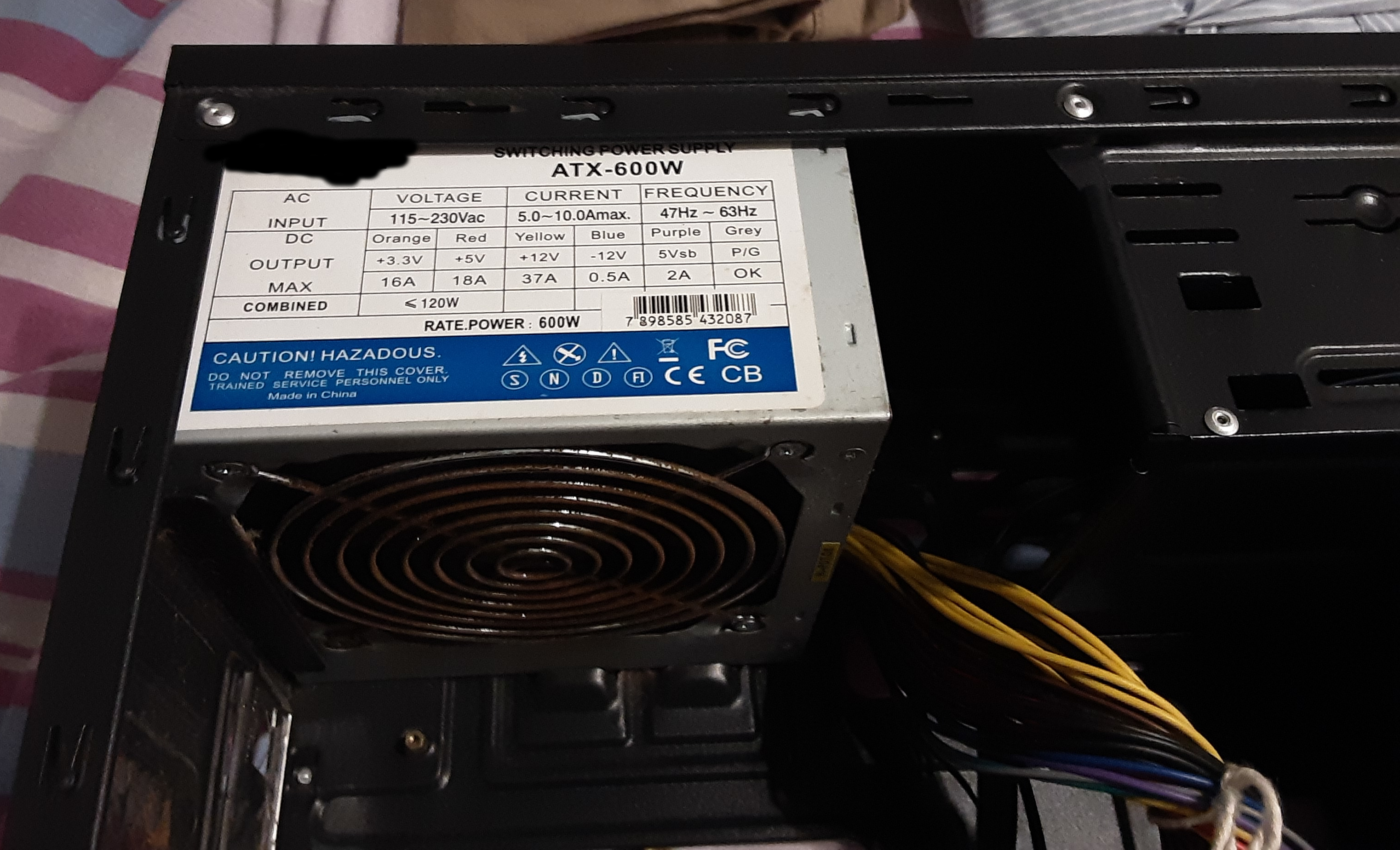
There's a power source attached to the case, which reads ATX-600W. Image1, image2.
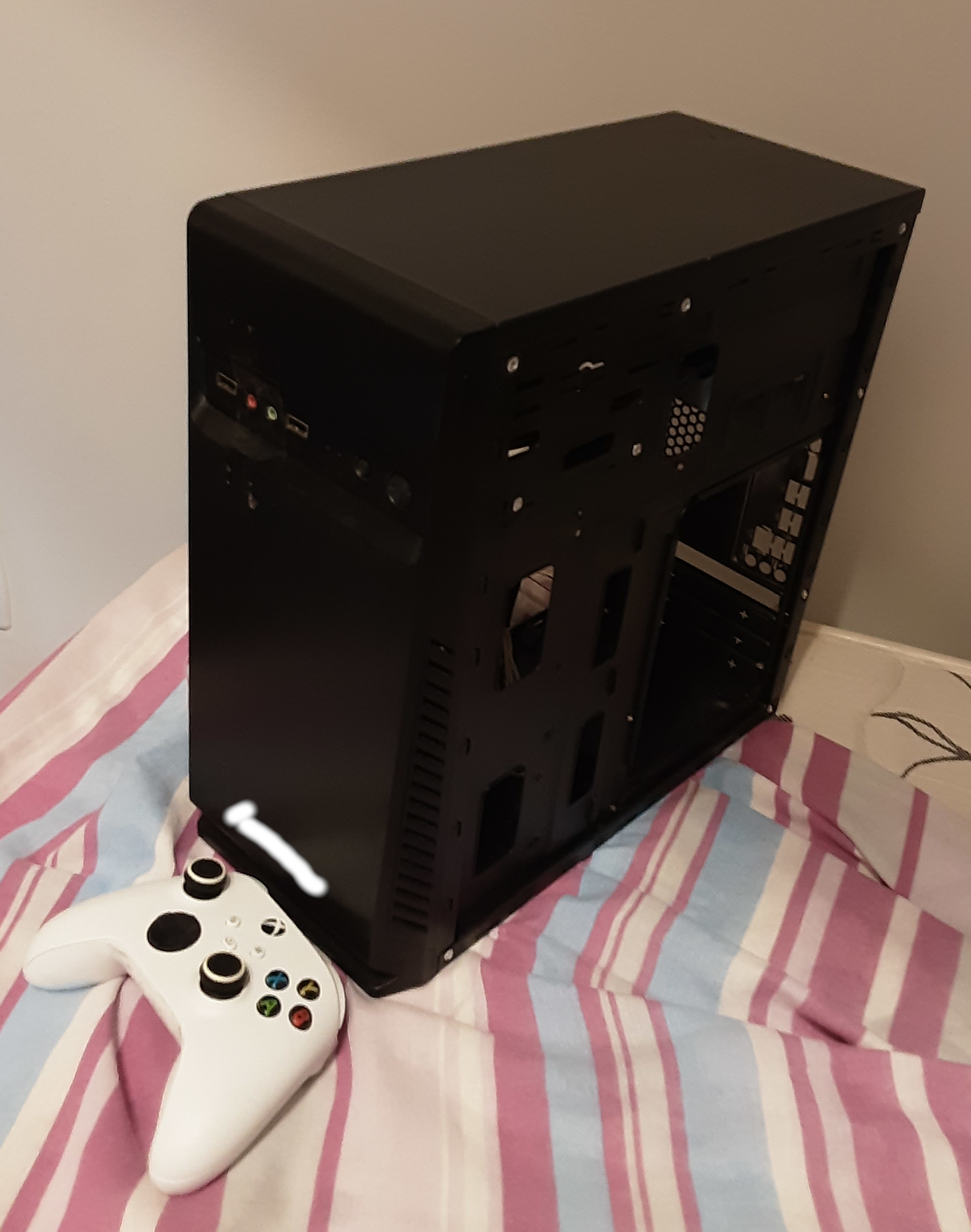
The computer case itself is a little beat up but I don't care about looks at all. Its external dimensions are 34.5cm by 35cm, with a width of 16cm. Here's how it looks (Xbox controller for scale).
I wanna build a new machine with the goals of:
My budget (including the monitor or monitors) is roughly 1400 US dollars. I understand that is not a lot of money for the majority of Tildes users, but that is just my reality. My 1400 US dollars PC is very much a luxury around here.
If needed for budget purposes I can get just one monitor now, and another down the road.
So, what's the best I can do?
Thanks! ;)
Part 1: Nerdforge - I Built the Ultimate Cyberpunk PC (18:28) Part 2: LTT - This PC took 600 HOURS to Build! (25:04) And if you just want to skip to the results, it's at 19m32s in the LTT video.
Hi folks! I am, unfortunately, probably going to have to build a new PC soon; my beloved Thelio-r1 is slowly failing, and while my original plan was to buy a Ryzen 7 5800X and keep riding this PC for another three to five years, I don't know that I'll actually be able to make that work.
I like the NXT H510 I used for my boyfriend's gaming build, but the thermal performance isn't amazing and, most importantly, I hate tempered glass!
Yes, I understand that people want to show off their (ridiculously!) expensive components. I understand that lots of things have RGB. However, metal is cheaper, easier to work with, doesn't shatter, and I can modify it if I need to.
So, does anyone know of a good mid-tower PC case with decent airflow, up-to-date features (no 5 inch bays, good cable management hardpoints, a cable hiding bay, etc.), and no tempered glass or, preferably, acrylic?
Thank you!
EDIT: Since a few people now have not realized how old this topic is before making a comment, see above date ↑. :)
My old PC's CPU (i7 930) started to critically fail after 8+ years of being overclocked from 2.8 to 4.0 GHz, so I decided to build a new one based on the Ultra-Compact Mini-ITX Gaming PC Build from TechBuyersGuru.
I went with Mini-ITX this time since my old PC was in a huge Antec P193 tower which weighs 16.4kg (36.2lbs) before components and so was a giant PITA to move around. The new Sugo SG13 case is roughly 1/7th the volume and initial weight so is much more convenient to move (but not build!).
p.s. I was unsure whether to post this 'buildapc' style content in ~tech or ~comp.... thoughts?
PCPartPicker Part List
Parts labeled incompatible are not... see "Notes" below in Build Process section.
Salvaged from old PC:
GPU - $0 - EVGA - GeForce GTX 980 Ti 6GB Superclocked ACX 2.0+ Video Card
SSD - $0 - Samsung - 850 Pro Series 1TB 2.5" Solid State Drive
SSD - $0 - Samsung - 840 Pro Series 256GB 2.5" Solid State Drive
HDD - $0 - Hitachi - Deskstar NAS 4TB 3.5" 7200RPM Internal Hard Drive
New Components:
Case - $72 - Silverstone - Sugo SG13B-Q Mini ITX Tower Case
Mobo - $190 - Gigabyte - Z370N WIFI Mini ITX LGA1151 Motherboard
CPU - $325 - Intel - Core i5-8600K 3.6GHz 6-Core Processor
Cool - $114 - Silverstone - NT06-PRO 74.0 CFM Sleeve Bearing CPU Cooler
RAM - $220 - Corsair - Vengeance LPX 16GB (2 x 8GB) DDR4-3000 Memory
PSU - $175 - Silverstone - 600W 80+ Gold Certified Fully-Modular SFX Power Supply
M.2 - $143 - Crucial - MX500 500GB M.2-2280 Solid State Drive
M.2 - $143 - Crucial - MX500 500GB M.2-2280 Solid State Drive
Total: $1382 (CAD)
Build Process w/ Pictures:
TL;DR - Behold my new Battlestation, IN ALL HER GLORY!!!
After saying goodbye to my old, heavy, oversized, Antec P193 case...
Unboxing the new one, which is almost the same volume as my UPS!...
And prepping all the new PC components for a photo op...
I began the arduous process assembling my new computer.
Everything went fairly smoothly to start. I installed the RAM, M.2 Drives, CPU and CPU Cooler before mounting the motherboard to the case, as instructed in the build guide. The CPU Cooler was a PITA to attach but that's no surprise as they always are.
Note: These "incompatible" parts listed on PCPartsPicker actually do fit together as the build guide said they would. However the RAM and CPU cooler fan are actually touching and I barely managed to squeeze them in together, so the build guide probably isn't lying when it said that particular low-profile RAM might be the only one that actually works with the cooler.
I then mounted the motherboard to the case and began slowly plugging everything else in. This was a particularly slow and frustrating process as I have pretty large hands and everything was incredibly tiny, in incredibly cramped positions, and required more finesse to get in place than I could muster with my fingers alone. As a result I wound up using long needle-nose pliers, including some bent-angle ones, to get most everything plugged in.
This is when I ran into my first major problem though... and one that was not mentioned in the build guide at all. The Case's front panel USB cable wouldn't fit in the motherboard with the CPU cooler fan in place. After trying fruitlessly to get the cable plugged in for 30min I finally gave up and decided to solve the issue the old fashioned way and it plugged in just fine afterwards. (Thanks for saving my ass yet again, Mr. Dremel!)
The other potential issue was due to the CPU cooler and case mounted PSU, which aren't supposed to work together, but once again as the build guide suggested they actually do... with a whopping 3mm clearance between them! At this point I also decided to swap out some of the ribbon power cables that came with the new PSU for some spare braided ones I had from another build since they are much nicer looking and allow for better airflow.
Note: The other supposed incompatibility listed on PCPartPicker is due to the fact that the case only officially supports 3x 2.5" drives or 1x 3.5" with 1x 2.5" but that's easy enough to get around, as explained below.
I also decided to cram an extra SSD under the front case fan, secured with double sided tape to the properly mounted SSD on the case floor panel. It worked just fine and allowed me to get my 3.5" 4TB HDD properly mounted on the underside of the top plate. Linus Tech Tips, in his similar Sugo SG13 build, even managed to squeeze 2 more SSDs above the PSU using double sided tape as well, so I guess that even leaves me with some room to expand my storage later. ;)
The rest of the build assembly process went relatively smoothly and once everything was hooked up, in position and plugged in, it booted straight into windows 10 (which was still on my old 1TB SSD). The moment when a new PC build gets past the POST is always a huge relief, however that momentary relief soon turned to dread as I quickly noticed a pretty big problem; The machine couldn't detect one of my new M.2 SATA drives.
After several hours of frustrated tinkering and much googling I finally found out the reason why, cursing PCPartPicker for not warning me and face-palming pretty hard for not having read the motherboard specs more carefully. It turns out that the Z370N motherboard actually only supports 1x M.2 SATA drive and the second M.2 slot is NVMe only. I had apparently just wasted $140+ on an M.2 SATA drive I couldn't use and my plans to configure them both in RAID 0 was shattered. But that's honestly not the worst part... in order to get the useless M.2 drive back out I had to basically FULLY DISASSEMBLE my entire build again since the NVMe M.2 slot is located on the bottom of the motherboard!
Despite the serious temptation to just leave it in there even though I couldn't use it, I wound up going through with the disassembly purely because I had a pretty good idea for how to actually make use of that second M.2 SATA drive based on something I saw on Linus Tech Tips a few months ago. So rather than leaving it in there or even returning it, after ordering myself the necessary enclosure I now have myself a pretty nice DIY 500GB Thumb drive. ;)
So several hours later after completely taking apart my new build, removing the bottom mounted M.2 SATA drive, and fully reassembling my build once again, I booted it up, it got past the POST and into Windows 10 again. I then reactivated Win 10 on the new hardware configuration (which was surprisingly painless compared to how it used to be where you needed to actually phone Microsoft) and then began the process of installing Linux Mint on the M.2 SATA drive I still had remaining.
Conclusion:
After several days of going at it now, I am finally done and my new computer is fully assembled, functional and ready to use. As always with building computers it was a bit scary, a bit painful, and more than a bit frustrating but ultimately well worth it. I couldn't be happier with the results and can't wait to overclock this bad boy when I get the chance!
I was wondering if we could discuss PC parts in this group or if this is an unwanted topic for this group.
For those of you not in the loop, the Verge created a PC build guide back in September, and it was...bad, to put it lightly. They took down the original video after a storm of criticism, but this guy reuploaded it, if you want to see it.
Kyle (aka Bitwit) created a response video to it, which got copyright striked (which is more severe than a claim and has to be done by a human, unlike content ID claims), in addition to ReviewTechUSA. Ironically, the Verge published an article about abuse of the copyright system just 3 days ago (2 days when the videos were taken down yesterday).
The Verge should have taken more responsibility to begin with, now that the dust have settled they seem bent on reminding everyone how bad their video was.
Edit: Bauke pointed out Kyle's video is back up! This is not because the Verge retracted their claim, but because YouTube actually had a human review it and determine it was fair use (which usually isn't the case from what I've heard).