Spotify won’t open-source to-be-bricked Car Thing, but starts refund process amid lawsuit
21
votes
I have a KZ ZSN Pro IEM and it's been going strong for 4+ years.
I also have a cheap Bluetooth QCY IEM that I use for podcasts and when I don't want wires tangling me.
Whenever I change from the Bluetooth QCY to the wired KZ I am in awe. The KZ ZSN Pro is a blast to listen to. Specially metal. The definition, the sound of the bass drums, everything is clear and powerful.
So I decided to try some entry level open back headphones and bought the SHP9500 that was cheap on Aliexpress recently. I thought I would find it even better since a lot of people sang it's praise for the price, but I am underwhelmed.
I find my KZ to have way more definition and power.
Also I need to up the volume of my smartphone quite a bit compared to the IEMs. It is near max volume.
Of course they are different beasts and the IEMs are literally inside my head. I don't really know what I expected.
I'm sure beyerdinamic or other more expensive brands might be better, but I don't feel like going down that path.
I'm going to keep the SHP9500 for a week more to see if I like it for different situations, but for now I am not amused.
I'm very sorry, but this is going to be rant. One that may seem to come up almost daily, but I still feel the need to vent.
Every day I feel like I'm jumping through hoops to keep a little bit of privacy and autonomy, without ever winning. DuckDuckGo is my search engine, use a paid mail provider, I try to stay away from anything Google and Meta, use only Signal, ad blocking everywhere, hosting most services locally, etc. It seems, however, to make no difference in the long run. The user-profile-building just seems to enter the home faster than I can mitigate it. Kids install some new app or new hardware ends up listening in, privacy infringement is there.
The reason I'm starting this post now is because I switched ISP and TV provider recently, but it has been on my mind for a long time. Finding one that isn't owned by one of huge 3 parent companies, is almost impossible here. After a year of deciding, I finally figured it was time to throw in the towel and just pick the least bad option. Yesterday was the day of switching and it has been such a frustrating process.
The provided router doesn't allow me to turn off its WLAN. I live in a city, so the airwaves are already crowded enough as it is. No need to keep that antenna on, but screw me, that's not possible. Opened up the device to just remove the card, but everything is soldered on the board and disconnecting the antennas didn't do shit.
It's possible to buy a modem/router myself, but it'll need to follow their requirements and will set me back $200. It would be okay if the rest of the service was great, but here comes the TV part!
The device they use for TV is apparently Android TV. I assumed it would be IPTV with this subscription, but Android TV isn't that. Booting the device makes it immediately clear they are here to harvest data. It makes me so unhappy that a service I'm paying for, is also making money on the side by collecting data. To get a quick idea of what's being done, I routed the box through wireshark to sniff DNS traffic. It's riddled with domains used for data collection and ads. That combined with the features this box wants me to agree to (location, using the mic, access local network, sign into PlayStore, make a profile including real life information) does not make me trust this device. So I've decided to not play and will be sending it back.
People around me are pretty conscious about what they do online, but compared to them I'm highly paranoid. Wherever I look, there are privacy issues. It seems impossible to escape from. How are other people dealing with this?
UPDATE: I don't know if anybody is really interested, but I thought I would update anyway. I decided to listen to my gut and I cancelled the subscription. It feels like the best decision I've made in a long time. It's nice to feel like I'm still a little bit in charge, even though I know that's also just a false sense of autonomy. Suck it, Google! You're not the boss of me :-)
Fellow PC builders, here's a fun one for you.
I took some "old" and no-longer-used PC parts and built my sister-in-law a gaming PC for her and her stepdaughter to use. It was a Christmas gift so the stepdaughter could play the Sims.
She has called me three times to tell me it's completely frozen - like hard locked, dead freeze, screen is displaying the last frame it was on but you can't interact with the PC in any way until you reset it with the power button.
She let it sit for an hour before she gave up. Two times this happened while stepdaughter was playing the Sims 4 and once it happened while my brother-in-law was watching YouTube videos.
Obviously, I went through the usual things you'd think in this situation and I had her bring the PC over so I could do some digging. Fully expecting to find a hardware issue, I tried the following:
I ran the Sims while also watching multiple YouTube videos in the background. Couldn't replicate the issue after about two hours.
I obviously checked the temperatures while gaming and YouTubing, checked the usual performance metrics and everything was great.
Ran OTTC stress tests - all of them. Under heavy loads, this thing was doing fine. Even at 100% utilization, the memory, graphics card, and cpu were fine. Did a power test too, fine. Did a "combined" stress test and all was fine.
Ran mem86, no issues with the memory, no bad sectors or errors.
Played Skyrim on ultra for several hours. This was a really fun way to troubleshoot.
Checked the event log from the day she had freezes. I can see where the event happened because leading up to the unexpected "power off" event, there were a ton of events related to various processes timing out. Seems like it was unable to connect with services and run certain background processes while it was frozen? I didn't see anything that really stood out to me as being a possible cause except...
in the event viewer, there were a few events related to Microsoft family safety. I set this up at the request of SIL so stepdaughter wouldn't get into anything she shouldn't. In the Event Viewer, it seems like maybe it wasn't verifying something correctly or didn't have permissions it needed? Upon Googling, I found some other folks with this error but I couldn't find anything about whether it caused freezing or not. Seems like one of the many events that just gives a warning but doesn't have any effect. One guy who had this issue had his computer freeze but disabling the family safety entirely did nothing. People in the comments thought it probably wasn't related. I also found another event that Google wasn't very helpful with. Might have been related to sound card but my sound card drivers are up to date and again, I have not been able to replicate the issue even when gaming and watching videos, so I don't know if it's related.
I ran the Windows System Files Checker and found no issues related to my Windows install.
I can't figure out why this would be happening only at her house. She says it froze after one hour of use every time. This brings me to the title of this post. My SIL moved into a really old house with sketchy wiring. My FIL told her the wiring is so bad that she needs to get it fixed immediately or risk a fire, so she's working on that. This house has a butler stairway, asbestos, and plaster/lathe walls if that tells you what we're dealing with here. This is the ONLY thing I can think of that would possibly be different between the two setups and maybe explain the freezing, but it just seems so unlikely to me that this is the cause.
Help?
I have a guitar multi effects that has a headphone out with 47Ω
I want a budget somewhat neutral headphone to use with it and I am getting confused with the answers I found so far.
The AKG K240 mk2 (55Ω) seems to be a popular choice with people who own another multi effects (HX Stomp) with a different impedance (I think it's 12Ω).
This headphone is within my budget, but it seems too close to the 47 output of my multifx.
Will I have a problem with this?
I read somewhere that the headphone impedance should be much bigger than the output impedance, but another text I read somewhere explained that they should match closely.
I'm really confused about this.
Hesitating between posting this as a comment or a topic but here we are.
While reading this Tildes post (and the blog post) about tiny undervalued hardware, a curiosity sparked in my head.
How do you organize and store your cables, tiny hardware, and other stuff? Mine are like a bunch of rat tails tangled up inside a plastic box.
I live in a small apartment (for now) and would like to hear your thoughts. And recommendations.
We don’t have to limit ourselves to just wires and cables. For example, I also have old phones, external CD players, etc.
Bonus points if it’s portable and you could travel with your “tiny hardware”.
Hi, I keep reading about this thing called a "NAS" and I don't have in my social network a bunch of reasonable geeks to figure out if this is something for me or if it is overkill and I can get by with less -- trying to be frugal and all.
At the moment, I have a Raspberry Pi 3 (that a colleague gifted me) which runs Jellyfin, mostly for music. I'd use it for watching series and movies, but given how slow it is at transferring files and the fact that it has a 1GB (maybe 2GB) RAM... I was afraid to break it. On top of that, its storage is a years-old external hard drive.
I use Jellyfin mostly to have music on my iPhone. I can access it when I'm out and about on Tailscale. I hope to find a solution for my photos as well.
I'd also occasionally use the pi to experiment with some self-hosted open-source apps.
I constantly find myself wanting to upgrade because I want to also backup my important photos (with face recognition if possible) and documents "offline" (i.e. in my local network) to something more stable than an aging hard drive. They're all in the cloud, but a second backup option could be great.
What I understand from reading about NAS's is that I basically have one, it's just not... reliable?
I understand there is definitely a buy-in cost for buying an actual NAS, I'd like to know how much... so that I can make an informed decision on if and when I would buy it. What is an entry-level NAS and how much will it cost? What could it NOT do that an RPi could, and vice-versa? Am I missing an in-between or even an alternative solution for my use case? Is it overkill and should I just upgrade the pi? What are my options?
Thanks in advance for reading my post!
I've always been a speakers kind of guy because I'm not a fan of how bulky headsets are, but because of the fun of Zoom meetings and things, I've kind of gotten over my hatred of headphones. That said, I'd still prefer to commit to earbuds rather than big, bulky GamerTM headphones long-term. Instead, I'd like to pivot to earbuds.
So my first problem is: I've always been under the assumption that 2.4Ghz dongle is superior to Bluetooth, but apparently modern Bluetooth is almost/practically as good. If that's the case, I wouldn't care about getting a Bluetooth-only set, but that does mean dropping more money on a dongle for my PC.
My other caveat is that I hate having to pause what I'm doing to charge something. The only wireless thing I own is a headset I use for Zoom meetings and things, and it's a Arctis Wireless that can easily do 20+ hours without a charge. I would be using these for my weekly RPG that I run online, which is almost always 8+ hours long, not counting me watching videos/listening to music in the leadup to to the game.
So yeah, with that in mind-- low latency and battery life are my big things, and I don't care about a microphone at all, but I'd like it to be fairly budget-friendly. Again, it just seems like... since I last used headphones 15+ years ago, things have changed a lot and even just googling and reading opinions on reddit-- all the opinions are varying and often opposing on what I should be shooting for.
I don't care all that much about brand loyalty, or what color it is, or anything like that, either. So, what all would anyone here recommend?
Basically the title. I need a machine that isn't fragile, doesn't invite theft and can be replaced or repaired if needed
Whenever smaller keyboards come up online, I often see a lot of the same reactions/dismissals. I've found many of these to be foolish, but also that the community around such devices has its own barriers. It sometimes is represented from its most extreme aspects rather than someone with a more normal approach and use case.
So here is yet another pitch on why you might want to consider trying out some of the smaller keyboards out there, and the various advantages it can bring. This will probably be quite long, but I hope it at least is interesting.
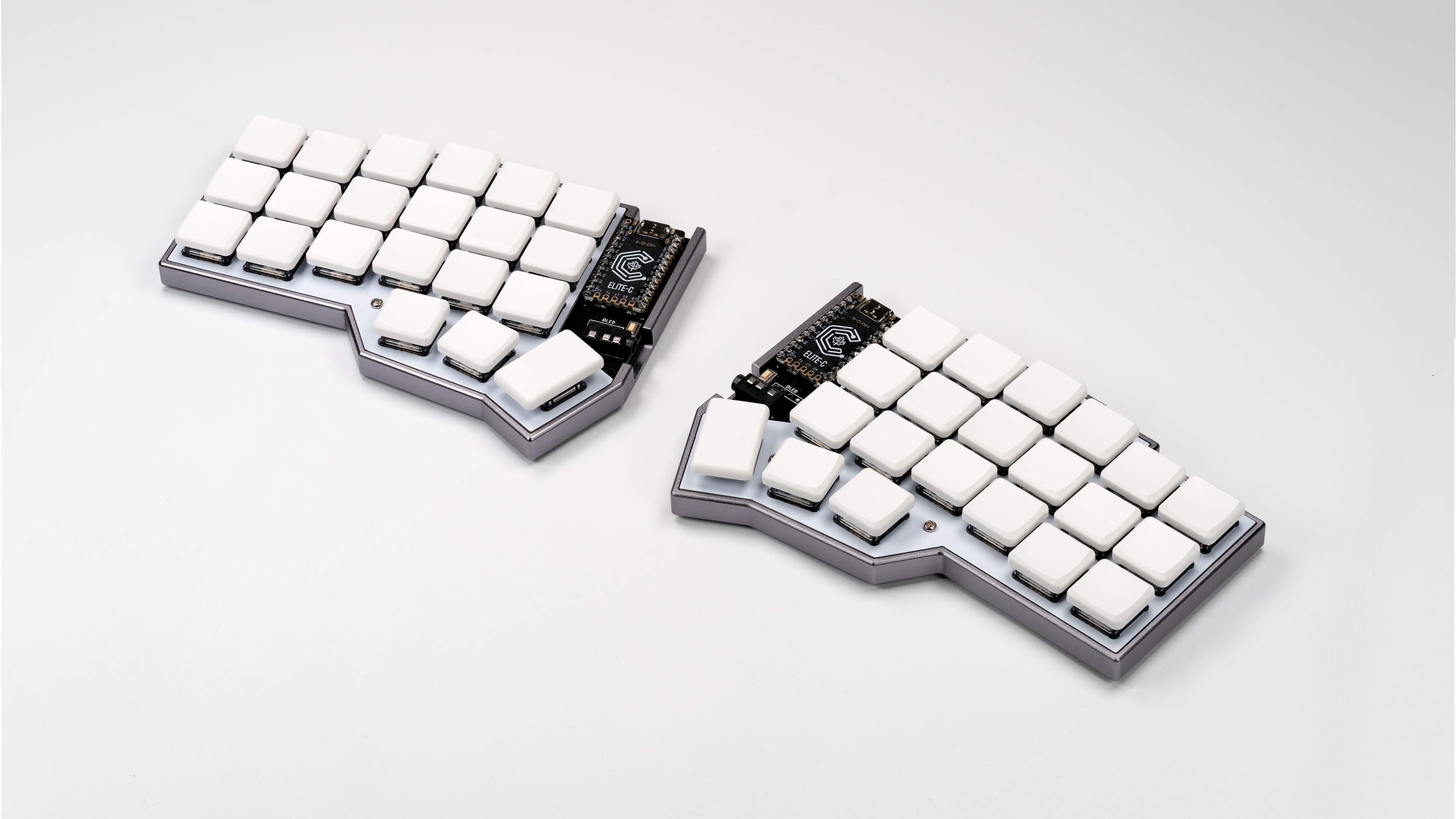
Corne LP split 40 - I carry this with me and use it for work and as a better keyboard for my GPD Pocket 3.
Mercutio 40 - for my lighter media/older/lower spec game machine.
Discipline 65 - for my gaming machine as at the time having the number row still seemed needed (and it just looks so nice)
Velcifire wireless 60 - As my other media keyboard since it's wireless and can be used from anywhere and causes my normal friends and family to have less of a stroke if they have to use it. A lot of what i'll say below won't apply to this as it doesn't have some keys and can't be custom mapped. (It's also what i'm typing all this on, much to my chagrin.)
I've gone through and have owned/own several others but i wanted to be clear about what i'm using in case anyone doesn't have a clue what i'm talking about.
I think the only real "skill" you must have to consider downsizing your keyboard is the ability to decently touch type without looking. If you're the sort of person who still hunts and pecks, no judgement, but this is not for you.
If you're someone who has to code, do data/numerical entry, or type a lot for work, then I encourage you to read on. Those are common barriers I hear thrown out, but in my experience are actually easier with a smaller keyboard.
The normal keyboard for most machines has a lot of dead/wasted space that could just be used better, and has some keys that are important or have grown more important in really poor positions.
The core idea is simple. You can find the home row easily with the homing keys (j/f generally have a bump or some defining feature). You're probably excellent at hitting the keys in relation to that if they're 1 step away from the home row. The farther you are from that, the more likely you'll need to look, and the longer it'll take you to press the key even if you don't. So where possible, it's ideal to try and use space more efficiently to keep the keys you actually need to use near this position.
But how are you going to fit all those keys anywhere near the home row?
As an example, to help explain moving forward, here is the keymap for my mercutio 40.
You'll want to save that json, and then upload it at qmk configurator, which will make it much easier to explore. If you've never looked at this before it can seem insane, but I promise you it's pretty tame ignoring some edge case stuff.
If you don't feel like going through the hassle here's screenshots from the site with descriptions of each layer.
Mostly the same as below but i did fix some missing info below so sorry about that. I'm also leaving the descriptions of my "gaming" layers 4/5/6 in the imgur only because I think that's out of scope for this).
Space is an interesting key. It's a key only ever really tap, never hold (outside of games, more on that later). So, why not double it up, and make it do something different when you hold it?
Well in this case, tapping any of my 3 space buttons gives you a space like anyone would expect, but if you hold either of the left 2, it "shifts" you to layer 1 (base layer is 0), and holding the right one, shifts you to layer 2.
I put shifts in quotes because it's just like the shift key. If you hit 7 on your keyboard, you get a 7. If you hold shift and hit 7, you get &. This is the same concept, and just keep the layers organized in a way that makes sense, keeps it very easy to know what layer what key you want is on.
Ignore the N/A's on this and the rest (where they'll be another symbol), as they are optional keys i don't have. Mute is also the encoder knob so don't worry about it.
It's pretty basic qwerty in the the middle, and tab/left shift/right shift/backspace/windows/the alts/right control are where they normally are, and left ctrl replacing capslock is something I recommend EVERYONE do.
Space, is still space. In fact all 3 of those spacebars are space...on tap. On hold, the left two "shift" the keyboard to layer 1, while the right one "shifts" the keyboard to layer 2. So just like holding shift + a key gets you a capital version of that key (or a symbol from the number row), holding space + a key gets you something else.
The left control/right windows key are also layer keys. Holding them takes you to layer 3 and they do nothing when tapped.
Finally right shift is where it always was, and is somewhat similar to space. If you tap it, you get /?, and if you hold it, you get right shift instead.
All this to say, that outside of enter, escape, the numbers, and moving control, most people who can already touch type could mostly type on this without any explanation.
Accessed by holding left space.
All keys that don't actually put a character on the screen (ignoring the left side where i've got some coding stuff but it doesn't really matter).
Up, down, left, right, home, end, page up, and page down are all in instantly intuitive positions and make navigating anything quickly a breeze (home on the left side since it jumps you to the left/start of the line, and end on the right since it jumps you to the right/end) . Enter, Delete, and Escape are the other 3 major keys on this layer, as they are of course useful, but don't actually put text on the screen.
The point is that if you're thinking to yourself, "where is that key on this keyboard" and you know that key doesn't actually put a character on screen, you know it's on this layer.
Accessed by holding right space.
I've turned the right side of my keyboard into a numpad that is always under my fingertips(my middle finger is always on 5, just like a 10 key), and since i'm using the number row numbers, I also have access to all their symbols instantly as well by just holding right space + shift. I also have dedicated *,/,+ keys, and the -/_ underscore laid out to be intuitive as well (higher key increases the value, lower key decreases, so multiplying above division, and addition above subtraction)
Finally we've got the rest of the keys that can output characters but didn't make it to the home row and don't fall into the numpad. `, ;, and . Again they are all basically where they normally would be, but instead you just hold right space and hit the key.
The other 5 keys that output text are on the left hand side near the home row because they're super useful for coding (I also use | and -/_ a lot, but their positions in this layout are intuitive to me). Having the paren's/brackets under/near my middle and index finger is so nice for all sorts of coding.
Accessed by holding "left control" or "right windows".
The function keys are the exact same layout as the numbers. F1 is where 1 on my layer 2 is. So F5 is where 5 is which means it's right under my middle finger. I put 10/11/12 going down on the left because that made the most sense to me, and so far has never caused me any issues.
The mouse/music stuff I don't use that often, but it's something I'd like to mess with a bit more.
I threw capslock on here in the rare cases where I actually need the key because some program or game wants it. I also have Insert on this layer in my live map, but I use it so rarely I tend to forget it until something needs it.
Finally you'll notice that on layer 3, where the G key is, is a toggle to put you into Layer 4. Meaning that once you hit it, you'll jump to layer 4 and NOT return to layer 0 when you let go. This is explained more on that layer and is totally bonus points. The main point of this keymap is done, and I think this is an excellent layout for productivity (or at least a starting point), without having to dive into lots of complicated or unintuitive concepts.
If you don't want to read all of that, the basic idea is that your average person can type on the keyboard with minimal explanation. If they forget where a key is, the other 3 layers all follow rules to help guide them. One layer for navigation and keys that don't actually output characters (home/end/delete/esc/et) and one layer for the rest of the keys that output characters, namely the numbers, which are then also your numpad and ALWAYS under your right hand, centered and ready to go. The final layer is, mainly, for the function keys, still following the numpad from the previous so you can again easily figure out where the button you want is.
In the end the main benefits i've found are easier navigation, as I essentially now have a navigation layer with every key i could want on it, and much faster access to numbers. I still do data entry and lots of numbers, and having the numpad always one keyhold away is awesome.
On top of that it's just nice to not have to move my hands so much to type, and to get so much of my desk space back.
I type just as fast as I do on a normal keyboard for basic text, as there's almost no difference, and I type faster doing code/editing text because my numbers, brackets, and navigation keys are all closer at hand and in such a way I don't need to look or even move my hand from the home row to hit them.
On the typing side, honestly yeah. I've seen a lot of excuses like "well i prefer a numpad" or "how do you type numbers" which I've tried to address in this post.
The only issue i've run into is gaming, where I already really solved most of my problems as shown in the extra layers in the imgur gallery, and think it might even be better for gaming vs the normal layouts.
The only remaining hassle is roguelike games such as stone soup or caves of qud, which LOVE to assign every fucking key a use so there's no easy way to remap things and I have to actually add another layer JUST so i can hit the numpad numbers because I need them to navigate....
BUT unfortunately, you might actually want to acquire one of these keyboards, and that's where stuff gets a little tricky.
All the upsides I just mentioned assume you can actually program the keyboard. Thankfully this has gotten much much easier with both Via and ZMK making the process very simple. QMK is doable, but difficulty wise it shared a lot of similarities with trying to get the perfect modded run of Fallout New Vegas going with about 20-40 mods. If you are not more comfortable in the tech world, I recommend ONLY boards that support via software. I believe these days anything that supports QMK supports VIA, but it's worth checking on the via website to make sure the board you're about to get works.
The mercutio and the discipline I built myself after ordering the parts. They're through hole soldering and were some of the first soldering I'd ever done on my own outside of a quick kit I bought off amazon to practice. It is actually not that hard BUT you need the equipment. It's not horribly expensive to get but it's not cheap either. I do really enjoy just throwing on music and putting these together, but I totally understand that you might just want to, you know, buy the fucking thing already built.
Thankfully many sites offer build services (or you can find them on etsey) which charge a fee to assemble it for you. This is what i've done with every corne i've ordered because it is NOT through hole soldering and I don't have the guts for it, and even still they've all had some eventual issues (although again, i carry mine with me in a very unprotected state because i'm insane so some of that is on me).
Especially if you're paying for the aforementioned build services, these things can get into the 200-400 range FAST, which is a lot for a keyboard. There are some cheaper options out there, and the Mercutio was only $70ish before switches(not bad) and keycaps (range from dirt cheap to ungodly expensive).
Still I would not recommend ANY of these for a first time buyer. My first smaller board was a 60% mechanical and those range from $70-100 these days from what i'm seeing.
Sometimes you just won't be able to find or buy the board you want in the way you want. There are lots of interesting boards i've seen over the years, but they're either very expensive or only open for a limited time. I had a working cornish zen that died on me. I'd love to replace it. I cannot as they currently don't sell them. Will they make more? Dunno. I hope they do.
I DO NOT recommend diving in head first and suggest starting with something simple like a 60 or 65, probably keychron, as they're a decent budget brand. You might want to go even cheaper with just a 60% off of amazon that isn't even programmable just to see if you outright hate it, but I do think that getting something you can start to tweak as you begin to understand what you want helps adoption.
I hope this gave some of you the push to look into all this. I'm glad I dipped my toe in it, less glad about the absurd amount of money i've spent on it (dear god keycaps), and really glad about the moment where I thought "huh i really just don't need all these keys" and pulled some out. I hope I can convince a few others give it a shot and hopefully see the same results. No dvorak or home row modifiers and weird triple tap macros. Just some layers and common sense.
I do still, if nothing else, highly recommend switching left control to caps lock.
I'm looking for a black & white laser printer with a scanner for home office use. The only fancy thing about it is that I'm running Linux and I don't want to install any driver packages from the manufacturer. I want to plug it into any laptop running any Linux distro and start printing and scanning with no fuss.
Brother printers are very popular, but if I search for any Brother printer and "linux", all I can find is stuff about the drivers and how to fix the various issues that come with those.
If I understand correctly, modern printers should just work via something called IPP/AirPrint and they should also work over USB. Is that correct?
What about the scanner? Does that also just work over IPP?
I do not like using mouse. I feel it disturbs the flow of things I am doing. Moreover, I like quickly pressing through a bunch of keystrokes that results in what I want. There is a sense of satisfaction in that.
For starters, I use Vim and love it. I liked it so much that all my browsers have Vim-like keybindings (through Vimium or Tridactyl). But that is as far as I have gone in making my life easier (apart from switching windows via Command+Tab, but for all else I need to use mouse).
I recently bought a MacBook and it is kind of disappointing that the keybindings are not so intuitive or don't exist natively as they do in Windows. For example, resizing the window was easier on Windows with Win+arrow. There are many such things I find lacking on Mac. Broadly, I am asking for what other improvements can I bring into better my keyboard-centric workflow.
Sometime this year, probably around the middle of the year or later depending on my welfare, I want to replace my two monitors with an ultra wide.
I do have some preferences, such as:
Would appreciate any suggestions or recommendations. Thanks.
Also, I have two monitors I would like to sell when I replace them, these being an ASUS VG27AQ, and a Dell S2721QS. Both of them are in perfect condition, other than being slightly dusty. What would be a fair price to list them for when selling?
This was tempting to post in ~games but think it suits ~tech better.
What are your thoughts on these monitor frame sync technologies?
Have they made a big difference to your gaming experiences?
Could you do with out it?
What about G-Sync vs Freesync?