McDonald’s built a 515-page dossier on me
50
votes
I won't be surprised if this is moved to ~misc or something, I thought transport might be most appropriate since it's about EV's, but I'm probably wrong.
I made the jump to an EV this week (Ioniq 5), and for the first time, I'm charging away from home. My work has free level 2 chargers (via ChargePoint), but I can't for the life of me activate the charger by tapping my phone to the terminal, I have to activate it through the app.
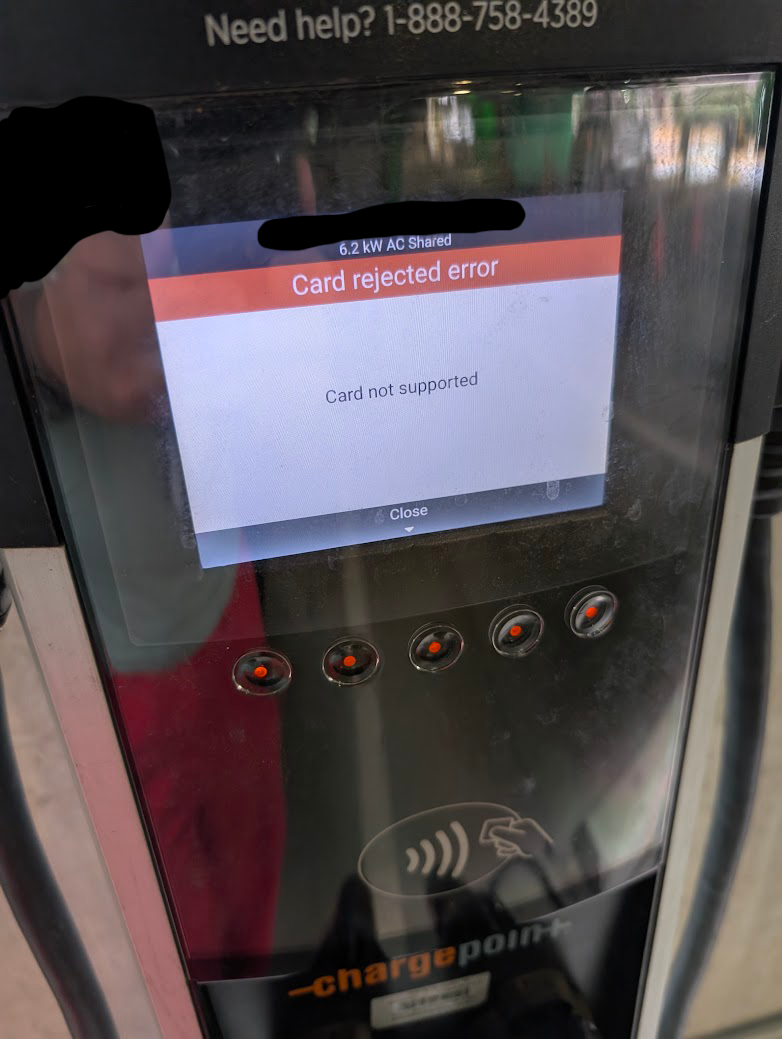
When I tap my phone (Pixel 9 Pro), it seems to act like I'm tapping a credit card, I get an error screen:
Card rejected error
Card not supported
The only things I can find online are in response to iOS people who apparently have to add a virtual ChargePoint card to their wallet, but from what I've read, this isn't necessary on Android since the ChargePoint app can interface directly with the phone's NFC capabilities.
I'd appreciate any tips on where I may be going wrong.
This is an unofficial Boost for Lemmy port.
With the Any significant changes to Tildes are extremely unlikely topic (and the Tildes successor one) from the other day about how this site was now in minimum maintenance mode, that gave me the motivation to finally look into porting Boost to work with Tildes. Knowing that the site won't change felt like a good time to "make" an app for it. For the longest time, the two mobile apps that I used for browsing Reddit were Reddit is Fun (which Tildes already has with Three Cheers thanks to @talklittle) and Boost. I've been using Three Cheers from the day that it came out. The original Boost creator (Rubén Mayayo) went to Lemmy instead of here and he created and maintains Boost for Lemmy. While Tildes isn't federated, it still has most of the features that Lemmy has, and it's also similar enough to Reddit. In the past few months, a project called Morphe has spawned to patch Android apps. A user on GitHub called Breal, has been maintaining Boost for Reddit by providing patches compatible with Morphe. He himself built his patches off the work from wchill though he's been mia for a few weeks. He's been fixing issues and backporting the new features that were implemented in the Lemmy app. That gave me the idea that something could be done for Tildes.
Anyway, I got a Claude subscription for the summer and I'm trying to test its limits. I've been a programmer for 16 years and it has been blowing my mind. The more I work with LLMs the more they feel like masochists (the techniques that they use to solve various problems are truly wild). Some projects that should usually take months or years can be done in only a few days through sheer brute forcing. I got a proof of concept done the other day to see if I could connect Boost for Lemmy to Tildes. It worked within only a few hours which was promising. It turns out that implementing this well though was a lot harder than I expected. It took some really heavy modding to keep it seamless. I really wanted it to feel like native Boost while still following Tildes' way of doing stuff. After a lot of trial and errors, here it is. I was able to maintain compatibility so that it can live alongside Lemmy. Boost's account switcher lets your easily switch between Lemmy and Tildes.
To install it:
github.com/Apostolique/apos-morphe-patches
Here's to multiple more years of talking with you guys on Tildes.
Report any bugs that you find, or issues with my instructions.
Edit: Some screenshots (low battery because this took a lot of testing to get right):
My phone is a Samsung A55. Fully updated.
I have ADHD and autism, which is to say that I have a very obsessive personality. I have used various blockers over the years to prevent me from wasting time on apps and websites.
Lock me Out has helped me for many years to curb my smartphone usage. Unfortunately, it stopped working, as it became easy to circumvent by either forcing the program to stop or uninstalling it. I have been in contact with the developer, but they weren't able to find a solution and eventually stopped responding to my emails.
So I need an app that prevents me from disabling blocks at all.
While I can pay for an app even if it is a little expensive, I cannot justify an expensive subscription priced in US dollars (although I might do so if there's no other alternative).
Any suggestions that could help me out? I'm using my phone 24/7, I can't stand it anymore. And I cannot simply turn it off because I have a toddler, and I must be accessible to my wife for emergencies when she leaves the home with him.
There are also many ways to use a smartphone that are actually useful, positive, and non-addictive. And I'd rather be able to access these functionalities.
Thanks!
This topic is for the Three Cheers for Tildes mobile app.
I'll summarize the major updates at the start of each similar topic, so people can read the updates and then hit Ignore if they don't care about more frequent updates and user feedback.
What's new:
[Android] Version 1.7.1 (Aug 10, 2026): Improved HTML parsing speed. Reduced installation size. Fixed rare crashes.
[iOS] Version 1.7.1 (Jul 31, 2026): Added light/dark theme setting. Improved HTML parsing speed.
On iOS, currently TestFlight only for the next week or so.
Version 1.7 fixes a long-standing problem in the app: the interface pretty much completely broke when login sessions expired (after a year), with no obvious way to fix it from the user's perspective. Now the app will detect expired sessions and show a prompt to re-login.
I promoted this from quiet bugfix to a more prominent release, because it was pretty terrible user experience, and anyone using the app for more than a year has run into it.
I had to test thoroughly on Android and iOS, since I don't want to ever break users' legitimate login sessions. I also had to change approaches partway: originally I wanted the app to automatically re-login, but that doesn't work for 2FA-enabled users. Also there were too many error-prone edge cases when trying automatic re-login, whereas a user-visible re-login prompt avoids most of those silent error cases.
Previously:
[Android] Version 1.6.8 (Jul 15, 2026): Fixed crash when searching for topics on Android 12 and earlier.
[Android] Version 1.6.7 (Jul 9, 2026): Fixed comment interactions after double-tap to vote.
[Android] Version 1.6.4 (Jun 18, 2026): Indicate when replying to a deleted comment, fixed minor UI bugs in topics feed, fixed networking bugs, fixed rare crashes, support Android 17
[Android] Version 1.6.3 (May 20, 2026): Added "Find in comments" to "..." menu. Fixed first search position in comments. Fixed tapping links in collapsed details summary. Fixed stale vote rendering.
[iOS] Version 1.6.3 (Jun 27, 2026): Indicate when replying to a deleted comment.
[iOS] Version 1.6.2 (Jun 14, 2026): Fixed comment scroll bugs, fixed networking bugs
[iOS] Version 1.6.1 (May 21, 2026): Improves on the Find in Comments feature. Fixes some UI bugs related to the Find Comment bar, and with potentially stale votes showing in the UI. Also adds the iPad pane toggle on iPadOS 18 and earlier, to bring the behavior closer to iPadOS 26, and fixes some iPad animation bugs.
Previous topic: May 2026
Android version on Google Play Store: https://play.google.com/store/apps/details?id=com.talklittle.android.tildes
Or sideloadable APK at https://www.talklittle.com/three-cheers/
iOS version on the App Store: https://apps.apple.com/app/three-cheers-for-tildes/id6470950557
Join TestFlight for iOS beta testing: https://testflight.apple.com/join/mpVk1qIy
When uploading an app I got this email:
ITMS-90068: MinimumOSVersion too low - This app has a MinimumOSVersion of 13.0. Starting in Spring 2027, all iOS apps must have a MinimumOSVersion of 15.0 or later in order to be uploaded to App Store Connect or submitted for distribution.
These are old iOS versions, so this policy isn't going to affect many people but I thought I'd post anyway. I still have an old iPad with iOS 12 that's usable for reading and media. I think some apps are still supported and getting updates surprisingly. As a dev I still update Three Cheers for Tildes to support iOS 12 and up. No idea if anyone other than me uses that old version though.
I like supporting the older iOS version because it means I can keep using this old hardware. Also knowing something runs on those old devices with okay performance, means it will be buttery smooth on any moderately recent iPhone/iPad. I mean, I can probably still install apps on it for my own personal use, just not distribute on the App Store.
On the other hand supporting iOS 12 is just not practical and not really a good use of developer time, so this had to happen at some point.
Not sure where this goes but I am looking for an app to help fill in between other reading practice we do with our 5 year old.
This won't be the main tool to help them learn, just trying to find something fun to help learn a bit. Does anyone have recommendations for fun and educational reading apps?
Hello!
First, some context- I have a very particular way I keep track of my work and take notes throughout my work week. This is currently managed through an ever-growing list of Notion pages. And Notion is great! It does a ton of stuff really well, but it's also suffered from a lot of feature bloat over the years and has just enough oddities to irk me on the daily.
So, I built a thing. I call it True To-do because it's fun to say and I'm okay at software and less okay at marketing. It is an opinionated daily work tracker with a lot of little features:
It is also 100% free, has no tracking, no cookies, no ads, doesn't ask for your email, your data does not leave your device, and is pretty performant (better than Notion, at least). It was written heavily with AI, but not by AI - It was directed, reviewed, and corrected by me.
What it does not have is any kind of user account feature. Everything stays on the device and will not transfer between devices unless you manually export and import the data. Maybe I'll add support for that at some point, I'm not sure. It is also only okay on mobile/tablet- this app was really made for desktop.
Anyways, give it a play around. It was purpose built by me for me but love to share the things I make when I think others may get some use out of them as well. I welcome feedback / bug reports / suggestions / etc.
EDIT: Stale link removed, DM me if interested and want the new link!
This topic is for the Three Cheers for Tildes mobile app.
I'll summarize the major updates at the start of each similar topic, so people can read the updates and then hit Ignore if they don't care about more frequent updates and user feedback.
Recently:
[Android] Version 1.6.8 (Jul 15, 2026): Fixed crash when searching for topics on Android 12 and earlier.
[Android] Version 1.6.7 (Jul 9, 2026): Fixed comment interactions after double-tap to vote.
[iOS] Version 1.6.3 (Jun 27, 2026): Indicate when replying to a deleted comment.
[Android] Version 1.6.4 (Jun 18, 2026): Indicate when replying to a deleted comment, fixed minor UI bugs in topics feed, fixed networking bugs, fixed rare crashes, support Android 17
[iOS] Version 1.6.2 (Jun 14, 2026): Fixed comment scroll bugs, fixed networking bugs
[iOS] Version 1.6.1 (May 21, 2026): Improves on the Find in Comments feature. Fixes some UI bugs related to the Find Comment bar, and with potentially stale votes showing in the UI. Also adds the iPad pane toggle on iPadOS 18 and earlier, to bring the behavior closer to iPadOS 26, and fixes some iPad animation bugs.
[Android] Version 1.6.3 (May 20, 2026): Added "Find in comments" to "..." menu. Fixed first search position in comments. Fixed tapping links in collapsed details summary. Fixed stale vote rendering.
On iOS, currently TestFlight only for the next week or so.
Following version 1.5's addition of searching for posts, Three Cheers 1.6 adds a bar to find text in comments. It changes the comment bar a bit which took some work, and it was pretty tricky handling the edge cases with highlighting the matched text. Might have some leftover bugs, or configurations I forgot to consider, so please report those here.
There was an Android bug with drafts not loading in some cases, reported last time. Should be fixed now.
Also I'm happy to report that I was able to fix some long-standing iOS bugs, some keyboard bugs specific to iOS 26 that have been reported on TestFlight intermittently for quite a while, and an iPad rare crash that likely went even further back. So this version should be pretty stable on iOS.
Previous topic: March 2026
Android version on Google Play Store: https://play.google.com/store/apps/details?id=com.talklittle.android.tildes
Or sideloadable APK at https://www.talklittle.com/three-cheers/
iOS version on the App Store: https://apps.apple.com/app/three-cheers-for-tildes/id6470950557
Join TestFlight for iOS beta testing: https://testflight.apple.com/join/mpVk1qIy
This was something I was surprised to learn on a recent trip to the zoo. While the palm oil industry is absolutely wrecking a lot of our rainforests, and, most notedly, orangutans, boycotting all palm oil is actually worse for the environment because palm oil is the most land-efficient vegetable oil crop. It supplies 40% of global vegetable oil but only uses 6% of the land dedicated to oil production.
It's also extremely versatile because "it is semi-solid at room temperature so can keep spreads spreadable; it is resistant to oxidation so can give products a longer shelf-life; it’s stable at high temperatures so helps to give fried products a crispy and crunchy texture; and it’s also odourless and colourless so doesn’t alter the look or smell of food products."
The issue is who produces it and how, so it's only certain products that should be boycotted.
I'm sure the solution isn't as simple as "download this app," but the zoo I went to recommended using the PalmOil Scan app (produced under the World Association of Zoos and Aquariums (WAZA) and led by Cheyenne Mountain Zoo, Chester Zoo, Auckland Zoo, Zoos SA and Mandai Wildlife Group). It's essentially only available in the Anglosphere (Australia, Canada, New Zealand, Singapore, United Kingdom, United States), but it tells you if the entire company meets their standards (but not individual products so users don't just boycott all palm oil).
We acknowledge that all companies that receive a rating are in different places on their journey to use 100% certified sustainable palm oil. We want to recognise those companies that are doing well and encourage those companies that need improvement. We hope that by creating this rating system we will accomplish this task and assist consumers with making the most educated shopping choices in regards to sustainable palm oil.
Companies are scored on a point structure and can earn a rating of Excellent, Good, Fair, Poor, or No Commitment.
I'm sure a lot of Tilderianeses are conscious of this, so I wanted to share the information (and presumably get more info from someone who knows more).
We used this question as an icebreaker in my church group, and it was interesting seeing what people thought they used compared to what they actually used.
Did you guess correctly?
Anything surprise you about which apps you used the most/how much time you spent on them?
I guessed Chrome, YouTube, and my ereader app, and got them right. But I also tend to see those same three apps each week through the weekly health report and figured it would be those.
I am forced to use WhatsApp for work. I would prefer to not have the WhatsApp app on my personal android phone. Is there any workarounds or alternative apps? Switching to a different chat network is not an option unfortunately.
Background:
While playing games for the Backlog Burner, I was surprised to learn that the Humble App (which is a "free" perk of having a Humble Choice subscription) has a few games that are actually exclusive to it.
Part of the reason I chose to play games from the Humble App is that I don't expect it'll be around much longer. It isn't getting updates or new games added to it. Also, Humble Games, the publishing arm of Humble which released many of the games available through the app, was abruptly dissolved in 2024.
With this in mind, I went through the entire current library for the Humble App and tried to identify games that I could not find available for purchase/download elsewhere.
Below is a list of games that I consider to be "endangered" because they might become unplayable/lost media if (i.e. when) the Humble App does shut down or stop working.
If you've got the Humble App, it might be worth playing some of these sooner rather than later.
If you've got game preservation sensibilities, it might make sense to download and archive these for posterity.
Game List:
Here are the games that are, as best as I can tell, Humble App exclusives and in danger of being lost permanently.
For each title below, I tried to find a decent link that gave information about the game. Many of these simply don't have a lot of online presence.
Some of them have Steam pages linked, but in those cases, they're just placeholders and you cannot actually buy the game.
A2Be - A Science Fiction Narrative - Steam page
after HOURS - info link
Crescent Bay - info link
Divinoids - Steam page
Elephant in the Room - trailer
fistful of nothing - homepage
Heeey! Park-Boy - Steam page
Keyboard Sports - Steam page (note: I found an itch.io page with it available for download, but it is clearly unofficial)
Lyric Sonata - gameplay video
Operator - trailer
Quiet City - trailer
Rogue Mansion - Steam page
Roman Sands - gameplay video
Space Routine - Steam page
Spoolside - trailer
The Groundz - gameplay video
THOR.N - gameplay video
Woten - Steam page
Yojimbrawl - gameplay video
Zodiac XX - trailer
Feel free to check my work and let me know if I missed any, or if some of these games are actually officially obtainable outside Humble and I didn't find them.
Also let me know if I whiffed any of the links or if you find better ones for any of the games.
I feel as though I have lost touch with the idea of the OS as software.
I’ve spent a lot of time looking for that all in one solution. Notes, reminders, calendar, etc. in one convenient app. Notion first, then AI came and fucked it all up. Obsidian was cool, super customisable, but I found that I don’t really need what it offers, stuff like linking and graph view aren’t that useful to me. The idea of a ‘second brain’ has always been interesting to me, but I could never find anything that made sense.
Recently, the thought hit me… “isn’t an OS just an super all-in-one app?”. This sounds stupid, but I haven’t actually considered the power of—in my case—macOS itself. I’ve just been using it as a portal for all these other bits of complex software, when surely it’s all built in?
Obviously finder would be the core of the system, but does anyone have experience with just… using the desktop metaphor as intended? Folders with files in them, that get opened in a program, and when you’re done, get saved back into the folder. Put things you use regularly on the desktop (or shortcuts to them, to maintain organisation) and delete them from the desktop when you don’t need them anymore. Again, it sounds stupid typing it out, surely the answer is “yeah dummy, that’s how you use a computer!!!!!” but… why do I have obsidian, and the photos app, and all this extra junk?
Going back to obsidian, for example. Surely, textedit (which has relatively simple rich-text editing, as well as plaintext) and some well thought out folders can get me where I need to go. It’s also widely compatible, since I can just… copy a file, should I choose to switch to Linux completely at some point.
I suspect this disconnect is a result of the iphoneification of personal computers, there’s a lot of layers between you and the file when you’re on a mobile device.
So, am I just talking nonsense? Or is it time, after these years of searching, for me to finally start using the computer as a computer again?
Hello tilderinos,
I'd like to launch my tab manager soon and to ensure a smooth launch, I'm looking for early users who would be willing to try my app as part of the private beta.
For those who would actually need this product, I'm happy to offer one year free (or more!), but even if you don't need it, I'd really appreciate the help.
I don't really need anything fancy, I'd just like to have some people install the app and try it to know if it works properly for them or if any unexpected issues come up, especially major ones. I'd like to make sure that the actual launch will be smooth, especially considering that I've been working on this project for four years now. It'd be a shame if it all went to waste.
Thanks a lot in advance!
PS - I wasn't sure in which group to post
I've been thinking on this for a while, and was inspired to ask about it while reading through the blackpill thread. I don't intend to actually look for a relationship for a while; it's been six months since the breakup, and my ex and I didn't agree to no-contact until two days ago, so I still have a long healing process to get through. But I have a lot of... dread? around not having a life partner forever, with the key factor being not having a close friend like my ex was pre-relationship. If I could emotionally and financially handle all life matters on my own that would be beautiful, but even just thinking about getting to the place I want to be financially while still maintaining a certain lifestyle is anxiety-inducing on its own. So again, even as I do not actively prepare to download any app and put myself out there, I'd like to take some notes as someone who has never used an app and whose previous relationships were by chance (classmates while in school, ex was from MMO).
For starters: I'm a cis woman, early 30s, and identify as lesbian, demisexual, demiromantic. I don't know where I am on the scale of conventional attractiveness. I'm extremely short and skinny. I've never really gone through the initial "dating" process (I knew my exes before getting in a relationship with them so we kind of jumped into being exclusive/"official").
The demi- bits mean a lot to me. I feel it makes sense to just seek spaces for activities that I enjoy and go on from there, but I feel like it's a difficult numbers game because statistically most people will be straight, right? And I don't think I exude any non-straight energy either, if that's even a thing. So this brings me to why I feel I inevitably will need to use dating apps - I fear the environment, I have never applied makeup on myself and couldn't tell you the difference between mascara and eyeliner without Googling, and the blackpill thread is filled with commentary on how these apps really cultivate a landscape with a focus on appearance. But simply being not-straight makes me feel I have to use an app for the basic filter of gender preference.
I don't see myself going to a gay bar (prefer not to drink). I can see some queer-friendly dating-focused events in my area that sound okay but I fear my issues with social performance will keep me away (I can perform for one person but the few events I see right now are speed-dating or casual mixers). Also some of them are hosted at wineries/pubs and I get that alcohol is normal, but I really don't like the vibe of bars themselves (too loud).
I also don't know if there are... things to "know" when trying to date as a lesbian? Like when folks talk about being masc/femme, those things don't really mean anything to me - I have male-dominated hobbies and don't wear feminine clothing, but to say that any bit of me says "masculine" in any way just doesn't seem right. I also honest to god do not know what expectations are regarding trans women. I can't write them off as I've never dated or been romantically interested in a trans woman, but I do fear that the... equipment, for lack of better phrase... might matter to me, and I don't want to offend too late? Is it transphobic to say I'd prefer to date cis women?
Apologies as I realize that this is definitely becoming more of a ramble on "how date, I've never dated strangers" and less on advice for use of dating apps specifically. But at the end of the day, yes, I feel that I will need to use dating apps but fear the experiences that I read about from using them.
Hi,
I’m hoping to tap into the collective knowledge base. I have officially ‘run out’ of notes on my task/notes app Tick Tick. I had no idea this was a thing.
I prefer to avoid paying subscription fees so I’m looking for a pay once alternative that fits my needs.
Tick tick is primarily a task / to do list app but I use it more extensively for the notes feature. I value having different spaces for notes and being able to quickly see my notes tags when looking at lists of notes. I also use the countdown feature to know which events are coming up first and how many days away they are.
I use the notes to organise bookings I have for upcoming events. I use the tags system to quickly see if deposits have been paid and what category of booking the event is. I also value being able to import a template first to keep notes structured in the same way.
Another thing that works for me is that tick tick is available on Mac, iOS and Android. All platforms that I use.
If they had a pay once option I’d pay it but I work hard not to rely on too many subscriptions, perhaps naively in this economy.
If anyone has any suggestions for similar apps then I’d love to know your recommendations.
Thank you so much
This topic is for the Three Cheers for Tildes mobile app.
I'll summarize the major updates at the start of each similar topic, so people can read the updates and then hit Ignore if they don't care about more frequent updates and user feedback.
Recently:
[Android] Version 1.5.2 (Apr 8, 2026): Fixed username display bugs in inbox, fixed "Tildes" user display bug in topic OP such as in the April Fools megathread
[iOS] Version 1.5.1 (Apr 8, 2026): Fixed pagination in main feed, fixed "Tildes" user display bug in topic OP
Edit: Currently on TestFlight only on iOS for the next week or so.
[iOS] Version 1.4.5 (Jan 2026): Fixed UI bugs on iOS 26
[Android] Version 1.4.5 (Apr 2025): Fixed YouTube bugs, voting bugs on Android 11 and earlier
Search has been near the top of my to-do list for a long time, so it feels good to finally release this feature.
I did some custom UI this time and I'm pretty happy with how it came out. Despite its basic appearance, it required a decent amount of detailed UI programming on both Android and iOS, to avoid breaking the adjacent Sort feature. I also had to redo the search results screen a few times, due to navigation quirks on each platform.
There are a couple related features that didn't make it this time: Searching for posts and comments within your own profile is not possible yet. Also "find in page" for comment text is not here yet either. These are both pretty high priority to me, and as usual it's a matter of making time and finding motivation to work on it.
Also on Android, expect a hotfix v1.5.1 coming out soon, to fix the comment reply sheet on Android 11-14. Big thanks to the user who reported this bug! The hotfix is already available to sideload, and under review on Google Play, as of this writing.
Previous topic: April 2025
Android version on Google Play Store: https://play.google.com/store/apps/details?id=com.talklittle.android.tildes
Or sideloadable APK at https://www.talklittle.com/three-cheers/
iOS version on the App Store: https://apps.apple.com/app/three-cheers-for-tildes/id6470950557
Join TestFlight for iOS beta testing: https://testflight.apple.com/join/mpVk1qIy
Does anyone have any idea on how different online translation "services" actually rank now? I was thinking about this today (after I saw the TranslateGemma announcement) and realized that I had not really updated my view on translation apps/services in quite a while.
There is Google Translate, Apple Translate, Kagi Translate, DeepL, etc., but I have no idea how these would rank, especially if it comes to different use-cases.
I've been using Google Keep (check boxes mode) for my work and personal to-do lists for a while now, and it's almost perfect for my use case. I love the simplicity and lack of options gumming up my process, and specifically I like the UI of having nested subtasks that all move with their head task when you reorder the top level tasks. That is to say, when you drag a headline task, all of its subtasks "roll up" inside it and "unfurl" when you drop the task into its new location. The fact that it syncs across devices is also really great, but not necessarily a deal breaker.
What is becoming a deal breaker is that you can only have 2 levels: top level or nested. I want more nesting levels, but with the simple touch-and-drag UI to which I've become accustomed.
Have any of you heard of/used an app such as I've described? I have issues using bigger, more fleshed-out apps because all the features distract my goblin brain, and the friction of having to use various touch menus or the keyboard on my phone to adjust indent levels keeps me from getting crap done.
Thanks in advance!
Edit: for now, I have settled on Workflowy. It seems to offer the most similar functionality with an acceptable number of interactions to do the things I want to do. Thank you to everyone who offered their experience!